Category

Andrea Tarrell

I’m going to make up a new buzzword.

Ready?

Cascading suppression lists.

Bear with me — it’s a made-up term, but a super necessary thing when you’re sending multiple emails at the same time and don’t want to over-email people.

If you’re already using this tactic, you’re going to read this post and think:

“Um yeah, how else would you do it.”

…but I’ve had to explain this to enough people in the last 30 days that I’ve concluded maybe it’s not entirely common knowledge.  So let’s discuss.

The Problem: Managing sends to multiple lists when the lists aren’t mutually exclusive

As marketers (and as humans who receive email) we know that personalization rulez, and mass batch-and-blast drools.

So let’s say you want to personalize based on a combination of criteria, with AND/OR logic that gets more complex than what dynamic content can support.  In those situations, I’ve typically built dynamic lists and separate email templates for different content variations.

Use case example

For example — one of my clients recently developed content about their product that can be used for various types of roles and job functions.  They created specific landing pages for each role.  Content included variations/angles for senior execs, sales pros, marketing pros, recruiters… and so on.

We wanted to use Pardot emails to drive traffic to these new pages and give non-users a personalized pitch for how they might use the product to the context of their day-to-day job.

For the purposes of this email, we created dynamic list criteria to capture as many non-users as we could in each category, i.e.:

  • Sales List anyone whose Job Title includes “sales” or “business development”

Sales List
  • Marketing List – anyone whose Job Title includes “marketing,” “brand,” or “creative”

Marketing List
  • Senior Exec List – anyone whose Joe Title includes “VP” or “Vice President” and a range of C-Suite Titles

Exec List

Simple concept, right?

Where this gets tricky is when someone matches the criteria for multiple lists.  If we come across a VP of Sales & Marketing, you bet we want to target them — but maybe not with 3 very similar emails on the same day.

How NOT to use suppressions across multiple sends

When I’ve pointed this dilemma out in similar use cases, many people’s first instinct is to suppress every list from the others. For example:

  • Sales List Email – Send to Sales List, Suppress from Marketing List and Suppress from Exec List
  • Marketing List Email – Send to Marketing List, Suppress from Sales List and Suppress from Exec List

  • Senior Exec List Email – Send to Exec List, Suppress from Sales List and Senior Exec List

The issue with this structure is that someone who matches multiple criteria will get NONE of these emails.  Our VP of Sales & Marketing will match the suppression criteria for every send — effectively ensuring they receive nothing.

An alternative approach: Cascading suppression lists

We definitely don’t want our primo prospects getting ALL THE EMAILS. But none of the emails doesn’t leave us in a very good place either.

If you find yourself with this dilemma, what I recommend is looking at your content and setting priorities.  If someone matches ALL of the criteria, what’s the best email for them to get?  Write those down in ranked order.

If all your content is equally magical, that’s cool, too. Write your content variations down in a list, in any order.

In this example, our Senior Exec messaging was pretty killer, Sales is a top persona, and Marketing is a growing sector.  Our preference on “who gets what” is:

  • #1 Priority – Exec
  • #2 Priority – Sales
  • #3 Priority – Marketing

When you go to execute the sends, start at the bottom of the list, and suppress every list that comes before it.  So, in this example:

  • Marketing List Email – Send to Marketing List, Suppress from Sales List and Suppress from Exec List
Marketing List2
  • Sales List Email – Send to Sales List, Suppress ONLY from Exec List

Sales List2
  • Senior Exec List Email – Send to Senior Exec List, Suppress nothing

Exec List2

It’s like an upside-down waterfall of suppression lists, aka cascading suppression lists.

Other ways to solve for managing multiple content variations / overlapping lists

If you’re thinking:

“Hey this sounds way complicated.”

…it honestly isn’t.  Once you start doing it, it becomes second nature.

But if you don’t want to do it this way, there are a few other possible ways to manage it:

Option 1: Build the logic into the Dynamic List

You could use “does not contain” in rules in the dynamic list to exclude people that may match other categories.

But without some super complex whiteboarding, you’ll likely run into the same issue where someone who could be eligible for several types of emails is inadvertently excluded and receives nothing.

Option 2: Use Dynamic Content instead

You could create a custom picklist/dropdown field called “Role Category”, use automation rules with your list criteria to fill this with the category of email you want them to receive, and then use dynamic content to show different content variations based on that field value.

But you can’t specify the order in which automation rules run — so if someone matches multiple categories, the system will set a value, and then overwrite it with the second match, and you can’t dictate what the final field value will be.

Option 3: Use Engagement Studio to send people one email

You could set up an Engagement Studio program to check list membership, send to matches, and then move on to the next list check — effectively ensuring each person only gets one email.

Here’s a mockup of what that would look like:
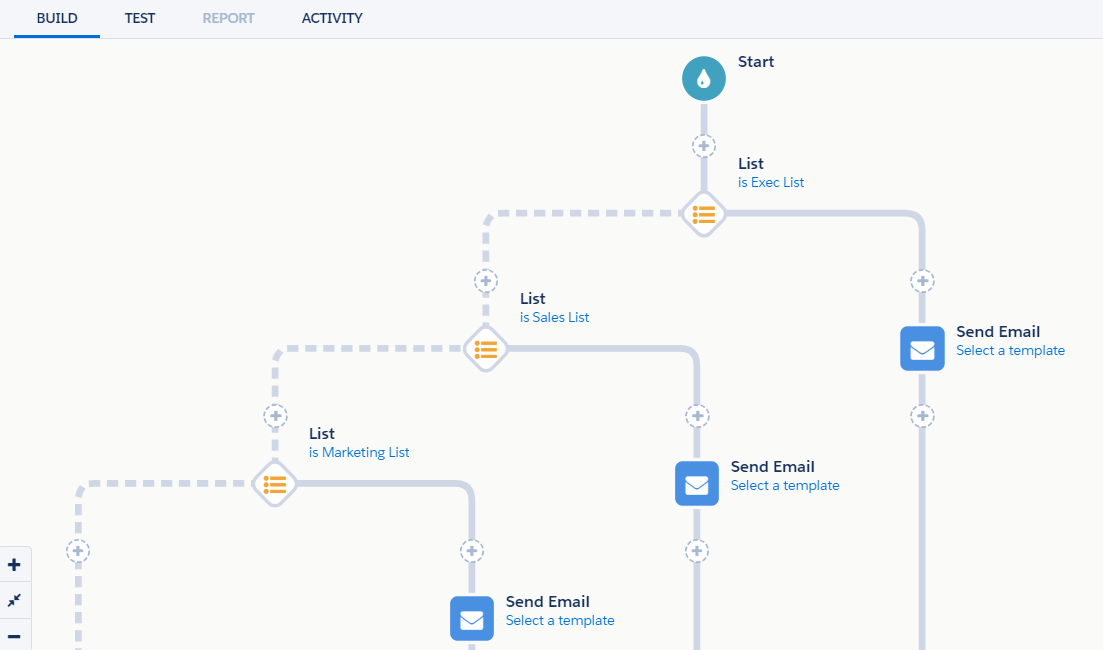
Engagement Studio

This is a pretty good alternative to what I described above, and a lot visually simpler if you have to explain it to other colleagues.

The only downsides I see with this approach are that your reporting options will be different than if you had used a list send, and if you’re using Connected Campaigns, the send/open/click numbers won’t be fed to Salesforce Campaign fields.

Option 4: Use a third-party tool

There are several apps that specialize in advanced personalization and dynamic content and play nice with Pardot. We have a client using Moveable Ink to address particularly complex use cases.

Option 5: Give up on email

Switch 100% of your budget to print. Or billboards. Or chatbots. Always an option.

How do you manage complex list criteria & other logic puzzles?

Marketing automation involves lots of little logic puzzles like these — and that’s what keeps it fun and interesting.

What other strategies have you found to manage intersecting lists and content priorities?  Any areas of the platform stretching your brain?

Let’s hear them in the comments!

A recent post focused on pros and cons of insourcing and outsourcing Pardot work.

The TL;DR of that one: there are great reasons for and against either approach.

But if you’re sitting here comparing your internal resources against your ever-growing to-do list, and decide you’re in the “outsource it” camp… here are a few ways to successfully leverage consultants.

1. Be clear on your goals, not just your deliverables

Sure, you could find an agency to write you 3 blog posts a month and 10X social posts.  But is that really what you’re after?

Look for a consultant that gets WHY you’re pursuing certain projects – not just the WHAT involved in execution.

If you find a consultant who takes the time to get to know your business and your objectives, they can advise you on the best way to get from point A to point B.

Some consultants are wired like this by nature, others are not.  IMO, this is the #1 thing that separates the good and the awesomesauce.

2. Look for cultural fit

Personality and work style are as important as experience.  Finding someone who is responsive, communicative, and who gels with your team is critical.

Equally critical is finding someone who is willing to challenge your status quo. It’s easy to meet with a potential client and tell them they’re doing a great job. But that’s not what will help you grow your business.

3. Have them train your team

Found someone with the expertise, consultative nature, and cultural fit you need? Great. Now make sure they’re willing to pass that value along to your team.

Ask them to walk your team through what they’ve built and document decisions for future team members. Good consultants are willing to do this and aren’t afraid of sharing their “secrets” with you – they retain clients by demonstrating results, not hoarding information.

4. Hold them accountable for investments of time

I generally like to price projects based on value or output, not on time.

Many consultants bill by the hour, which is fine and dandy.  As you look to hold them accountable for more than just running up the clock, consider asking them things like:

  • What deliverables can we expect for X amount of hours?
  • How long does it typically take to do XYZ task?
  • What results should we expect from the campaigns we’re building?

These are really hard questions to answer.  For all marketers.

Your prospective consultants may squirm a bit… because as you’ve likely experienced, there are no guarantees in digital marketing and it’s hard to commit to firm numbers.

But they should be able to share benchmark performance rates, look at your historical performance, or at the very least share anecdotal evidence of what they’ve seen work for other companies like yours.

5. Be open to the “good kind” of scope creep

“This should only take a minute.”

…famous last words before discovering 5 other things that should be addressed before finishing the initial project that you set out to do.

Consultants are notorious for quoting one thing and going way over budget. If this is done to trick you into signing a contract or because of shoddy requirements gathering — that’s not cool.

But in some cases, when you’re working with a consultant you will uncover some problems you didn’t even know you had.  When that happens, consider the issue that’s been uncovered… and if it merits it, take the time to address it.

Be open to the good kind of scope creep that helps you get the right foundation in place for successful execution.

6. Evaluate the resources, not just the firm

Find out which actual team members will be working on your account.  What is their experience, and do you have confidence in it.

It’s shocking to me how some big-name consulting firms will bill crazy-high hourly rates, and then promptly turn around and hand a new project to their 22-year old new hire who can count on one hand the number of times they’ve logged into Pardot.

7. Set communication expectations upfront

Sense of urgency and speed of response to communications vary.  Rather than make assumptions, consider asking direct questions about the type of turnaround time and communication cadence you can expect, such as:

  • What is your typical response time to questions and requests? (Or if you have a specific expectation, like 48 hours, ask if they can meet that).
  • How do you keep your clients updated on your work?
  • What tools and processes do you have in place for collaborating on projects?

8. Treat them like an extension of your team

Keep your consultants in the loop on your overall marketing plan and business goals. Invite them to your team meetings, get them involved in planning, share the reports and communications you give to your execs and internal team members.

The more information you share, the more empowered they will be to give your strategic guidance and set you up for success.

[Side note: this is another great reason to price by deliverables/output vs. time — because who wants to pay for consultants sitting in a bunch of meetings?]  

Over to you: How do you successfully bring in outside partners?

How have you successfully onboarded partners, agencies, and consultants?  Any key tips or lessons learned you might share?

Let fellow readers know in the comments!

There are a million reasons to not do something.

But many of the ones we say out loud are… how do I put this… not real.

Let’s talk about constraints

Constraints are a fact of life.  They’re all around us.  Some of them are easy to name and point to – deadlines, budgets, rules, API limits.

Others lurk in semi-consciousness. They might be things that we don’t want or know how to name.  Like the fear of looking like we don’t know what we’re talking about.  Or of trying and failing.  Or of just generally looking foolish.

The right kind of constraints can generate enormous creativity. But if you misdiagnose your constraints — especially the silent ones, the ones you can’t quite say out loud — you may find them hamstringing your goals and efforts.

The fallback excuse: time & money

The time and money excuse is a trap.

It’s so easy to blame time and internal bandwidth for why you’re not addressing an issue or taking on a new project.  Heck, I’m running a startup, and let me tell you, time and internal bandwidth are the most precious and scarce resources my team and I have.

But there will never be enough time.  There will never be unlimited funds.  So with the time and budget at your disposal, how can you best influence the change you seek?

Persuasion: a big constraint we don’t like to talk about

Marketing automation professionals need technical skills, sure.

But the “soft skills,” the ability to rally the team, to get leaders to a yes, to get others on the team to step up and contribute — this is where the real work lies.

In the realm of marketing automation, we sit at the intersection of sales, marketing, and IT.  One of the most interesting and at times, grating, parts of the job is having to be the voice of change constantly and enlist others to get on board.

When I see marketing automation professional struggling, it’s often not a time and budget issue (although that might be what they point to.)  It’s possible that a deficit of persuasion is really the constraint at hand.

The resistance

That familiar feeling of “I can’t, I won’t, who am I to” — that’s the resistance.  When it rears its ugly head, take a beat.

Tell your impostor syndrome to shut its damn mouth and consider:

“With a finite budget and number of hours in the day… what can I learn? Who can I change?

What is the “lead domino” that if set in motion will make all of my future efforts easier?

Fill in the blank

The next time you find yourself thinking:

“I can’t because ______.”

Hit the reset button.

Are you being brutally, full-on honest with yourself about how you fill in that blank?

What is the most important outcome you need to achieve? What are the constraints you face?  What resources can you leverage?  Is your internal narrative helping or hurting you?

Grappling with these questions is how we do the work we are born to do.

I’m working on a secret project.  It involves crayons.  Maybe some colored pencils.  Very illicit stuff.

Okay fine, I’ll just tell you what it is.

It’s a coloring book. Called “Why Marketing Automation Admins Drink.”

Why a coloring book? Good question…

My entire career has been focused on digital marketing and marketing automation — client side, for agencies, and for Salesforce consultants.  I now own a Pardot consulting business.  I love what I do and wouldn’t change it for the world.

But man, sometimes it’s hard to be a marketing automation pro.

We have to carry the torch for change and relentlessly advocate for a new way forward in our organizations.  Technology advancements move a mile a minute. Our jobs look easy to people who know nothing about it.

And also, coloring is an excellent coping mechanism when you’re on your 8th straight conference call of the day.

A sneak peek…

I made this with the help of a crazy talented illustrator and some insightful and hilarious Pardashians (Sara, Jacqueline, and Lara, to name a few). It was fun playfully capturing some of the moments that make our jobs… challenging.

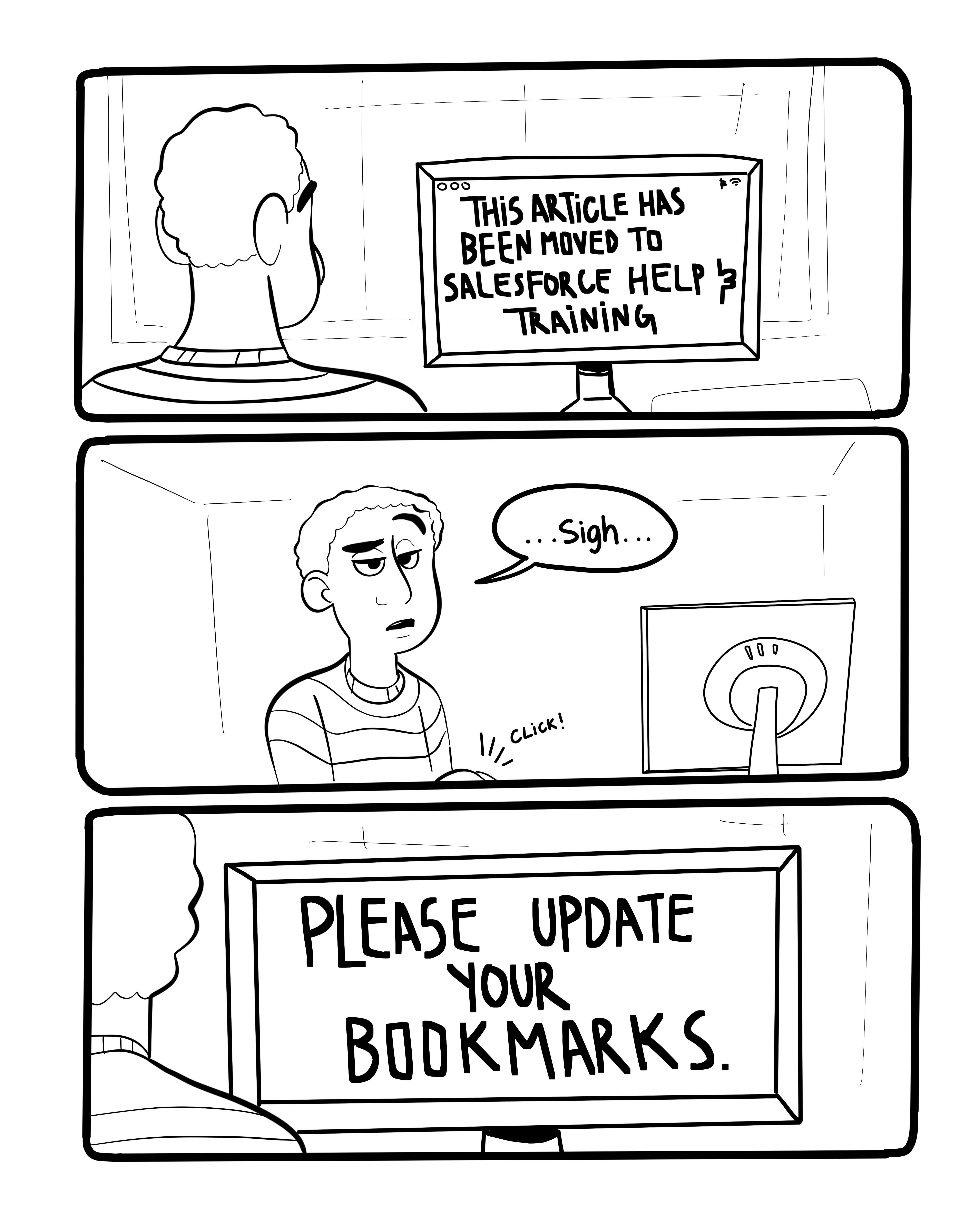
Here’s one sketch that didn’t make the final print edition cut, because Pardot FINALLY redirected their help & training links (thank you, Pargods!):

IMG_0364.JPG

My book “Why Marketing Automation Admins Drink.” is now available on Amazon!

Today is a momentous day for this little blog.

One year ago today, I wrote and shipped my first post.

Since then, I’ve posted 84 articles about the platform (whew, that’s a lot of opinions), including one guest post from the wonderful & fabulous Brittany Rhyme.

Because I love excuses to celebrate… here’s a look at the top 10 most viewed posts on the site to date:

  1. GDPR Compliance in Pardot: The Freaky Fast & Un-Boring Guide
  2. 9 Things to Remember About Images in Pardot Emails
  3. A surprisingly FAQ: How do you pronounce Pardot?
  4. 10 Engagement Studio “Gotchas” to Watch Out For
  5. The Pardot Eventbrite Connector: What is it Good For?
  6. Things I Hate Thinking About: Pardot Folder Structure & Naming Conventions
  7. Connected Salesforce + Pardot Campaigns [In Beta] and How They’re Going to Rock Our Worlds
  8. Chrome’s New SSL Policy + Pardot iFrames: Are We in Trouble?
  9. The Mascots of Salesforce & Rampant Speculation About Pardot’s
  10. 13 Scantily Documented Pardot Surprises

I’m always up for most guest blogs or collaborative solutioning if you have a story or use case to share!  If something comes to mind, let’s chat — you can find me on Twitter, Linkedin, email, or even IRL at Dreamforce next week.

Thanks for being a loyal reader of this collection of how-tos, random ideas & war stories. I’m glad you’re here. ❤

There are so many Dreamforce sessions that it is borderline overwhelming.  In the best possible way.

When I’m picking sessions to attend, I tend to favor sessions that involve:

  1. Product enhancements with a side of forward-looking statements
  2. Hands on training & interactive roundtables
  3. Real, in-the-trenches stories from speakers that actually use the product

If you filter the list of sessions by “Pardot” in Agenda Builder, you’ll see a breakdown of sessions that are available.  I’ve always wished there was a filter for “who’s talking” – because the content and delivery of a topic varies greatly whether it’s a customer, consultant, vendor, or someone from the Salesforce mothership.

But sadly, there is no “who dis” filter.

So, ladies and gentleman… here is your manually created guide to who’s hosting what Pardot sessions.

Hope this is helpful as you’re building your agenda for the big event!

Pardot sessions led by customers

3 Ways to Accelerate Your Trade Show Marketing with Pardot

5 Steps to a Seamless Migration to Pardot

What to Expect When You’re Expecting Pardot

Pardot sessions led by customers + a Salesforce employee

30 Days to Launch: How iControl ESI Implemented Pardot in One Month

Announcing the Pardot Lightning App

Better By Design: Using B2C Creative Strategies For Better B2B Marketing

Enterprise-Level Marketing Automation with Pardot

Make Data-Driven Decisions with B2B Marketing Analytics

Pardot for Lending: Redefining the Customer Experience

Pardot for Social Impact: How Marketers Are Changing the World

Salesforce Pardot: B2B Marketing on the World’s #1 CRM (1)

Salesforce Pardot: B2B Marketing on the World’s #1 CRM (2)

The Age of Intelligent Marketing with Pardot, Marketing Cloud, and Sales Cloud

Wealth Management: Grow Client Relationships with Pardot

Pardot sessions led by consultants

The Power of Three: Connecting Pardot, Marketing Cloud, and Salesforce CRM

Underutilized Pardot Features

Pardot sessions led by Salesforce employees

3 Don’t-Miss Features: Uncovering Hidden Gems in Pardot (1)

3 Don’t-Miss Features: Uncovering Hidden Gems in Pardot (2)

3 Keys to Mastering B2B Email Like a Jazz Musician (1)

Consulting Partner Adventures: Pardot Integration to Accelerate Pipeline (1)

Consulting Partner Adventures: Pardot Integration to Accelerate Pipeline (2)

Education Cloud Live Demo: Pardot for Higher Ed

Hands-on Workshop: Explore your Data with B2B Marketing Analytics (1)

Hands-on Workshop: Explore your Data with B2B Marketing Analytics (2)

Hands-on Workshop: Optimize Sales Performance with Pardot

Hands-on Workshop: Personalize the Prospect Experience with Pardot (1)

Hands-on Workshop: Personalize the Prospect Experience with Pardot (2)

How Pardot Transformed Our Website Into a Lead Generation Machine (1)

How Pardot Transformed Our Website Into a Lead Generation Machine (2)

How To Quickly Implement Pardot and Get Your Campaigns Up and Running (1)

How To Quickly Implement Pardot and Get Your Campaigns Up and Running (2)

Marketing for Small Businesses: Your Pardot Journey Begins Here

Nonprofit Cloud Live Demo: Pardot Marketing Automation

Pardot Creates Targeted Webinars Built for Lead Generation

Pardot’s Product Roadmap: The Future of B2B Marketing and Beyond (1)

Pardot’s Product Roadmap: The Future of B2B Marketing and Beyond (2)

Reimagine the B2B Marketing Experience with Engagement Studio

Small Teams, Big Dreams: Elevate Your Marketing with Pardot

Use Heroku, Pardot, & Amazon Redshift to Scale your Go-To-Market Operations (1)

Use Heroku, Pardot, & Amazon Redshift to Scale your Go-To-Market Operations (2)

Group led roundtables & circles of success

Automate Your Marketing Workflow with Pardot (1)

Automate Your Marketing Workflow with Pardot (2)

B2B Marketing Birds of a Feather Roundtable Event (1)

B2B Marketing Birds of a Feather Roundtable Event (2)

Boost Your Lead Generation with Pardot Forms and Landing Pages (1)

Boost Your Lead Generation with Pardot Forms and Landing Pages (2)

Delighting Your Customers with Pardot (1)

Delighting Your Customers with Pardot (2)

Marketing Birds of a Feather Roundtable Event for Financial Services (1)

Marketing Birds of a Feather Roundtable Event for Financial Services (2)

Maximize Your Marketing Efforts with Pardot Lead Management (1)

Maximize Your Marketing Efforts with Pardot Lead Management (2)

Pardot and Your MarTech Stack (1)

Pardot and Your MarTech Stack (2)

Pardot Trailblazer Spotlight: Top Insights from B2B Marketing Experts

No more posts to show