Before the advent of Data Cloud and Customer Data Platforms (CDPs), businesses strived to integrate their data into their CRM to obtain a holistic view. If you’re considering another expansive platform, there’s an excellent interim solution to consider: the Campaign Audience Builder (CAB).
Where to get Campaign Audience Builder
The Campaign Audience Builder is a package on the Salesforce AppExchange developed by Lightblaze. Known for its user-friendly interface, CAB allows you to create audience segments using your Salesforce data, making it an efficient substitute or preliminary step towards a full-scale CDP solution.
Campaign Audience Builder Ease of Use
Campaign Audience Builder has a simple point-and-click interface that allows you to navigate and filter data related to the people you are trying to add to an audience. It simply gets installed alongside your data and has a very short implementation time (I was up and running in 10 minutes).
Once installed, it really is a 3-step process of getting your first audience created and usable:
Define the Criteria: as a techie myself, this was really the fun part. Connecting data and filtering the right records feels natural and familiar.
Generate the Audience: This is basically running the process based on all the work you did in the previous step to see who matches. As always, it’s a great idea to spot-check that some people you expected to appear were successfully matched!
Populate the Campaign: you have your list of people, it is time to put them somewhere that you can act on. This is when you choose which Campaign to use, how often the audience should be evaluated, and if people should be removed should they no longer meet your criteria.
Unlike CDPs and other types of data platforms, which require accommodating complex data relationships and aren’t always user-friendly, CAB offers a seamless alternative.
Advanced Segmentation Features in Campaign Audience Builder
Looking for Contacts that have Closed Won Opportunities with Products in a certain Product Family? Yep, Campaign Audience Builder can do that.
Do you also want to ensure those same people don’t have a Case? Yep, you can do that too.
While not unlimited in its power, there’s no data scenario that you cannot segment with CAB (compared to report builder or segmentation in Account Engagement).
CAB allows you to select either a Lead or Contact as your audience driver and connect it with any related object. After defining your audience, you can populate a Campaign by creating CampaignMember records. CAB also provides controls on how frequently your audience should be evaluated and whether it should clean records that no longer meet your criteria.
With your audience defined, you can now use that information to populate a Campaign by creating CampaignMember records. You have some controls on how often CAB should be building your audience and if it should clean CampaignMember records that no longer meet the criteria.
Integration and Data Security
CAB stands out with its ability to directly publish the audience into Account Engagement (Pardot) into a static list. This feature eliminates the need to clumsily attach data to the Lead/Contact records for list population.
A key feature of CDPs is the ability to “act” on the new audience that you’ve created in downstream systems. While CAB doesn’t really integrate with a bunch of other third-party tools, it can call APEX/Flows (where you can do almost anything integration-wise).
Data security is paramount for Salesforce organizations. Moving data into other systems like data platforms or CDPs can potentially jeopardize these security controls. Since CAB operates within your Salesforce organization, it only accesses the data you can, thereby ensuring data security.
CAB may be the stepping stone you seek
In summary, the Campaign Audience Builder (CAB) offers a user-friendly, efficient, and secure way to handle your Salesforce data. It’s a practical stepping stone if you’re considering a more complex Customer Data Platform (CDP) solution.
With its easy setup, advanced features, and commitment to data security, CAB is a smart choice for businesses looking to maximize their data management and audience segmentation without taking on a full CDP solution just yet.
Thinking about implementing CAB in your org? Contact the team at Sercante to learn more about the tool and how it will work with your overall technology strategy.
Account Engagement (Pardot) Optimizer BETA was released with the Spring ‘23 new features, but it has become “Generally Available” as of the Summer ‘23 release. This new feature promises to help you identify and correct issues that may be negatively affecting your Business Unit’s processing power. In this blog, we’ll dive into everything you need to know to access and use the new Account Engagement Optimizer feature.
Accessing the Account Engagement Optimizer
To access the Optimizer, go to your Account Engagement Settings tab, “Optimizer” will appear as an option on the left-hand menu.
If you are using Default User Roles, only Administrators will have access to the Optimizer. If you are using Custom User Roles, make sure your custom role has the following permissions selected (edit Custom User Roles by going to Account Engagement Settings > User Management > Roles > then selecting the role you’d like to edit).
Admin > View Optimizer
Admin > View and Edit Pending Table Actions
Marketing > View and Delete Automation Rules
Marketing > View and Delete Lists
If you opted into the Beta before the Summer ‘23 release, there is nothing you need to do to continue using the Optimizer. If you did not opt into the Beta, the Optimizer should have auto-enabled when your org was upgraded to Summer ‘23.
Analyzing Your Optimizer Report Results
The Optimizer, with the help of Brandy, will provide one of three statuses for your business unit:
Looking Good: No critical issues to address
Pay Attention: There are a few recommended actions to improve your business unit
Action Needed: There are critical issues and you should resolve them right away.
Prospect Change Monitor By Feature Chart
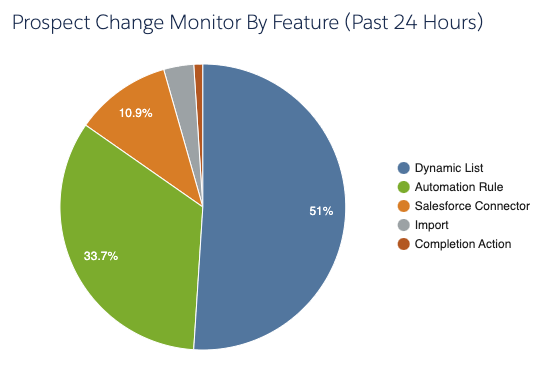
Next to Brandy and your Optimizer Status, you’ll see your Prospect Change Monitor By Feature chart.
This feature shows you which type of automations have made a change to Prospects in the last 24 hours. You can double click on each slice of the pie to drill into exactly which assets are making changes.
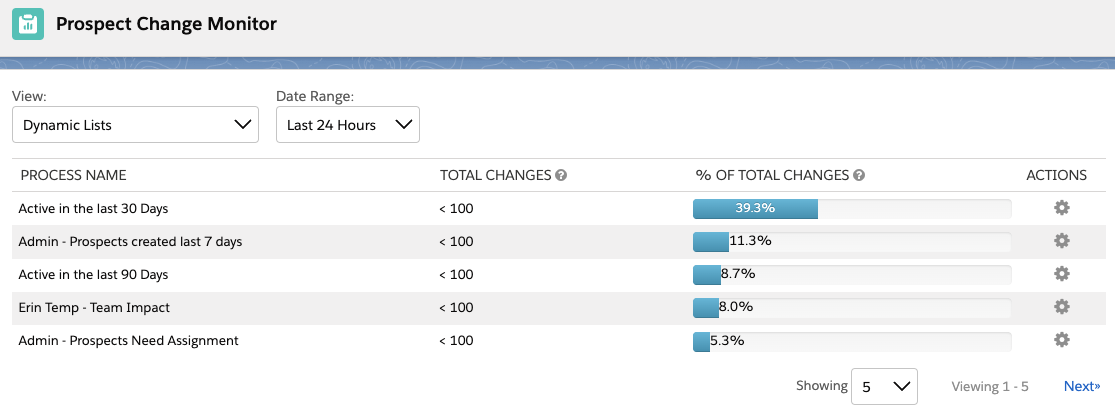
Changing Filter Views
In this view, you can also change your filters to show different date ranges and different views. I like to change my view to “All Processes” and Date Range to “Last 30 Days” to better keep an eye on which automations are running at least every month.
This view can be especially helpful in finding automations that may not have been set up in the most efficient way possible, such as an automation rule that is set to repeat every single day.
Configuration Issues
Next in the Optimizer report is your Configuration Issues. This table will show setup problems that are stopping you from full access to Account Engagement’s features. This can be issues like your sending domain not being verified or prospects being paused for bot-like behavior.
I tried to see if turning off Connected Campaigns would also trigger an issue here, but no dice. Hopefully, Salesforce will provide a list of all configuration issues that are checked in a future release, but in the meantime you can use our implementation checklist to ensure your Business Unit is configured correctly.
Performance Improvement Measures
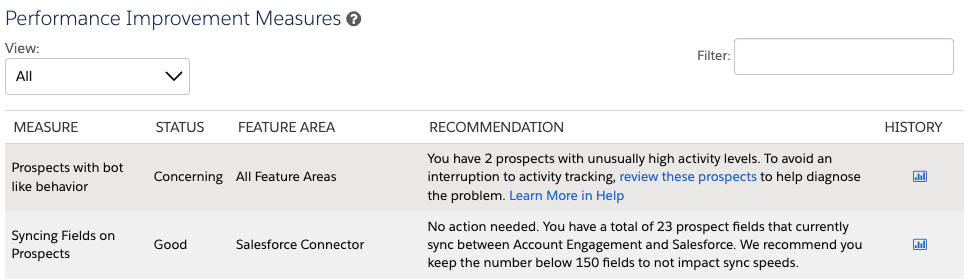
Next is Performance Improvement Measures, this table shows you recommendations that will improve your Business Unit’s processing power. This table defaults to “Actionable Measures,” but you can change this view to “All” to see what else is being monitored.
This table is broken down into five columns:
Measure: What exactly Optimizer is reviewing.
Status: Whether the measure is in Good, Concerning, or Critical standing or if there are actions that can be taken. “Good” statuses will not show when this table is filtered to only show “Actionable Measures.”
Feature Area: Which Account Engagement Features are involved in this measure.
Recommendation: What next steps, if any, should you take. Most insights will also include links to documentation, which I personally love.
History: If there is enough data for this measure, you can select the chart icon to see the measures for the last 8 days. These charts also shed light on what the Optimizer considers good, concerning, or critical.
Maintenance Resources
Finally, you have Maintenance Resources. This section links to a few views and reports that can help your Business Unit run in tip-top shape. This includes 2 views we’re already used to: Inactive Automation Rules and Inactive Dynamic Lists, but also 2 new super useful views:
Table Action Manager: This view allows you to pause, prioritize, and cancel actions currently running in the Business Unit. For example, say you recently kicked off an Automation Rule that will update 3,000 prospects, but you are also running a Dynamic List that is needed for an email send going out in 5 minutes. Now you can prioritize that Dynamic List over the Automation Rule rather than panicking if your Dynamic List is going to complete in time.
Unused Dynamic Lists: This view shows you which Dynamic Lists have a blank Usage table. Now you no longer have to click into each Dynamic List to check if any assets are listed on the “Usage” tab, YAY!
Account Engagement Optimizer is Available Now
Now that Optimizer is available for all orgs, I would highly recommend you check the report at least monthly to keep an eye out for any potential issues. If you have any questions or neat tips about the Optimizer, let us know in the comments! Also, if you’re looking for other ways to improve your Business Unit’s processing power, check out our blog post, “4 Things to Clean in MCAE (Pardot) for Faster Processing Times.”
The Salesforce Summer ’23 Release Notes are out and we’ve been combing through them to see how these changes will affect our clients and readers. This post includes what you’ll need to know as a Marketing Cloud Account Engagement (Pardot) admin or user.
Probably the new release feature I am most excited about, an Account Engagement Connector for Data Cloud! This connector will allow you to pull in Data Cloud segments via Account Engagement Dynamic Lists, allowing you to not only market directly to your Data Cloud customers, but also reap the benefits of Data Cloud’s unified view of customer data to help support your ABM initiatives.
If you have multiple Account Engagement Business Units (BUs), then you probably know the pain of keeping universal assets exactly the same across all of your BUs. The Summer ‘23 release is hoping to make that pain point a thing of the past by enabling Salesforce Flow to replicate assets across BUs. This new feature will allow for replication of custom fields, email templates, engagement studio programs, files, and custom redirects! Keep an eye out for a follow up post on this, I can’t wait to try it and share some tips and tricks with all of you.
Back in the Winter ‘23 release, Salesforce announced they were doing away with the “Most Recently Updated” sync behavior option for Account Engagement’s “Opt Out” field. However, after hearing from the community, this change is being rolled back. So, if you didn’t prepare for this change, your procrastination has paid off! Just keep in mind new business units created after October 18th, 2023 will have the Opt Out sync behavior set to “Use Account Engagement” by default.
External Actions, which allow Account Engagement to send data to 3rd Party Applications, will now be available in Completion Actions. Now you can easily register a prospect for an event in a 3rd Party system upon form fill, or even send them a text as a completion action.
Account Engagement Optimizer is moving from Beta to Generally Available! Optimizer provides easy ways to clean up your Account Engagement org but pinpointing potential issues. With the move to Generally Available, Optimizer has a couple of additional metrics, including:
Configuration Issues: diagnose problems that are blocking access to features
Performance Improvement Measures: display good measures so you can see what is working well in the Business Unit
Prospect Change Monitor: understand which features result in the most prospect changes for your Business Unit
Salesforce is upping their game in the race to incorporate the latest generative AI tools into their products. Announced during Salesforce Connections on June 7, Marketing GPT and Commerce GPT are coming to Salesforce customers using Marketing Cloud and Commerce Cloud.
The features are gonna make it easier for marketers to reach the right audiences and generate emails, and commerce teams will create better shopping experiences and customer journeys. But, the best part is that both Marketing GPT and Commerce GPT can be connected to Data Cloud — meaning the tools can do their thing using data from any source.
History of Salesforce in the GPT game
Both Marketing GPT and Commerce GPT are dependent on Einstein GPT, which is the generative AI version of Einstein.
For a little back story, Salesforce Einstein is the machine learning model the company rolled out in 2016 to analyze large sets of CRM data. So, Salesforce has been on the AI train for a while already.
You can get it in Marketing Cloud Engagement and Account Engagement, Sales Cloud, Commerce Cloud, Experience Cloud, and Service Cloud, along with other platform tools.
So, how are Marketing GPT and Commerce GPT related to Einstein GPT?
Both Marketing GPT and Commerce GPT are powered by Einstein GPT — the AI-powered set of solutions that marries Salesforce AI with OpenAI’s technology. They are both iterations of Einstein GPT that are tailored for the respective clouds. Stay tuned because we’re seeing GPT features getting infused across all Salesforce clouds in addition to these two.
What capabilities do Marketing GPT and Commerce GPT have?
Both of the sets of features combine generative AI capabilities, which use data from OpenAI, with Salesforce Data Cloud. That means you can use customer profiles in Data Cloud that include data from any source in real time. And while you don’t have to use Data Cloud to take advantage of the Salesforce GPT features, you’ll definitely be able to do more if you have it.
So, what exactly can you do with Marketing GPT and Commerce GPT?
Marketing GPT Capabilities
We’re really gonna be cooking now by giving the people super valuable experiences through email and content marketing. We already have Einstein features in our marketing back pocket, but now we’re throwing GPT into the overall mix. That means we can use conversational language prompts to get Marketing Cloud to do things for us.
I mean, it’s not going to organize all those random newsletter graphics you’ve been uploading to Account Engagement without using a naming convention (yet???). But it will do things like analyze the data you have and use that information to predict the best ways to improve your emails.
Segment Creation | generally available Oct. 2023 This is a whole new fancy way to build your audience segmentation strategy. You can tell Marketing Cloud to create audience segments for you using natural language prompts, and it will help you to improve your targeting using AI recommendations and audience data that’s in Data Cloud.
Email Content Creation | generally available Feb. 2024 Ok, so I’m gonna have to see this one in action, but Salesforce said this feature can “reduce writing workload” by creating auto-generated emails. It can potentially be a big one for marketing teams that have the content but stumble with their email marketing.
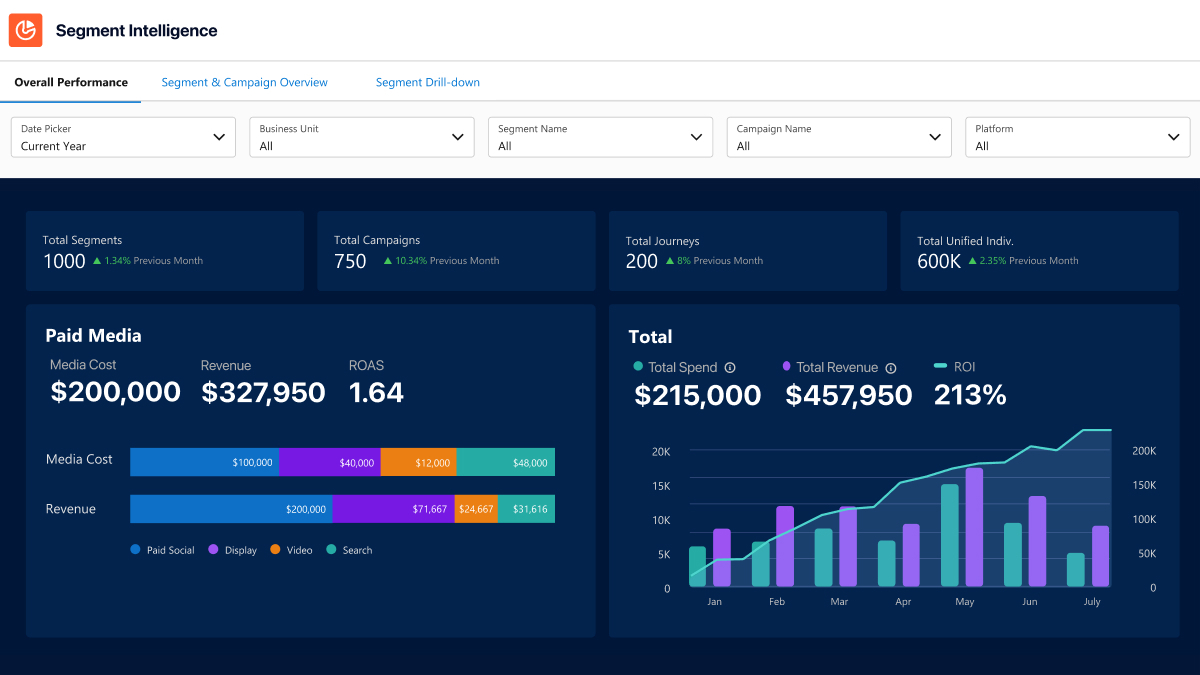
Segment Intelligence for Data Cloud | generally available Oct. 2023 This adds a fancier twist for tracking ROI. Segment intelligence combines first-party audience data, revenue data, and paid media data to show you exactly how your campaigns are doing in relation to your audience segments.
Rapid Identity Resolution, Segmentation, and Engagement | generally available Aug. – Oct. 2023 Salesforce is going heavy on the ‘transform at the speed of your customer’ theme. The mouthful that is this feature basically keeps Data Cloud segments updated in real time so messaging is always relevant and timely.
Typeface content platform | GA date not given yet Using a third-party content generator called Typeface, marketers can create branded visual assets (like email graphics or social cards) inside Salesforce. Stay tuned for this one cuz it could be huge.
These are the features that Salesforce outlined during the announcement, but we’re sure the list will grow with each Salesforce release.
Commerce GPT Capabilities
We’re also getting a bunch of generative AI features for B2C companies that use Salesforce tools for commerce. These are especially cool because ecommerce customers can be a fickle bunch. Getting them exactly what they want when they want it makes all the difference.
Goals-Based Commerce | generally available Feb. 2024 This is one of those a-ha tools for businesses with big growth goals. It unites Data Cloud, Einstein, and Flow to lay out everything commerce companies need to do to reach their goals. Users give it a goal, like increase average order value (AOV) by XX%, and it gives recommendations on how to get there.
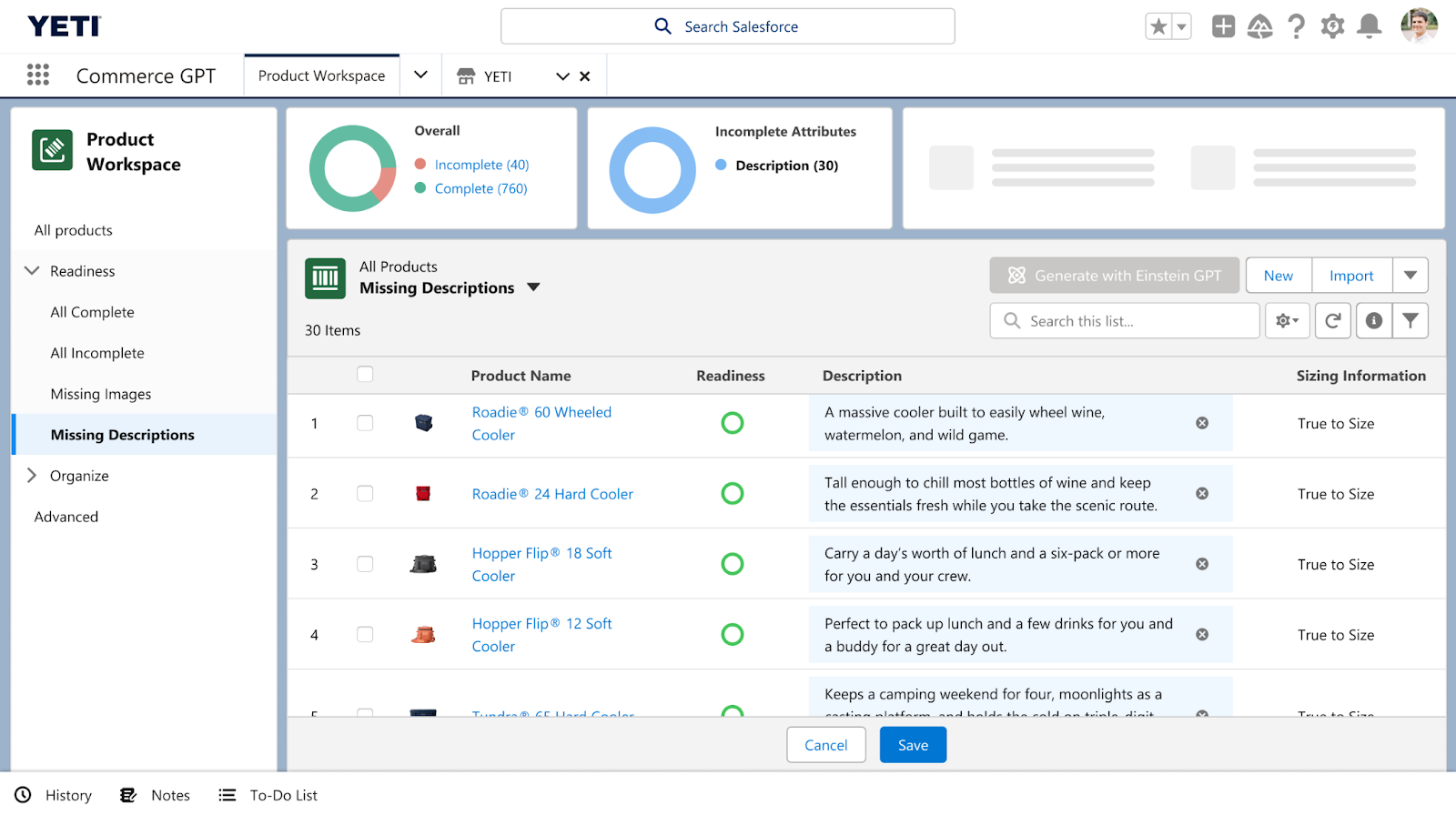
Dynamic Product Descriptions | generally available July 2023 Okay, so we’ve seen how serving up product recommendations based on customer preferences has shaken things up for commerce companies. But now we’re gonna be taking it even further by introducing dynamic copy capabilities for product descriptions. It could be a serious game changer.
Commerce Concierge | generally available Feb. 2024 Not all of the Commerce GPT features are specifically for Salesforce users. Online shoppers can use Commerce Concierge to find what they need using language prompts across channels from online stores to SMS messaging.
Comments on generative AI + Salesforce from the peanut gallery
My two cents: My mind immediately goes to the content creation features of Marketing GPT. There is SO MUCH copywriting that goes into marketing. And we’ve seen a whole bunch of copywriting GPT tools pop up in the last year, like the free Stensul email toolkit or paid ones like GrammarlyGo. Some people are naysaying the tools in fear that they will replace copywriting jobs, but I don’t think that’s the case at all.
In my experience, leaner marketing teams rarely have dedicated copywriters. Those responsibilities are usually lumped into other marcom roles. I see the tools giving marketers the ability to edit copy instead of writing from scratch. Then, they can have bandwidth to dig deeper with their messaging and present higher quality work that hits their audience in the feels. And being able to do that inside Salesforce just sweetens the whole deal.
I opened the floor to my teammates about what they think about Marketing GPT and Commerce GPT, and here’s what they had to say.
Cate Godley
“I’m excited to see how Marketing GPT can help marketers to craft better subject lines and calls to action to increase engagement with content. There are so many ways to use generative AI to inspire creativity in our marketing efforts, and I can’t wait to see how people are using these tools in new and exciting ways.”
Courtney Cerniglia
“As marketers, we’re constantly asked what content is resonating most with customers, what action will increase likelihood to purchase, and how we identify our highest value leads. Marketing GPT is going to help prove our assumptions and give us the data in real-time, across platforms, so we can quickly pivot and personalize experiences for customers.”
Mike Creuzer
“There have been a few inflection points where human knowledge growth hockey sticked. Gutenberg press took centuries, computers took decades, the internet took years, and this generative AI appears to be taking… months?
According to the 2023 Connections Keynote, there were 1 million users in two months for ChatGPT (if I remember correctly).
We are at the start of the next great change in pace of human knowledge and communication.
2023 is the year where AI is no longer hidden away behind RFID badged doors and is widely available to EVERYBODY in a usable, general way.
In business, AI has been baked into the tools that we use for many years now. But it’s been a one trick pony. It’s now anything WE want it to be, not just what our vendors built.”
Continue the conversation
What are your thoughts on Salesforce and generative AI? Any hot takes? Tell us about it in the comments, or reach out to team Sercante to see how the tools fit into your overall marketing and operations strategy.
Salesforce is introducing something pretty exciting for orgs that have little wiggle room while assigning licenses to Salesforce users. A new type of license called “Salesforce Integration User” is available now, and it’ll help you to save your user licenses for actual humans.
The Salesforce Integration User was introduced to facilitate best practices of using a separate license for any integrations that require an integration license to integrate with Salesforce. That includes integrations like Docusign and MuleSoft.
This license is specifically designed for System-to-System Integration types and provides the user with API Access Only.
How many Salesforce Integration User Licenses Do We Get?
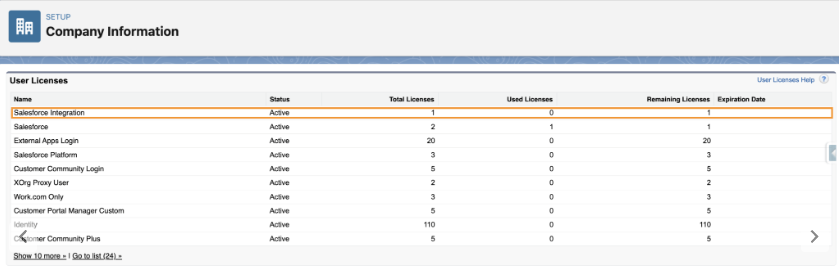
All orgs will have 5 free Salesforce Integration User Licenses available to them, and additional licenses are available to purchase for about $10 each (customers should speak to their AEs regarding the purchase of additional licenses).
Salesforce Integration User License Setup
You can verify the number of integration user licenses available to you under Company Information > Setup.
In addition to the new licenses, a new standard profile called ‘Salesforce API Only System Integrations‘.
NOTE: When creating a new user with the Salesforce Integration User License, this will be the only profile available.
Creating a Custom Profile for the API Only System Integration User (System Permissions)
Since the new ‘Salesforce API Only System Integrations’ profile is a standard profile and therefore can’t be updated, it is recommended that you create a new profile by cloning the Salesforce API Only System Integrations (not System Administrator) for integration users in order to customize the permissions:
Go to Setup > Profiles
Locate the ‘Salesforce API Only System Integrations’ profile and click Clone.
In the Permission set, go to System Permissions
Enable the following permissions:
Password never expires – doing this prevents the password from expiring while someone is out of the office with no one available to update it across integrations
API Enabled
Api Only User
Chatter Internal User (optional)
(Still under System Permissions) Make sure ‘Multi-Factor Authentication Login Requirements for API Access’ is not enabled
Create a Custom Permission Set for the Integration (Object Access)
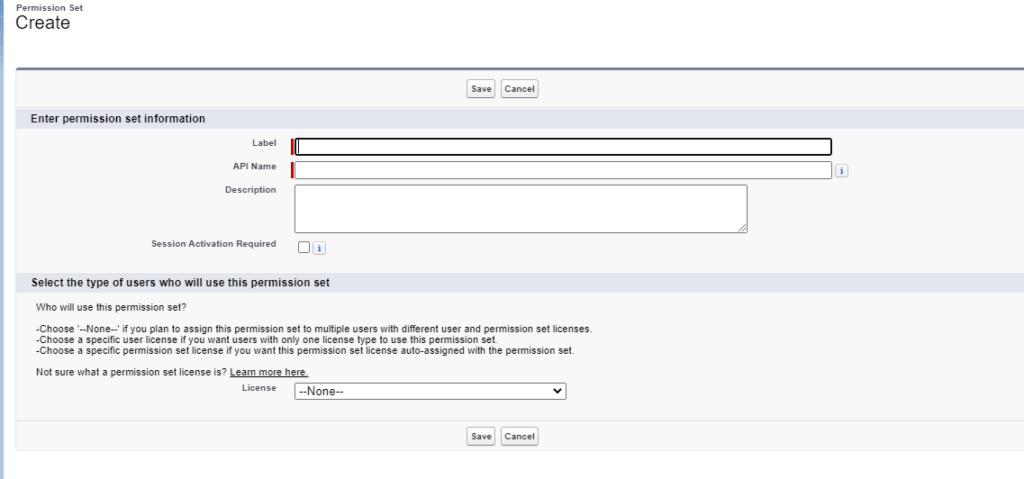
Go to Setup > (Quickfind) Permission Sets
Create a new permission set
Name your permission set to reflect the permission for this integration. For example “Integration – ZoomInfo”
Leave the License Type empty “–None–”
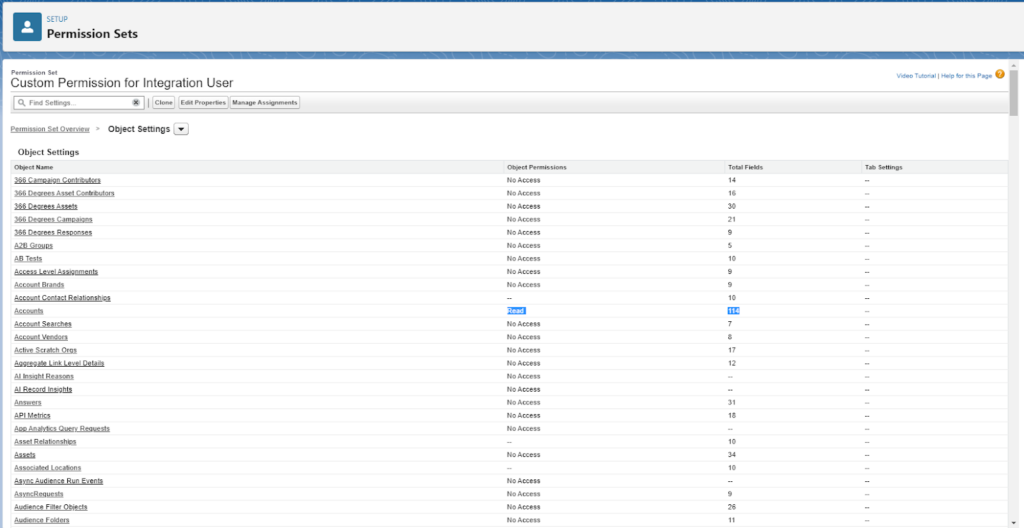
Add the following to the Object Settings for each object the integration needs access to:
In particular, keep in mind custom record types that are deployed by integrations’ own packages
Creating an Integration User
To use one of these licenses, it is recommended to:
Create a new user for each specific integration (if there is not a dedicated license already)
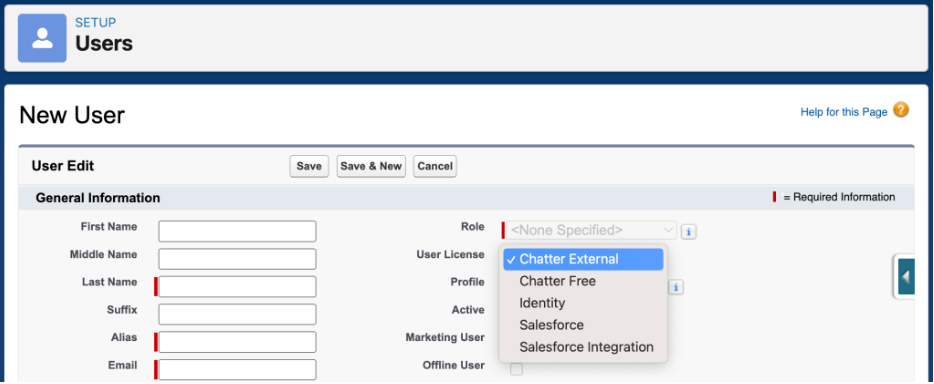
Assign the Salesforce Integration license (or you can change the license or if you already have a dedicated user for the integration)
Give the user the Salesforce Integration API permission set license.
Add the custom permission set you created above.
Validate
Once your user is set up:
Add the new integration user credentials in the integration platform (the steps may vary based on the integration)
Test the integration to confirm the integration is working the way it should.
For example, are records being updated as expected?
Considerations
The Salesforce Integration user license is API Access Only, meaning that it is not suitable for non System to System integration uses. Users with this license will not have access to the direct user login or access the org through the UI.
With the new licenses, it is still recommended to use one integration user per integration to ensure traceability of the transactions that the integration has within Salesforce.
If you are moving an existing user to the integration user license, the new ‘Salesforce API Only System Integrations’ profile, may not have all the object permissions needed. Any specific permissions needed may need to be assigned using permission sets.
Pardot API users are usually better met with the Identity User License, but if there are reasons to use this license (Oath2 Client Credentials) the Integration Connector User permission set is what will need to be applied to grant Pardot record access. Users using this license may not appear in User Sync until after you manually create and connect a Pardot user.
A custom permission set granting object and field access is preferred over doing this in the profile as permissions in profiles is scheduled to be sunset Spring of ’26.
In a move that extends beyond the chatbots used to formulate interview questions or write email subject lines, Salesforce is expanding automation capabilities by integrating Einstein GPT and Data Cloud with Salesforce Flow.
Bringing Einstein GPT and Data Cloud capabilities into Salesforce Flow means marketers can use the automations to create impressive real-time experiences for customers. And they’ll accomplish that using clicks rather than coding skills.
It’s something that will make the tools easily scalable for Salesforce customers at every growth stage.
How and when can Salesforce customers access it?
The announcement actually involves two initiatives Salesforce is launching. The first is a tighter integration between Salesforce Data Cloud and Flow. And the second is the integration of Einstein GPT and Flow.
According to John Kucera, senior vice president of product management at Salesforce, customers can use Flow currently with Salesforce database data. The integration updates between Data Cloud and Salesforce Flow are opening up the possibilities, and incorporating Einstein GPT is adding an efficiency edge to the technology.
Kucera said the Einstein GPT capabilities will be available on an early adopter basis in early fall as part of the Salesforce Winter ‘24 release. He went on to say that the Data Cloud integration will probably be offered as part of a standard Salesforce subscription, and Einstein GPT for Flow may carry an additional charge once those details are worked out.
Einstein GPT and Data Cloud Capabilities
Salesforce introduced Einstein GPT in March 2023 as the world’s first generative AI CRM technology, which infuses proprietary Salesforce AI models with generative AI models from OpenAI and other large AI models. And Data Cloud takes customer data from any source inside or outside the Salesforce platform and harmonizes it in real time.
So what in the world does that mean for marketers?
That means marketers can use information from Data Cloud to generate content and build workflows via Einstein GPT. Since Data Cloud reacts to data changes in real time, marketers can serve content that adapts dynamically and creates personalized experiences every time.
For example, a marketer could use Einstein GPT to generate an email with dynamic content blocks that update in real time when a Data Cloud field updates based on customer activity.
John Kucera said to SiliconANGLE, “You can give it a prompt such as ‘I want to create a guided workflow for a new customer or create a rule to follow up with an email to customers who haven’t responded in five days.”
Infusing Einstein GPT and Data Cloud with Salesforce Flow
The new integrations are going to turn things up a notch for marketers. Here’s what happens when we incorporate Salesforce Flow into the Einstein GPT and Data Cloud mix.
What is Salesforce Flow?
Salesforce Flow is a declarative automation tool. It allows you to create complex automations inside the platform using clicks rather than code, so users can get in there without the need for developer skills.
Marketers use Salesforce Flow for things like managing campaign activations, automating customer onboarding steps, or creating a custom task series for sales teams.
How can marketers use Salesforce Flow with Einstein GPT and Data Cloud?
Using the Einstein GPT and Data Cloud integration alongside Salesforce Flow is changing the game for marketers who use the platform. That’s because marketers will be able to use conversational chatbots to automate complex workflows and trigger actions in real time.
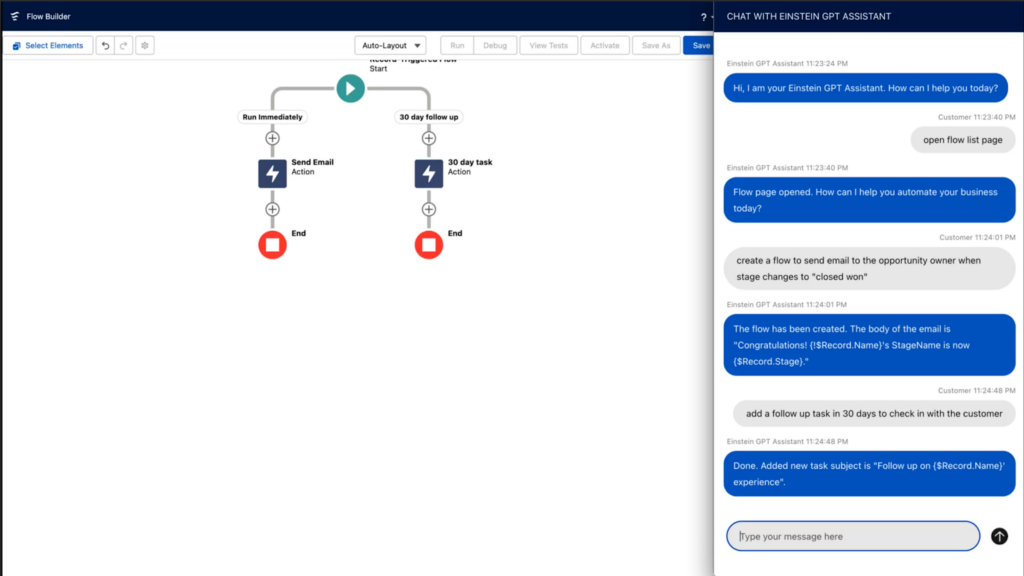
Users and admins can describe the type of flow they want to build, and then they’ll sit back and watch the chatbot complete the tasks. Or, it can be used to build formulas or search for functions. It removes much of the manual and tedious work that goes into creating complex flows and automations.
For example, a field in Marketing Cloud Engagement detects that a customer added items to their shopping cart, but they left the page without completing the purchase. That triggers an immediate email notification, created via generative AI, that goes to the customer and offers a discount code for them to complete the purchase.
In summary, the three benefits to marketers include:
Reduced flow build time
Access to more options to automate with flow
Improved real-time personalization for customer interactions
Get ready for generative AI inside your Salesforce org
We’re on the edge of our seats with anticipation for combining Einstein GPT with Salesforce Flow and Data Cloud capabilities.
These technologies make us feel like we have a front row to the future of CRM and marketing automation. So, in the meantime, we’ll be thinking about all the ways we can use conversational AI to do all the things us busy marketers do.
Have any aha use cases you’d like to share? How do you think Einstein GPT, Data Cloud, and Flow are going to work together in your org? Let us know in the comments!
You can also drop us a line if you’re wondering how you can incorporate these tools into your marketing operations strategy.