Category

Release Notes

Account Engagement (Pardot) Optimizer BETA was released with the Spring ‘23 new features, but it has become “Generally Available” as of the Summer ‘23 release. This new feature promises to help you identify and correct issues that may be negatively affecting your Business Unit’s processing power. In this blog, we’ll dive into everything you need to know to access and use the new Account Engagement Optimizer feature. 

Accessing the Account Engagement Optimizer

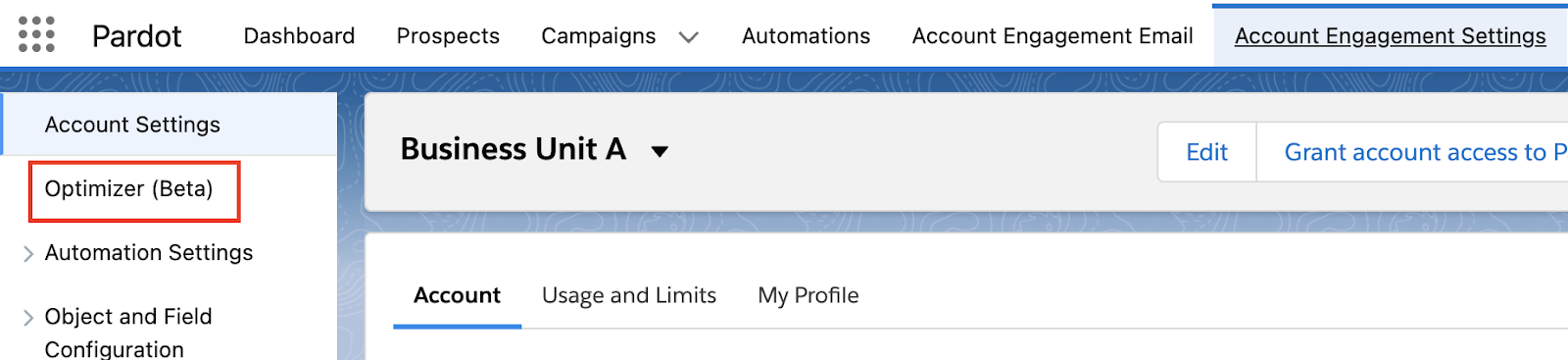
To access the Optimizer, go to your Account Engagement Settings tab, “Optimizer” will appear as an option on the left-hand menu. 

Account Engagement Optimizer

If you are using Default User Roles, only Administrators will have access to the Optimizer. If you are using Custom User Roles, make sure your custom role has the following permissions selected (edit Custom User Roles by going to Account Engagement Settings > User Management > Roles > then selecting the role you’d like to edit). 

  1. Admin > View Optimizer
  2. Admin > View and Edit Pending Table Actions
  3. Marketing > View and Delete Automation Rules
  4. Marketing > View and Delete Lists

If you opted into the Beta before the Summer ‘23 release, there is nothing you need to do to continue using the Optimizer. If you did not opt into the Beta, the Optimizer should have auto-enabled when your org was upgraded to Summer ‘23. 

Analyzing Your Optimizer Report Results

The Optimizer, with the help of Brandy, will provide one of three statuses for your business unit:

  1. Looking Good: No critical issues to address
  2. Pay Attention: There are a few recommended actions to improve your business unit
  3. Action Needed: There are critical issues and you should resolve them right away. 
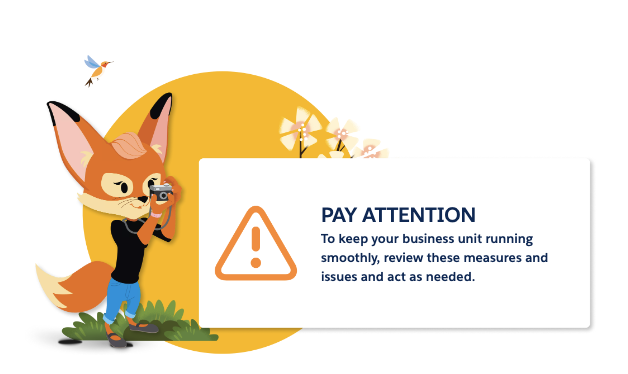
Account Engagement Optimizer - Brandy

Prospect Change Monitor By Feature Chart

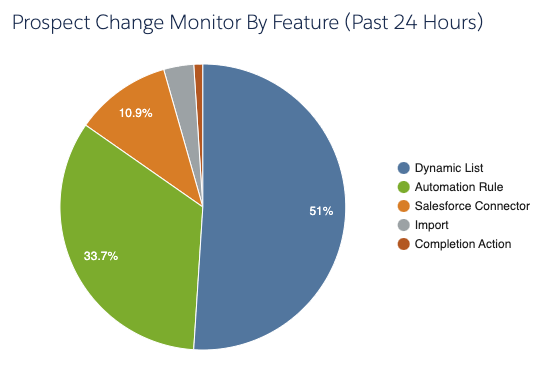
Next to Brandy and your Optimizer Status, you’ll see your Prospect Change Monitor By Feature chart. 
Account Engagement Optimizer - Chart

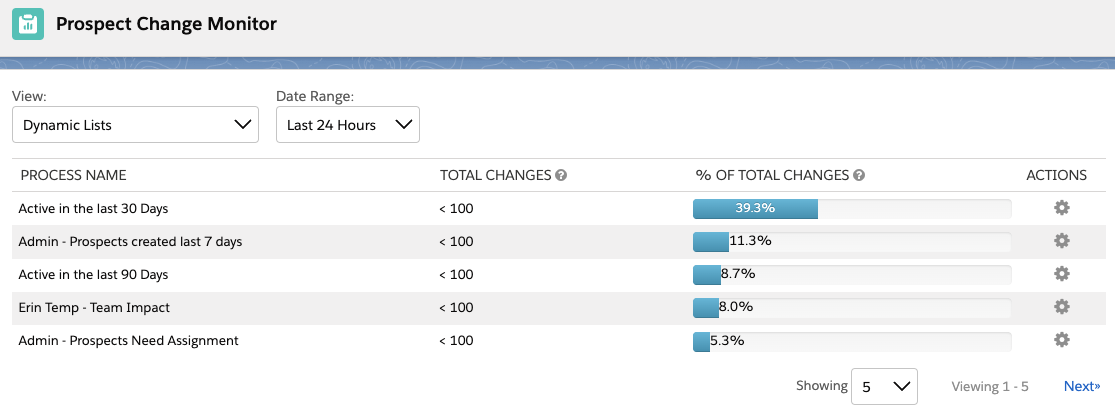
This feature shows you which type of automations have made a change to Prospects in the last 24 hours. You can double click on each slice of the pie to drill into exactly which assets are making changes. 
Account Engagement Optimizer - prospect change monitor

Changing Filter Views

In this view, you can also change your filters to show different date ranges and different views. I like to change my view to “All Processes” and Date Range to “Last 30 Days” to better keep an eye on which automations are running at least every month. 

This view can be especially helpful in finding automations that may not have been set up in the most efficient way possible, such as an automation rule that is set to repeat every single day. 

Configuration Issues

Next in the Optimizer report is your Configuration Issues. This table will show setup problems that are stopping you from full access to Account Engagement’s features. This can be issues like your sending domain not being verified or prospects being paused for bot-like behavior. 

I tried to see if turning off Connected Campaigns would also trigger an issue here, but no dice. Hopefully, Salesforce will provide a list of all configuration issues that are checked in a future release, but in the meantime you can use our implementation checklist to ensure your Business Unit is configured correctly. 

Performance Improvement Measures

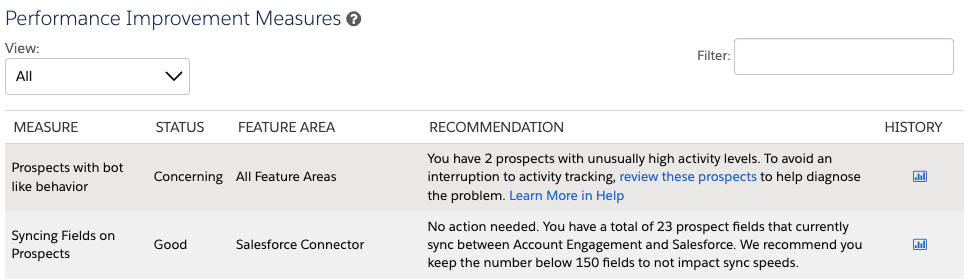
Next is Performance Improvement Measures, this table shows you recommendations that will improve your Business Unit’s processing power. This table defaults to “Actionable Measures,” but you can change this view to “All” to see what else is being monitored. 
Account Engagement Optimizer - performance improvement measures

This table is broken down into five columns:

  1. Measure: What exactly Optimizer is reviewing.
  2. Status: Whether the measure is in Good, Concerning, or Critical standing or if there are actions that can be taken. “Good” statuses will not show when this table is filtered to only show “Actionable Measures.”
  3. Feature Area: Which Account Engagement Features are involved in this measure.
  4. Recommendation: What next steps, if any, should you take. Most insights will also include links to documentation, which I personally love. 
  5. History: If there is enough data for this measure, you can select the chart icon to see the measures for the last 8 days. These charts also shed light on what the Optimizer considers good, concerning, or critical. 

Maintenance Resources

Finally, you have Maintenance Resources. This section links to a few views and reports that can help your Business Unit run in tip-top shape. This includes 2 views we’re already used to: Inactive Automation Rules and Inactive Dynamic Lists, but also 2 new super useful views:

  1. Table Action Manager: This view allows you to pause, prioritize, and cancel actions currently running in the Business Unit. For example, say you recently kicked off an Automation Rule that will update 3,000 prospects, but you are also running a Dynamic List that is needed for an email send going out in 5 minutes. Now you can prioritize that Dynamic List over the Automation Rule rather than panicking if your Dynamic List is going to complete in time. 
  2. Unused Dynamic Lists: This view shows you which Dynamic Lists have a blank Usage table. Now you no longer have to click into each Dynamic List to check if any assets are listed on the “Usage” tab, YAY!

Account Engagement Optimizer is Available Now

Now that Optimizer is available for all orgs, I would highly recommend you check the report at least monthly to keep an eye out for any potential issues. If you have any questions or neat tips about the Optimizer, let us know in the comments! Also, if you’re looking for other ways to improve your Business Unit’s processing power, check out our blog post, “4 Things to Clean in MCAE (Pardot) for Faster Processing Times.”


The Salesforce Summer ’23 Release Notes are out and we’ve been combing through them to see how these changes will affect our clients and readers. This post includes what you’ll need to know as a Marketing Cloud Account Engagement (Pardot) admin or user.

Salesforce Summer ‘23 Release Feature #1

Data Cloud and Account Engagement

Probably the new release feature I am most excited about, an Account Engagement Connector for Data Cloud! This connector will allow you to pull in Data Cloud segments via Account Engagement Dynamic Lists, allowing you to not only market directly to your Data Cloud customers, but also reap the benefits of Data Cloud’s unified view of customer data to help support your ABM initiatives. 

Salesforce Summer ‘23 Release Feature #2

Copy Assets Across Business Units

If you have multiple Account Engagement Business Units (BUs), then you probably know the pain of keeping universal assets exactly the same across all of your BUs. The Summer ‘23 release is hoping to make that pain point a thing of the past by enabling Salesforce Flow to replicate assets across BUs. This new feature will allow for replication of custom fields, email templates, engagement studio programs, files, and custom redirects! Keep an eye out for a follow up post on this, I can’t wait to try it and share some tips and tricks with all of you. 

Salesforce Summer ‘23 Release Feature #3

Opt Out can again be set to “Most Recently Updated”

Back in the Winter ‘23 release, Salesforce announced they were doing away with the “Most Recently Updated” sync behavior option for Account Engagement’s “Opt Out” field. However, after hearing from the community, this change is being rolled back. So, if you didn’t prepare for this change, your procrastination has paid off! Just keep in mind new business units created after October 18th, 2023 will have the Opt Out sync behavior set to “Use Account Engagement” by default. 

Salesforce Summer ‘23 Release Feature #4

External Actions are coming to Completion Actions

External Actions, which allow Account Engagement to send data to 3rd Party Applications, will now be available in Completion Actions. Now you can easily register a prospect for an event in a 3rd Party system upon form fill, or even send them a text as a completion action. 

Salesforce Summer ‘23 Release Feature #5

Account Engagement Optimizer is Generally Available

Account Engagement Optimizer is moving from Beta to Generally Available! Optimizer provides easy ways to clean up your Account Engagement org but pinpointing potential issues. With the move to Generally Available, Optimizer has a couple of additional metrics, including: 

  • Configuration Issues: diagnose problems that are blocking access to features
  • Performance Improvement Measures: display good measures so you can see what is working well in the Business Unit
  • Prospect Change Monitor: understand which features result in the most prospect changes for your Business Unit

A Few Other Summer ‘23 Updates

Which Salesforce Summer ‘23 new release feature are you most excited about? Let us know in the comments!

Salesforce is introducing something pretty exciting for orgs that have little wiggle room while assigning licenses to Salesforce users. A new type of license called “Salesforce Integration User” is available now, and it’ll help you to save your user licenses for actual humans.

The Salesforce Integration User was introduced to facilitate best practices of using a separate license for any integrations that require an integration license to integrate with Salesforce. That includes integrations like Docusign and MuleSoft.

This license is specifically designed for System-to-System Integration types and provides the user with API Access Only.

How many Salesforce Integration User Licenses Do We Get?

All orgs will have 5 free Salesforce Integration User Licenses available to them, and additional licenses are available to purchase for about $10 each (customers should speak to their AEs regarding the purchase of additional licenses).

Salesforce Integration User License Setup

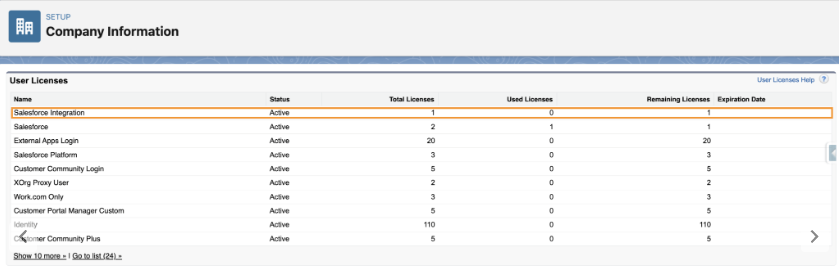
You can verify the number of integration user licenses available to you under Company Information > Setup.

In addition to the new licenses, a new standard profile called ‘Salesforce API Only System Integrations‘.

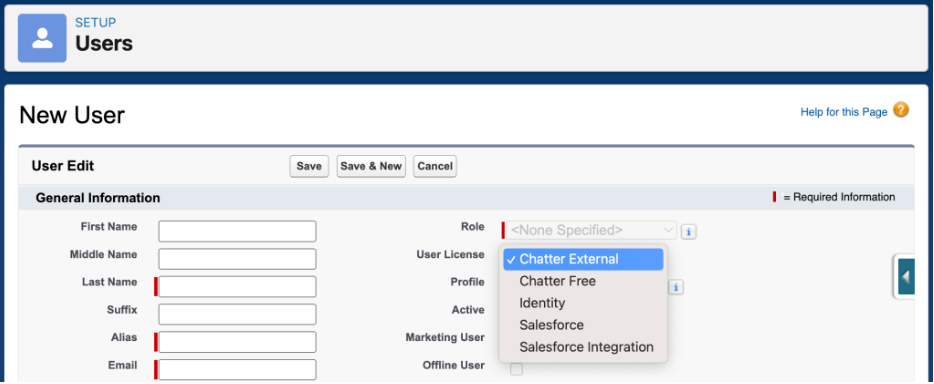
NOTE: When creating a new user with the Salesforce Integration User License, this will be the only profile available.

Creating a Custom Profile for the API Only System Integration User (System Permissions)

Since the new ‘Salesforce API Only System Integrations’ profile is a standard profile and therefore can’t be updated, it is recommended that you create a new profile by cloning the Salesforce API Only System Integrations (not System Administrator) for integration users in order to customize the permissions:

  1. Go to Setup > Profiles
  2. Locate the ‘Salesforce API Only System Integrations’ profile and click Clone.
  3. In the Permission set, go to System Permissions
  4. Enable the following permissions:
    • Password never expires – doing this prevents the password from expiring while someone is out of the office with no one available to update it across integrations
    • API Enabled
    • Api Only User
    • Chatter Internal User (optional)
  5. (Still under System Permissions) Make sure ‘Multi-Factor Authentication Login Requirements for API Access’ is not enabled

Create a Custom Permission Set for the Integration (Object Access)

  1. Go to Setup > (Quickfind) Permission Sets
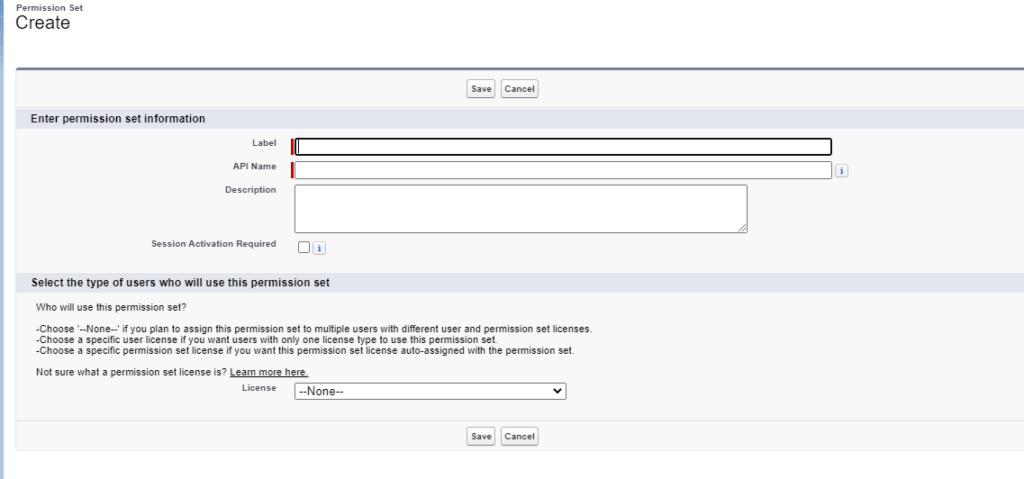
  2. Create a new permission set
  3. Name your permission set to reflect the permission for this integration. For example “Integration – ZoomInfo”
  4. Leave the License Type empty “–None–”
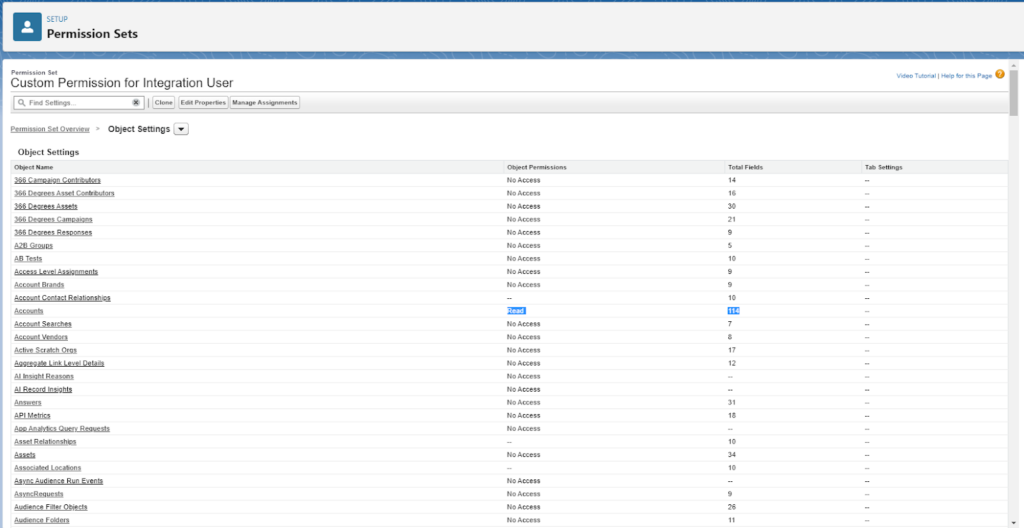
  5. Add the following to the Object Settings for each object the integration needs access to:
    1. Object CRUD access (Create/Read/Update/Delete/View All/Modify All)
      • This example is for adding access to just the Account object to the Integration User.
    2. Field-level access (Read/Edit) for each field on the object
    3. Remember the principle of least privilege – we want to grant access only for the actions that the integration needs.
      • In particular, keep in mind custom record types that are deployed by integrations’ own packages

Creating an Integration User

To use one of these licenses, it is recommended to:

  • Create a new user for each specific integration (if there is not a dedicated license already)
  • Assign the Salesforce Integration license (or you can change the license or if you already have a dedicated user for the integration)
  • Give the user the Salesforce Integration API permission set license.
  • Add the custom permission set you created above.

Validate

Once your user is set up:

  • Add the new integration user credentials in the integration platform (the steps may vary based on the integration)
  • Test the integration to confirm the integration is working the way it should.
    • For example, are records being updated as expected?

Considerations

  • The Salesforce Integration user license is API Access Only, meaning that it is not suitable for non System to System integration uses. Users with this license will not have access to the direct user login or access the org through the UI.
  • With the new licenses, it is still recommended to use one integration user per integration to ensure traceability of the transactions that the integration has within Salesforce.
  • If you are moving an existing user to the integration user license, the new ‘Salesforce API Only System Integrations’ profile, may not have all the object permissions needed. Any specific permissions needed may need to be assigned using permission sets.
  • Pardot API users are usually better met with the Identity User License, but if there are reasons to use this license (Oath2 Client Credentials) the Integration Connector User permission set is what will need to be applied to grant Pardot record access. Users using this license may not appear in User Sync until after you manually create and connect a Pardot user.
  • A custom permission set granting object and field access is preferred over doing this in the profile as permissions in profiles is scheduled to be sunset Spring of ’26.

Additional Resources

Special thank you to Heather Rinke, Larry Harvey, and Mike Creuzer for contributing to this post.

In a move that extends beyond the chatbots used to formulate interview questions or write email subject lines, Salesforce is expanding automation capabilities by integrating Einstein GPT and Data Cloud with Salesforce Flow.

So, what does the announcement from Salesforce mean for marketers? 

Bringing Einstein GPT and Data Cloud capabilities into Salesforce Flow means marketers can use the automations to create impressive real-time experiences for customers. And they’ll accomplish that using clicks rather than coding skills.

It’s something that will make the tools easily scalable for Salesforce customers at every growth stage.

How and when can Salesforce customers access it?

The announcement actually involves two initiatives Salesforce is launching. The first is a tighter integration between Salesforce Data Cloud and Flow. And the second is the integration of Einstein GPT and Flow. 

According to John Kucera, senior vice president of product management at Salesforce, customers can use Flow currently with Salesforce database data. The integration updates between Data Cloud and Salesforce Flow are opening up the possibilities, and incorporating Einstein GPT is adding an efficiency edge to the technology. 

Kucera said the Einstein GPT capabilities will be available on an early adopter basis in early fall as part of the Salesforce Winter ‘24 release. He went on to say that the Data Cloud integration will probably be offered as part of a standard Salesforce subscription, and Einstein GPT for Flow may carry an additional charge once those details are worked out.

Einstein GPT and Data Cloud Capabilities

Salesforce introduced Einstein GPT in March 2023 as the world’s first generative AI CRM technology, which infuses proprietary Salesforce AI models with generative AI models from OpenAI and other large AI models. And Data Cloud takes customer data from any source inside or outside the Salesforce platform and harmonizes it in real time.

So what in the world does that mean for marketers?

That means marketers can use information from Data Cloud to generate content and build workflows via Einstein GPT. Since Data Cloud reacts to data changes in real time,  marketers can serve content that adapts dynamically and creates personalized experiences every time.

For example, a marketer could use Einstein GPT to generate an email with dynamic content blocks that update in real time when a Data Cloud field updates based on customer activity.

John Kucera said to SiliconANGLE, “You can give it a prompt such as ‘I want to create a guided workflow for a new customer or create a rule to follow up with an email to customers who haven’t responded in five days.”

Infusing Einstein GPT and Data Cloud with Salesforce Flow

The new integrations are going to turn things up a notch for marketers. Here’s what happens when we incorporate Salesforce Flow into the Einstein GPT and Data Cloud mix. 

What is Salesforce Flow?

Salesforce Flow is a declarative automation tool. It allows you to create complex automations inside the platform using clicks rather than code, so users can get in there without the need for developer skills.  

Marketers use Salesforce Flow for things like managing campaign activations, automating customer onboarding steps, or creating a custom task series for sales teams. 

How can marketers use Salesforce Flow with Einstein GPT and Data Cloud?

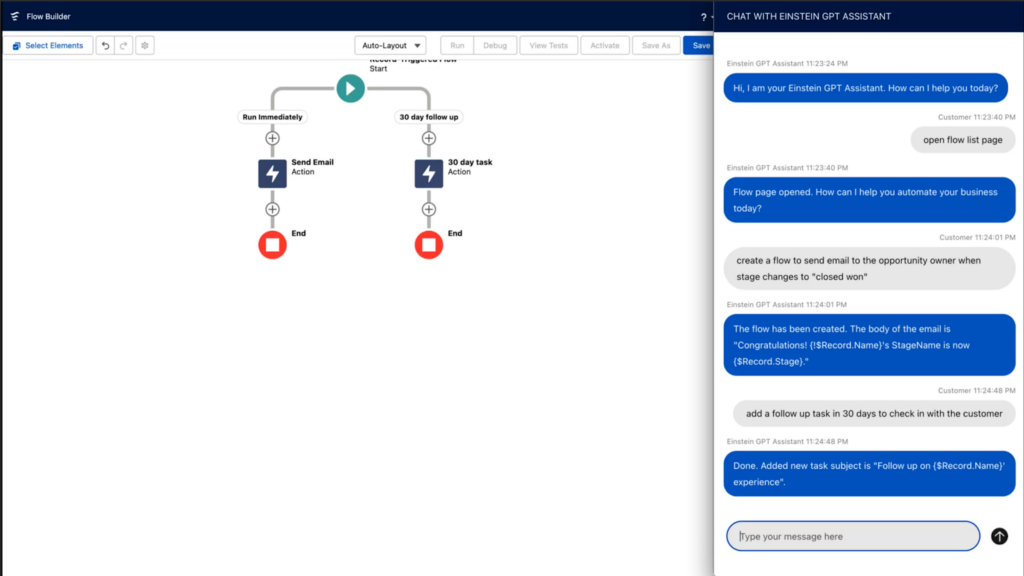
Using the Einstein GPT and Data Cloud integration alongside Salesforce Flow is changing the game for marketers who use the platform. That’s because marketers will be able to use conversational chatbots to automate complex workflows and trigger actions in real time.

Users and admins can describe the type of flow they want to build, and then they’ll sit back and watch the chatbot complete the tasks. Or, it can be used to build formulas or search for functions. It removes much of the manual and tedious work that goes into creating complex flows and automations.

Source: Salesforce

For example, a field in Marketing Cloud Engagement detects that a customer added items to their shopping cart, but they left the page without completing the purchase. That triggers an immediate email notification, created via generative AI, that goes to the customer and offers a discount code for them to complete the purchase.

In summary, the three benefits to marketers include: 

  • Reduced flow build time
  • Access to more options to automate with flow
  • Improved real-time personalization for customer interactions  

Get ready for generative AI inside your Salesforce org

We’re on the edge of our seats with anticipation for combining Einstein GPT with Salesforce Flow and Data Cloud capabilities. 

These technologies make us feel like we have a front row to the future of CRM and marketing automation. So, in the meantime, we’ll be thinking about all the ways we can use conversational AI to do all the things us busy marketers do. 

Have any aha use cases you’d like to share? How do you think Einstein GPT, Data Cloud, and Flow are going to work together in your org? Let us know in the comments! 

You can also drop us a line if you’re wondering how you can incorporate these tools into your marketing operations strategy.

Those of you who have been followers of The Spot for a few years now know that we have shared our favorite Marketing Cloud Account Engagement (Pardot) Ideas from the Salesforce IdeaExchange either in blog posts or the Pardashians Slack group.  

This tradition started in 2017 with Andrea’s initial post highlighting 8 ideas on the IdeaExchange that Pardot admins should upvote.  We’ve seen great features come to life in the most recent Salesforce releases (looking at Conditional Options for Completion Actions), and we’re hoping you can help prioritize ideas for future releases.

Salesforce has three releases throughout the year and uses their IdeaExchange to help drive which features are prioritized in future releases. As a marketer, you have most likely entered a situation where your team is requesting a solution that is currently not available in Marketing Cloud Engagement or Marketing Cloud Account Engagement as a feature. 

Your first stop is to see if this feature/solution has been mentioned or resolved via the IdeaExchange. Checking there first is going to help you understand how others have solved it, and then you can add in your own vote to the idea.

What is the Salesforce IdeaExchange anyway?

Back in 2006, the Salesforce #Ideaexchange was born as a way to involve its customers (big and small) in a modern effort to crowdsource ideas for its product roadmap. This ensures the community gets a platform to contribute their ideas and wishes — you know, a place where the margods can go for inspiration if you will as they build the world of tomorrow.

How does one enter their idea into the Salesforce IdeaExchange?

  • Come up with an idea and submit it to the exchange
  • You then get trapped and spend 2-4 hours going through other people’s ideas (definitely optional, but highly encouraged). 
  • If your idea gets enough votes (10+ points for you) then a product manager gets involved
  • The idea is developed and then delivered, and we all cheer!

Need more details? We wrote a little about the history of the AppExchange.

Top Salesforce IdeaExchange items for marketers

As Salesforce continues to work on improving their marketing automation platforms, our team has put together a list of ideas that we recommend you upvoting and adding to your wish list in hopes of getting them added to the top of the prioritization list.

Here is our current list of Salesforce IdeaExchange items that marketers should check out and upvote.

Salesforce

  1. Ability to Customize Campaign Member Status Values for all Campaigns

This feature would help with needing to update campaign member statuses for each individual campaign. We wrote about how to fix this with Protected Campaign Member Statuses.

Upvote >>

Marketing Cloud Engagement

  1. Access to a Marketing Cloud Engagement Developer Edition

This feature would help trailblazers gain hands-on experience working within Marketing Cloud Engagement without being a customer.

Upvote >>

  1. Include Dynamic Links in Engagement Split Activity

This feature would ensure Journey Builder engagement splits based on clicks can monitor the clicks on any dynamic link as well as static links.

Upvote >>

  1. Access to a Recycle Bin in Marketing Cloud Engagement

This feature would give Marketing Cloud Engagement admins the same abilities as the Marketing Cloud Account Engagement recycle bin.

Upvote >>

  1. Include the “De-Duplicate by Email Address” Feature in Journey Builder

This feature would give users the same abilities they have when sending a normal email through Marketing Cloud Engagement.

Upvote >>

  1. Allow Data Extensions as Suppression Lists in Journey Builder

This feature would allow marketers to use data extensions for suppression lists in Journey Builder instead of lists.

Upvote >>

Marketing Cloud Account Engagement

  1. Track and Record Direct Replies to an Email Sent from Marketing Cloud Account Engagement

This feature would provide an additional, much needed KPI for marketers to be able to determine which CTAs are working for their emails that do not go directly to links or forms.

Upvote >>

  1. Reduce Errors Post-Sending Email

This feature would allow you to either recall or edit emails that have not been opened yet after an email is sent with an error.

Upvote >>

  1. Allow or Operational Email Sending in Engagement Programs

This feature would bring the operational email checkbox to the entire Engagement Program or individual Email steps to ensure those who need to receive these emails still are even when in an Engagement Program.

Upvote >>

  1. Audit changes to Marketing Cloud Account Engagement Assets

This feature would bring a tool similar to what Salesforce Admins have available to them to be able to view all changes made to lists and assets throughout Marketing Cloud Account Engagement.

Upvote >>

  1. Allow Variable Fields in SFDC Tasks

This feature would allow for more variability and customization when creating a Salesforce Task from within Marketing Cloud Account Engagement.

Upvote >>

  1. Notifications for SFDC Connector Errors

This feature would bring forth a notification system for your team to understand when there are Connector errors between Salesforce and Marketing Cloud Account Engagement.

Upvote >>

  1. BRING BACK “PARDOT”

This feature needs no explanation as many people are hoping we can reverse the name rebrand and move back to calling the tool “Pardot” at some point in the future.

Upvote >>

Analytics

  1. Ability to Include Cross Filters in Report Filter Logic

This feature would allow users to be able to use standard filters and cross filters together in a report with filter logic.

Upvote >>

  1. Reporting on Email Activity from Salesforce Inbox or Standard Inbox Integrations

This feature would bring email activity into the Activity records to allow for reporting between emails and other activities.

Upvote >>

  1. Allow Reference Lines on Dashboard Components

This feature would bring an amazing reporting feature to dashboards so marketers can include reference lines on any report chart within a dashboard.

Upvote >>

We Want to Hear From You!

While some Pardot admin recommendations get picked up and implemented faster than others, it all depends on community participation and perceived need from the Marketing Cloud product team. In fact, to help drive ideas, Salesforce created a prioritization system where you can see top feature suggestions across the ecosystem battle it out!

Are there any features or functionality you wish you could see? If so, let us know below. With a little bit of luck and support from your Salesforce Ohana, you might also uncover the secrets of the IdeaExchange and get your idea on the scoreboard.Don’t forget to vote for these ideas, submit your own and chat with us on Twitter, LinkedIn or simply subscribe to the blog. 

The Salesforce Spring ’23 Release Notes are out and we’ve been combing through them to see how these changes will affect our clients and readers. 

In this blog post, we’ll share the Salesforce Spring ’23 Release things you should know if you’re a Marketing Cloud Account Engagement (Pardot) admin or user.

Engagement Optimizer BETA

An easier way to monitor and clean up your org? Yes, please! This new feature helps you: 

  1. Improve email send times
  2. Keep visitor tracking running smoothly
  3. Keep an eye on the overall status for your business unit
  4. Pause and prioritize actions

This feature is in BETA for all editions of Account Engagement, so if you want to go ahead and start using it, opt in by going to Account Engagement Settings and selecting Optimizer (Beta) from the left menu.

Once you enable the Optimizer, you’ll instantly see areas of your instance that can be cleaned up. The listed actions will include:

  • Reason for Alert
  • Priority
  • Feature Area
  • Recommendation 

Domain Validation Changes

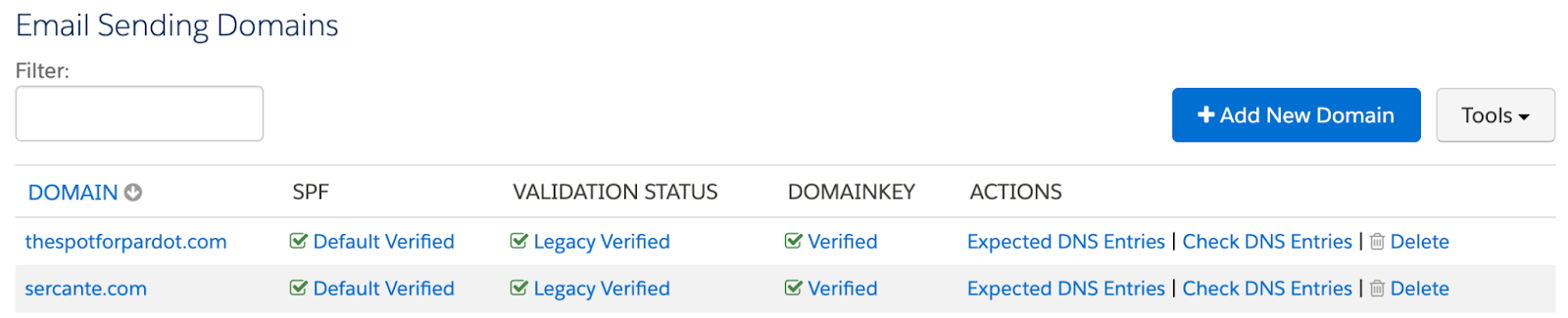
Account Engagement is also making some changes to sending domain validation. This only affects domains validated after the Spring ‘23 release, so don’t worry about your existing Domains! 

Validating a new domain now requires proof of ownership via a validation key that you’ll need your IT team to paste into the DNS. The DomainKey Policy section of the Domain page has also been retired as this is no longer required. 

These changes should make validating new sending domains a bit easier going forward!

Old View

New View

New Pardot Org Defaults

If you create a new Account Engagement Business Unit after the Spring ‘23 release there are new defaults that you’ll want to take note of.

  1. First Party Tracking is enabled 
  2. Force HTTPS is enabled
  3. The Honor Do Not Track (DNT Header) option is enabled
  4. Request opt-in from all visitors is enabled
  5. The Max Tracking Cookie Duration setting is set to 365 days 

These defaults aim to protect your Prospect’s privacy, but they can be overwritten by an Account Engagement Administrator, if desired. These settings can be found under Account Engagement Settings > Edit. 

External Actions Monitoring

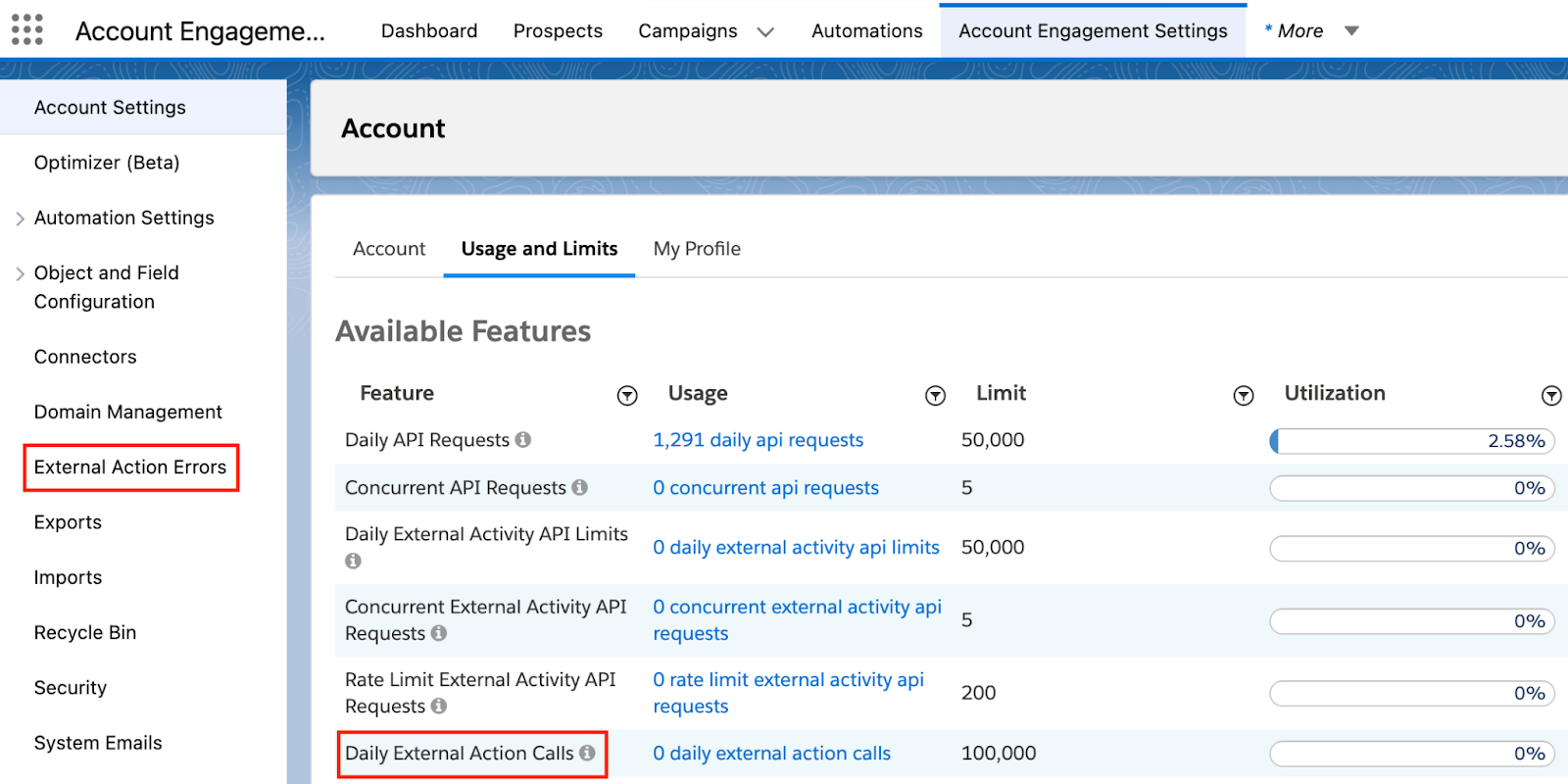
With the Spring ‘23 release, you can now keep an eye on External Actions. 

External Action Errors will now be available in a new report under Account Engagement Settings > External Action Errors and you can monitor External Action usage under your Account’s Usage and Limits report.

Retirements

Several connectors and one feature were retired this release:

  1. ReadyTalk was removed November 30th, 2022
  2. Webex retiring March 31, 2023 and removed from Pardot April 1st , 2023
  3. Account Engagement for Slack BETA is retiring February 23rd, 2023
  4. The Option to Run Automation Rules in Real Time Is Being Retired as discussed in the Winter ’23 release 

Not in the new release, but…

These two changes were not in the new release notes but they’re important to point out. 

Opt Out Field Changes

This is happening on February 26th so make sure you’ve chosen your syncing system of record or your Opt Out field will stop syncing with Salesforce! 

Check out the Preparing for Pardot Opt Out Field Sync Changes blog for guidance on this change.

Pardot Files Now Open in a New Tab

I don’t know why Salesforce didn’t shout this one from the rooftops, this is a long needed feature that will make a lot of marketers happy. 

As of January 23rd, files stored in Account Engagement will open in a new tab when clicked rather than automatically download (hello white paper and case study hosting!). 

This only affects files uploaded on/after January 23rd. But you can reupload your file over your existing one to get the new behavior.

Keep it Going

Spring ‘23 Salesforce Release: Platform Highlights
Brian Roff shared all the things that caught his attention from a Salesforce platform perspective in this blog post. Read it here.

Reach out to the team at Sercante to get help implementing these enhancements in your Salesforce org. And leave us a comment below to let us know what you think about the Spring ‘23 Release.

No more posts to show