But many of the ones we say out loud are… how do I put this… not real.
Let’s talk about constraints
Constraints are a fact of life. They’re all around us. Some of them are easy to name and point to – deadlines, budgets, rules, API limits.
Others lurk in semi-consciousness. They might be things that we don’t want or know how to name. Like the fear of looking like we don’t know what we’re talking about. Or of trying and failing. Or of just generally looking foolish.
The right kind of constraints can generate enormous creativity. But if you misdiagnose your constraints — especially the silent ones, the ones you can’t quite say out loud — you may find them hamstringing your goals and efforts.
The fallback excuse: time & money
The time and money excuse is a trap.
It’s so easy to blame time and internal bandwidth for why you’re not addressing an issue or taking on a new project. Heck, I’m running a startup, and let me tell you, time and internal bandwidth are the most precious and scarce resources my team and I have.
But there will never be enough time. There will never be unlimited funds. So with the time and budget at your disposal, how can you best influence the change you seek?
Persuasion: a big constraint we don’t like to talk about
But the “soft skills,” the ability to rally the team, to get leaders to a yes, to get others on the team to step up and contribute — this is where the real work lies.
In the realm of marketing automation, we sit at the intersection of sales, marketing, and IT. One of the most interesting and at times, grating, parts of the job is having to be the voice of change constantly and enlist others to get on board.
When I see marketing automation professional struggling, it’s often not a time and budget issue (although that might be what they point to.) It’s possible that a deficit of persuasion is really the constraint at hand.
The resistance
That familiar feeling of “I can’t, I won’t, who am I to” — that’s the resistance. When it rears its ugly head, take a beat.
“With a finite budget and number of hours in the day… what can I learn? Who can I change?
What is the “lead domino” that if set in motion will make all of my future efforts easier?
Fill in the blank
The next time you find yourself thinking:
“I can’t because ______.”
Hit the reset button.
Are you being brutally, full-on honest with yourself about how you fill in that blank?
What is the most important outcome you need to achieve? What are the constraints you face? What resources can you leverage? Is your internal narrative helping or hurting you?
Grappling with these questions is how we do the work we are born to do.
I’m working on a secret project. It involves crayons. Maybe some colored pencils. Very illicit stuff.
Okay fine, I’ll just tell you what it is.
It’s a coloring book. Called “Why Marketing Automation Admins Drink.”
Why a coloring book? Good question…
My entire career has been focused on digital marketing and marketing automation — client side, for agencies, and for Salesforce consultants. I now own a Pardot consulting business. I love what I do and wouldn’t change it for the world.
But man, sometimes it’s hard to be a marketing automation pro.
We have to carry the torch for change and relentlessly advocate for a new way forward in our organizations. Technology advancements move a mile a minute. Our jobs look easy to people who know nothing about it.
And also, coloring is an excellent coping mechanism when you’re on your 8th straight conference call of the day.
A sneak peek…
I made this with the help of a crazy talented illustrator and some insightful and hilarious Pardashians (Sara, Jacqueline, and Lara, to name a few). It was fun playfully capturing some of the moments that make our jobs… challenging.
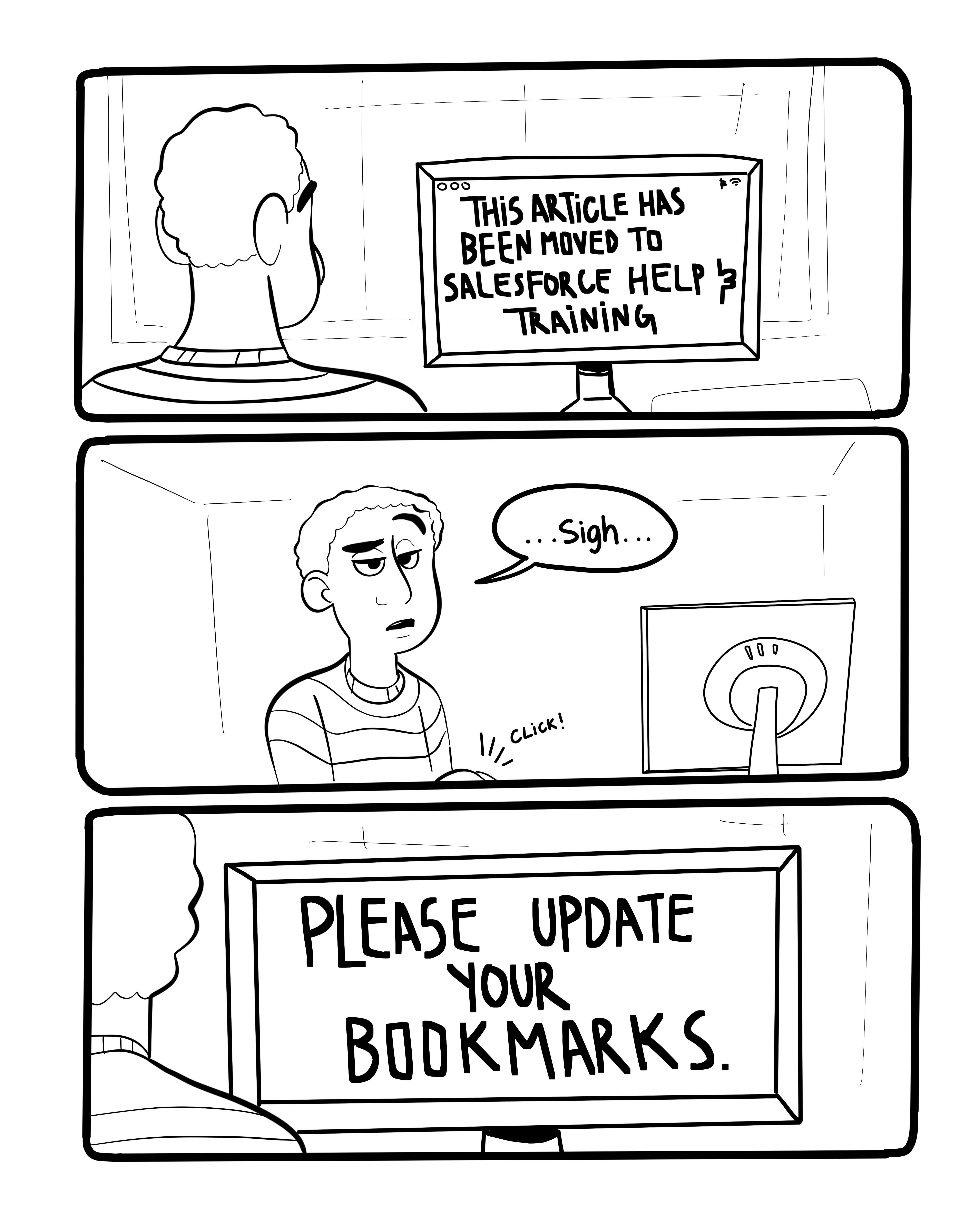
Here’s one sketch that didn’t make the final print edition cut, because Pardot FINALLY redirected their help & training links (thank you, Pargods!):
One year ago today, I wrote and shipped my first post.
Since then, I’ve posted 84 articles about the platform (whew, that’s a lot of opinions), including one guest post from the wonderful & fabulous Brittany Rhyme.
Because I love excuses to celebrate… here’s a look at the top 10 most viewed posts on the site to date:
I’m always up for most guest blogs or collaborative solutioning if you have a story or use case to share! If something comes to mind, let’s chat — you can find me on Twitter, Linkedin, email, or even IRL at Dreamforce next week.
Thanks for being a loyal reader of this collection of how-tos, random ideas & war stories. I’m glad you’re here. ❤
Ariana Huffington’s open letter to Elon Musk struck a chord with me.
I mean… to be fair, she wrote a book on naps, so it was a little self serving, maybe. But I think it’s a worthy reminder to be a little less intense.
I love what I do, and I’ve spent many caffeine-fueled nights making ish happen. In the moment, these client and business challenges feel 100% heart/head/soul consuming.
But at the end of the day, we are Pardot pros doing some bad ass marketing. Not curing cancer or decoding a bomb that’s about to detonate and decimate all of humanity. Marketing emergencies exist… but they are few and far between, and most don’t include the imperative to ship an email by EOB.
Can we all agree to work hard, love what we do, and take care of ourselves? I think these don’t need to be mutually exclusive. When presented with a fake deadline or artificial pressure — let’s push back.
So Elon, bro, I’m sending you cosmic hugs and all the good vibes. I believe in you and your vision.
And readers — here’s to checking our FOMO and inflated sense of urgency, embracing rule number 6, making healthy life choices, showing empathy, and cutting each other some slack.
The original working title of this blog was “Why Wasn’t This Documented, Abridged Edition.”
“Scantily documented surprises” sounded like a nicer way of saying the saying the same thing.
I stumbled across a really frustrating thing about AMPSEA yesterday. This is by no means the first stumble. There are many itty bitty little things in Pardot that are really sparsely documented and actually make a huge difference.
I’m not complaining, don’t get me wrong. It’s part of why I have a job as a consultant with a pipeline that overfloweth. And sometimes these “undocumenteds” are fun little Easter eggs.
Sometimes though, undocumented surprises throw a wrench in your plans in a big bad way.
So to help you circumvent those potholes, here are the top 11 “did you know” things I’ve been surprised by (or have seen others get surprised by):
1. Adding new Salesforce fields does not automatically sync the data.
When you create a Pardot field and map it to a Salesforce field, the data does not automatically come over to Pardot for all of your records. I’ve heard many a customer say:
“I waited all night for it to refresh and nothing happened.”
Quit waiting. To populate data in a new field, you need to do a full database refresh. This can be done by either:
Downloading your full prospect list and uploading it again to Pardot
Adding all of your leads and contacts to a Salesforce campaign and pushing the “Add to Pardot List” button
Asking support to push some secret magic back end button
2. Adding new picklist values does not automatically update your picklists.
Let’s say you have a dropdown on your forms for ice cream flavors – vanilla, strawberry, and chocolate. Then your product team steps it up a notch and you decide to release Orange Mocha Frappucino flavored ice cream.
You go to Admin > Prospect Fields and then edit “flavors” to contain your new value.
Think you’re all set?
Nope.
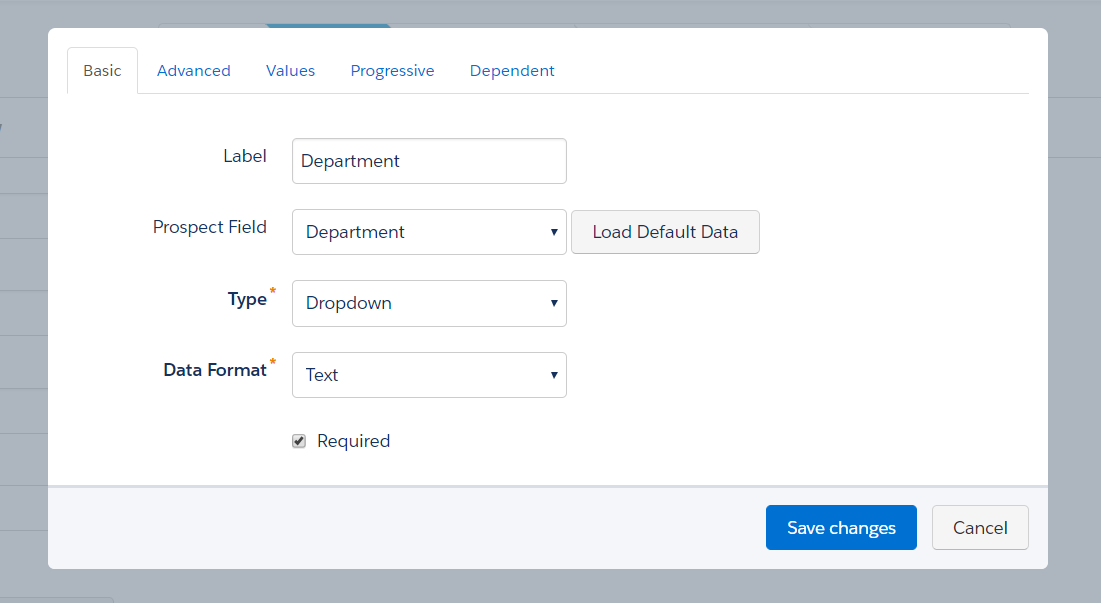
You have to go to any of the forms where that field is in use, edit the form, edit the field, and click “Load Default Data.”
NOW your customers can be shocked and awed by your wealth of selections.
3. Semi-colons in Pardot mean OR, and in Salesforce commas mean OR.
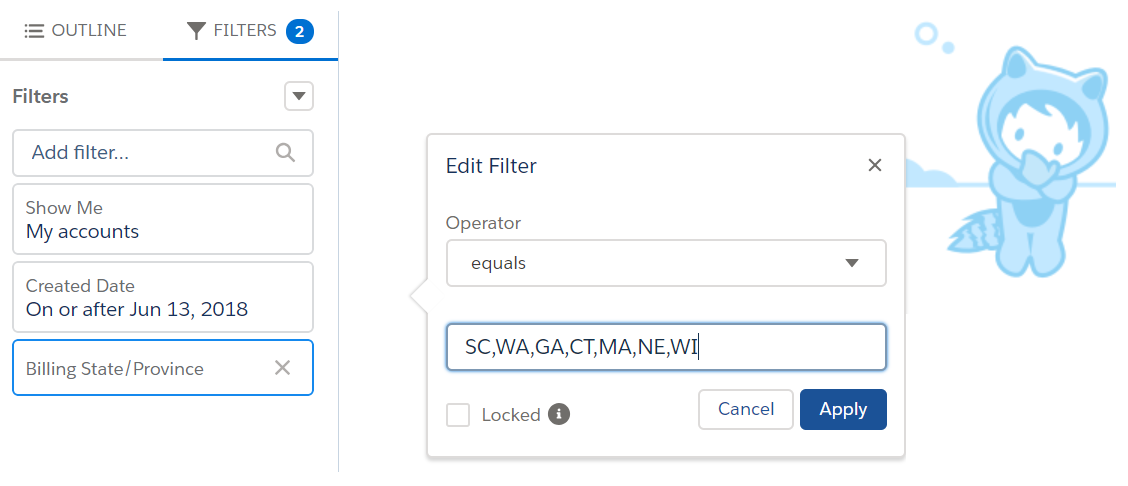
In Salesforce world, you can use commas to separate values in report criteria and this behaves like an “or.” So for example, this would pull anyone with an address in any of these states:
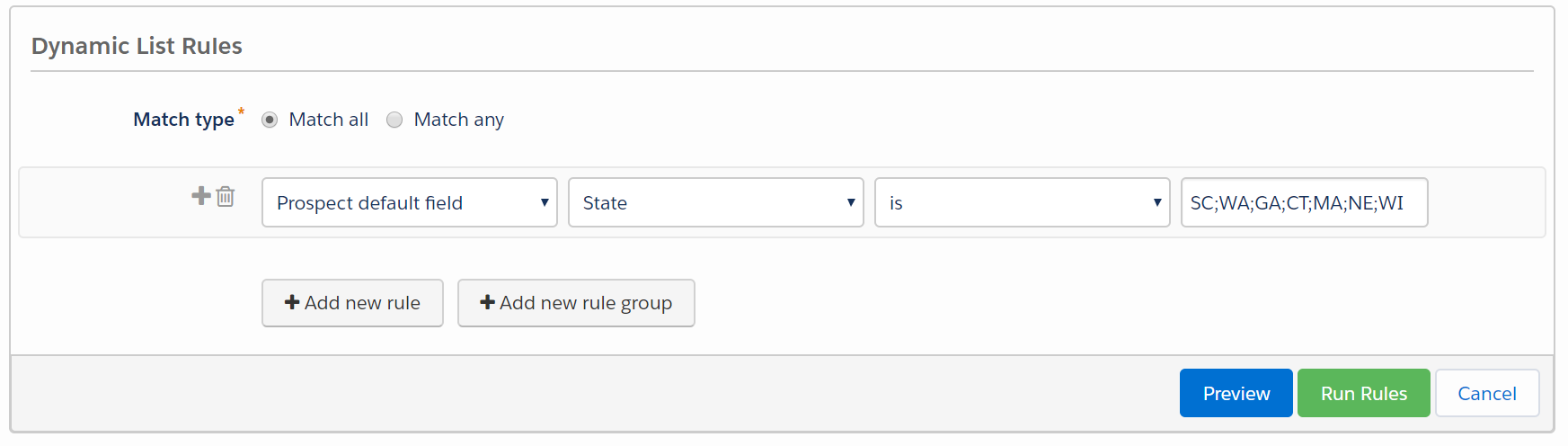
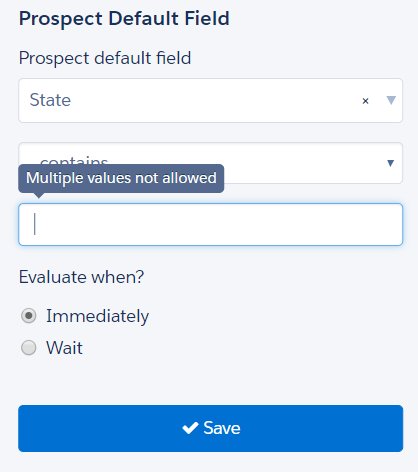
To do the same thing in Pardot, you would use semi-colons:
Lara Black discovered ANOTHER twist in this punctuation plot when using semi-colons in Engagement Studio, but that has since been shut down so that you can’t use those in ESP rules:
4. Repeating automation rules based on field values are… sneaky.
When you reference forms in looping automation rules, Pardot looks to see if a new action took place. When you reference fields, there’s no concept of “is changed” when Pardot looks for a match.
It just looks to see if your prospects meet the criteria, yes or no — not if any NEW prospects met the criteria. If the field you’re evaluating doesn’t change, the rule will rematch it for all eternity.
Something like this, for example, will go haywire:
This makes much more sense with a detailed example… so check one out here.
5. If you turn on User Sync and unverify the Salesforce connector, synced users lose access to Pardot.
User sync is super wonderful and helpful! It lets you auto-create Salesforce users in Pardot with permissions that align to their Salesforce profile, and it automatically enables SSO for them.
But with SSO enabled, your users don’t actually have a method of logging into Pardot. If you take down your Salesforce connector for whatever reason, SSO users will be locked out.
Related: if the user accounts linked to 3rd party integrations (like the WordPress plugin) are converted to SSO, the connectors will break because your Pardot username and password no longer work.
6. You can expose dynamic lists in Email Preference Centers.
For the majority of my time as a Pardot admin, I operated with the belief that only static lists could be exposed in Email Preference Centers. It kind of makes sense, right? People can add and remove themselves from static lists. No can do with dynamic lists — you set the criteria and people either match or they don’t.
But, you CAN make dynamic lists “public” — they just will only show for prospects who meet the criteria for inclusion on the list.
They won’t be added or removed from the list if they update their preferences, but you can track their status in the column “opted out of list” when checking out the dynamic list in Pardot:
7. There are no published instructions for assigning Engage licenses to Platform users, but you CAN do it.
One of my customers fought really hard to get budget approval for 30 Engage licenses for their CSR team. This internal group had access to Salesforce with Platform/Force.com licenses (a partial license that can’t access leads and opportunities, among other things).
The customer sent me a list of who they wanted to have access, so I went to the Salesforce Engage License Assignment tab as usual and… these users didn’t show up on the list of people eligible to receive a license.
Cue the heart pounding.
I googled this thing half to death and came to the conclusion that Engage licenses just couldn’t be provisioned to Platform users. Just before I picked up the phone to have strong words with their Salesforce AE…
….I discovered you can manually assign the licenses by going to Setup, visiting their individual user records, going to Permission Set License Assignments, and adding this one:
Crisis averted.
8. Time in Salesforce and Pardot operates slightly differently.
The way that Pardot and Salesforce handle a request for the “last 30 days” isn’t quite the same. To Pardot “days ago less than or equal to 30” means 30 days ago starting from yesterday, but in Salesforce it means 30 days ago starting from today.
So for example: if I’m running a report on May 1st looking at the last 30 days, Pardot grabs people from April 1 to 30, and Salesforce grabs people from April 2 to May 1.
There is probably a layer of nitty gritty detail that I’m missing here involving time zones and yada yada, but the short story is:
…if your lists don’t exactly match between Salesforce and Pardot and you’re using a date filter, don’t pull your hair out.
9. You can sync some types of lookup fields from Salesforce.
In general, you can’t map Salesforce lookup fields to Pardot.
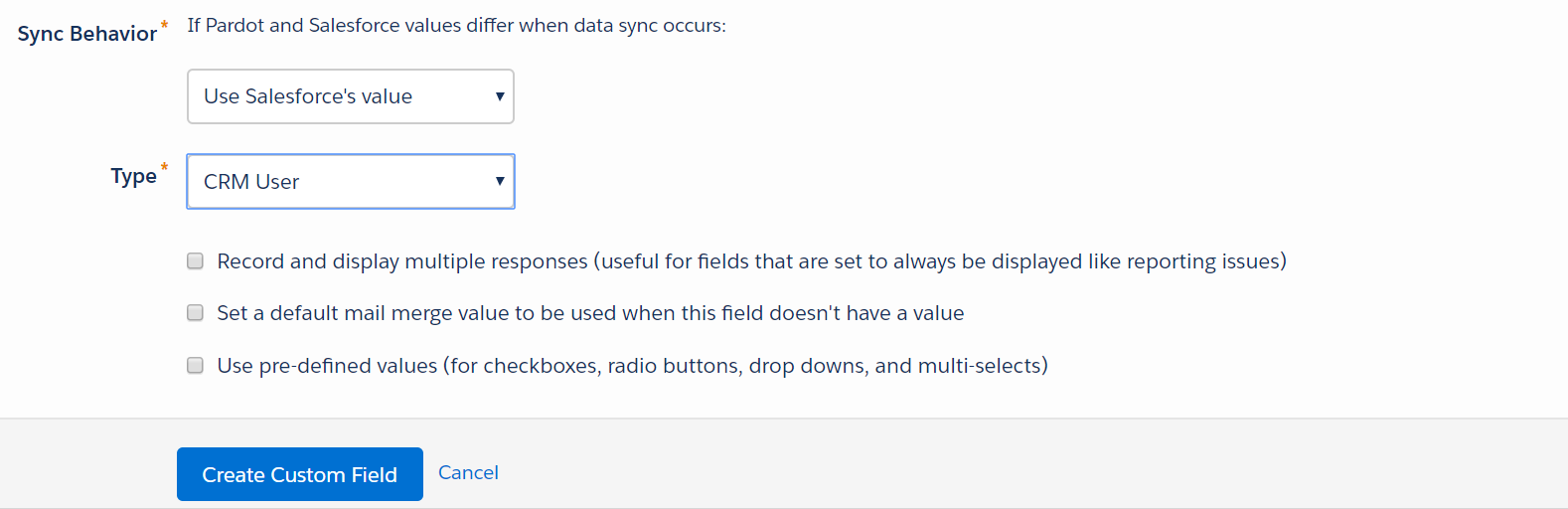
But you CAN sync this if it’s a lead or contact field doing a lookup to the User object. And then, even better still… you can then reference that field to be the sender for list emails.
10. Referencing Google fonts can screw with your CTR metrics.
One of my clients had a 100% click-to-open ratio. First reaction:
COOL!
Second reaction:
..mmmm, something’s off.
Turns out, if you’re linking to a Google font, a click is recorded when emails loaded. Here’s the detailed explanation from Pardot:
“If you use <a href=””> to import a font for a Pardot email, the font gets tracked as a click when the email is opened by the recipient. This tracking happens because Pardot tracks links that begin with http:// or https://, so links such as http://fonts.google… get rewritten and tracked. Pardot records a click when these links are loaded as part of the CSS reference.
To avoid this situation, you can use an @import reference instead of a <a href=””> to load your fonts. See Custom Fonts in Email for more details.”
11. HTTPS can make scary things happen on landing pages.
More and more browsers and providers are taking steps to strongly encourage (*cough* force *cough*) sites to use SSL.
In Chrome, for example, HTTP web pages with forms are marked as “not secure” when the user enters data:
So upgrading your Pardot tracker domain and vanity subdomain to HTTPS makes a lot of sense. It takes a few clicks and all of 15 minutes to set up. A word of caution, though:
In other words, if you’re setting the default to HTTPS, make sure your images and forms use HTTPS in the URL… not a mixture of HTTP and HTTPS. After enabling, do a quick landing page check to ensure you don’t have any missing content or broken links.
12. Taking the connector offline with Connected Campaigns on breaks pretty much everything.
There are definitely some work-in-progress things that are still being buttoned down, though. Trying to create a form or an email that is linked to a Connected Campaign while the connector is down makes crazy things like this happen:
I’m confident this will be fixed soon. Just be mindful that this is still evolving.
13. There’s tons of cool stuff you’re probably not taking advantage of.
This last one is actually several in one. Becka Miller and Lara Black gave a talk at Texas Dreamin’ last week on “5 Pardot Features You Might Be Overlooking,” which was a great reminder to regularly review tools that might be useful as your needs on the platform evolve.
Things like:
Competitor tracking
Site search integration
Keyword & paid search tools
The marketing calendar in Pardot
Dynamic content
Scoring categories
A full & growing list of connectors, add-ons & integrations (Sara McNamara has a solid list here!)
What other “surprises” have you found?
Have you uncovered any Pardot surprises of your own? What documentation do you wish existed… but haven’t been able to find? What has tripped you up, or unexpectedly delighted you?
When talking about these events with other consultants and business owners, several have dismissed them saying:
“Oh those are a huge waste of time… I never get anything out of them.”
I wholeheartedly disagree with this assessment. Here’s why:
1. You get to network with really smart people
I “see” a lot of the Ohana on Twitter regularly, but there’s nothing like getting to mingle in protein form.
The number of people that turn out for these events (from all types of companies, all types of roles, all backgrounds) is astounding. This is even more impressive for the Dreamin’ events, which are 100% community organized.
Having a support network to bounce ideas off of when you hit a roadblock or come across a doozy of a use case is invaluable.
2. You learn all the things
The Salesforce ecosystem changes constantly. It’s impossible to know everything about the products, use cases, and best practices without constantly educating yourself.
I have yet to attend a Salesforce event where I didn’t walk away with at least one new idea or insight that changed the way I approached my work.
Also usually walk away with lots of stickers.
3. You might find you have something to give
If your one and only goal is to sell something at these events – yeah, then maybe they are a waste.
Like many things in life, if you go into something with a focus on “getting,” you’re probably going to be disappointed.
My experience in the community is that a posture of generosity and focusing on what you have to share generally leads you to a better place. And sometimes even helps you sell stuff.
4. Mental blue-sky time is where the magic happens
It’s so easy to get caught up in day-to-day execution and keep-the-lights-on types of tasks.
How can you carve out time to think more strategically? How can you take a step back and ascend from myopia?
For me, attending events like Connections and Texas Dreamin’ provide a great opportunity to focus on the bigger picture and think about the longer-term roadmap.
Do you find conferences & Salesforce community events worth it?
What’s your take? Do you find value in attending conferences and events? Any on your “must attend” list?
Let me (and your fellow readers) know in the comments!