Category

New Features

Those of you who have been followers of The Spot for a few years now know that we have shared our favorite Marketing Cloud Account Engagement (Pardot) Ideas from the Salesforce IdeaExchange either in blog posts or the Pardashians Slack group.  

This tradition started in 2017 with Andrea’s initial post highlighting 8 ideas on the IdeaExchange that Pardot admins should upvote.  We’ve seen great features come to life in the most recent Salesforce releases (looking at Conditional Options for Completion Actions), and we’re hoping you can help prioritize ideas for future releases.

Salesforce has three releases throughout the year and uses their IdeaExchange to help drive which features are prioritized in future releases. As a marketer, you have most likely entered a situation where your team is requesting a solution that is currently not available in Marketing Cloud Engagement or Marketing Cloud Account Engagement as a feature. 

Your first stop is to see if this feature/solution has been mentioned or resolved via the IdeaExchange. Checking there first is going to help you understand how others have solved it, and then you can add in your own vote to the idea.

What is the Salesforce IdeaExchange anyway?

Back in 2006, the Salesforce #Ideaexchange was born as a way to involve its customers (big and small) in a modern effort to crowdsource ideas for its product roadmap. This ensures the community gets a platform to contribute their ideas and wishes — you know, a place where the margods can go for inspiration if you will as they build the world of tomorrow.

How does one enter their idea into the Salesforce IdeaExchange?

  • Come up with an idea and submit it to the exchange
  • You then get trapped and spend 2-4 hours going through other people’s ideas (definitely optional, but highly encouraged). 
  • If your idea gets enough votes (10+ points for you) then a product manager gets involved
  • The idea is developed and then delivered, and we all cheer!

Need more details? We wrote a little about the history of the AppExchange.

Top Salesforce IdeaExchange items for marketers

As Salesforce continues to work on improving their marketing automation platforms, our team has put together a list of ideas that we recommend you upvoting and adding to your wish list in hopes of getting them added to the top of the prioritization list.

Here is our current list of Salesforce IdeaExchange items that marketers should check out and upvote.

Salesforce

  1. Ability to Customize Campaign Member Status Values for all Campaigns

This feature would help with needing to update campaign member statuses for each individual campaign. We wrote about how to fix this with Protected Campaign Member Statuses.

Upvote >>

Marketing Cloud Engagement

  1. Access to a Marketing Cloud Engagement Developer Edition

This feature would help trailblazers gain hands-on experience working within Marketing Cloud Engagement without being a customer.

Upvote >>

  1. Include Dynamic Links in Engagement Split Activity

This feature would ensure Journey Builder engagement splits based on clicks can monitor the clicks on any dynamic link as well as static links.

Upvote >>

  1. Access to a Recycle Bin in Marketing Cloud Engagement

This feature would give Marketing Cloud Engagement admins the same abilities as the Marketing Cloud Account Engagement recycle bin.

Upvote >>

  1. Include the “De-Duplicate by Email Address” Feature in Journey Builder

This feature would give users the same abilities they have when sending a normal email through Marketing Cloud Engagement.

Upvote >>

  1. Allow Data Extensions as Suppression Lists in Journey Builder

This feature would allow marketers to use data extensions for suppression lists in Journey Builder instead of lists.

Upvote >>

Marketing Cloud Account Engagement

  1. Track and Record Direct Replies to an Email Sent from Marketing Cloud Account Engagement

This feature would provide an additional, much needed KPI for marketers to be able to determine which CTAs are working for their emails that do not go directly to links or forms.

Upvote >>

  1. Reduce Errors Post-Sending Email

This feature would allow you to either recall or edit emails that have not been opened yet after an email is sent with an error.

Upvote >>

  1. Allow or Operational Email Sending in Engagement Programs

This feature would bring the operational email checkbox to the entire Engagement Program or individual Email steps to ensure those who need to receive these emails still are even when in an Engagement Program.

Upvote >>

  1. Audit changes to Marketing Cloud Account Engagement Assets

This feature would bring a tool similar to what Salesforce Admins have available to them to be able to view all changes made to lists and assets throughout Marketing Cloud Account Engagement.

Upvote >>

  1. Allow Variable Fields in SFDC Tasks

This feature would allow for more variability and customization when creating a Salesforce Task from within Marketing Cloud Account Engagement.

Upvote >>

  1. Notifications for SFDC Connector Errors

This feature would bring forth a notification system for your team to understand when there are Connector errors between Salesforce and Marketing Cloud Account Engagement.

Upvote >>

  1. BRING BACK “PARDOT”

This feature needs no explanation as many people are hoping we can reverse the name rebrand and move back to calling the tool “Pardot” at some point in the future.

Upvote >>

Analytics

  1. Ability to Include Cross Filters in Report Filter Logic

This feature would allow users to be able to use standard filters and cross filters together in a report with filter logic.

Upvote >>

  1. Reporting on Email Activity from Salesforce Inbox or Standard Inbox Integrations

This feature would bring email activity into the Activity records to allow for reporting between emails and other activities.

Upvote >>

  1. Allow Reference Lines on Dashboard Components

This feature would bring an amazing reporting feature to dashboards so marketers can include reference lines on any report chart within a dashboard.

Upvote >>

We Want to Hear From You!

While some Pardot admin recommendations get picked up and implemented faster than others, it all depends on community participation and perceived need from the Marketing Cloud product team. In fact, to help drive ideas, Salesforce created a prioritization system where you can see top feature suggestions across the ecosystem battle it out!

Are there any features or functionality you wish you could see? If so, let us know below. With a little bit of luck and support from your Salesforce Ohana, you might also uncover the secrets of the IdeaExchange and get your idea on the scoreboard.Don’t forget to vote for these ideas, submit your own and chat with us on Twitter, LinkedIn or simply subscribe to the blog. 

Salesforce Marketing Cloud Personalization (Interaction Studio) is a fantastic platform to add to your marketing toolset. But starting a Marketing Cloud implementation can be daunting, especially when it is as complex as Personalization. 

The following sections of this article will detail the implementation approaches available, provide indicative timelines and outline example use cases. However, if  you’re wanting to understand a little more about what the tool can offer, you can check out my last article – Salesforce Marketing Cloud Personalization (Interaction Studio): A Beginner’s Guide

SFMC Personalization Implementation Methods

With any platform like SFMC Personalization, which promises Real-Time Personalization and AI Recommendations, it’s easy to get carried away with what it can offer. However, the key takeaway from this article is that you should focus on what you and your company can achieve, which is particularly important given the tricky interdependencies you’ll face when implementing Personalization.

In a nutshell, the approaches vary from minimal viable product (MVP), where the goal is to implement a baseline as quickly as possible and then build upon it in future iterations, all the way to future-state implementation (FSI), where you depend on use cases to drive large-scale transformation. There is also a halfway house approach of implementing an As-Is, for those who may sit between the two methods above. 

Marketing Cloud Personalization Discovery Questions

Thankfully, understanding which method may suit your needs can be easily identified by answering a few simple discovery questions — as laid out by Salesforce in their Implementation of Marketing Cloud Personalization Trailhead

These helpful questions allow you to ascertain which method will best suit your needs, including: 

  • How often does your company change its website? 
  • Do you have easy access to developer resources? 
  • Are you migrating from an existing tool? 
  • Do other platforms need to be integrated? 

What you’ll find is: 

  1. MVP is great for companies making constant changes to their website, have easy access to developers, and are not migrating from an existing personalization platform. In other words, it’s a viable method for those who are perhaps new to real-time personalization. 
  2. As-Is is great for companies that don’t have immediate access to developers, are looking to migrate from one tool to another and have a few live personalization campaigns ready to migrate. 
  3. FSI is the preferred option for companies that less frequently change their website, have limited access to developers, are looking to integrate Personalization with multiple clouds (Marketing, Sales or Service), and have external data sources that need to be integrated. 

Marketing Cloud Personalization Implementation Roadmap

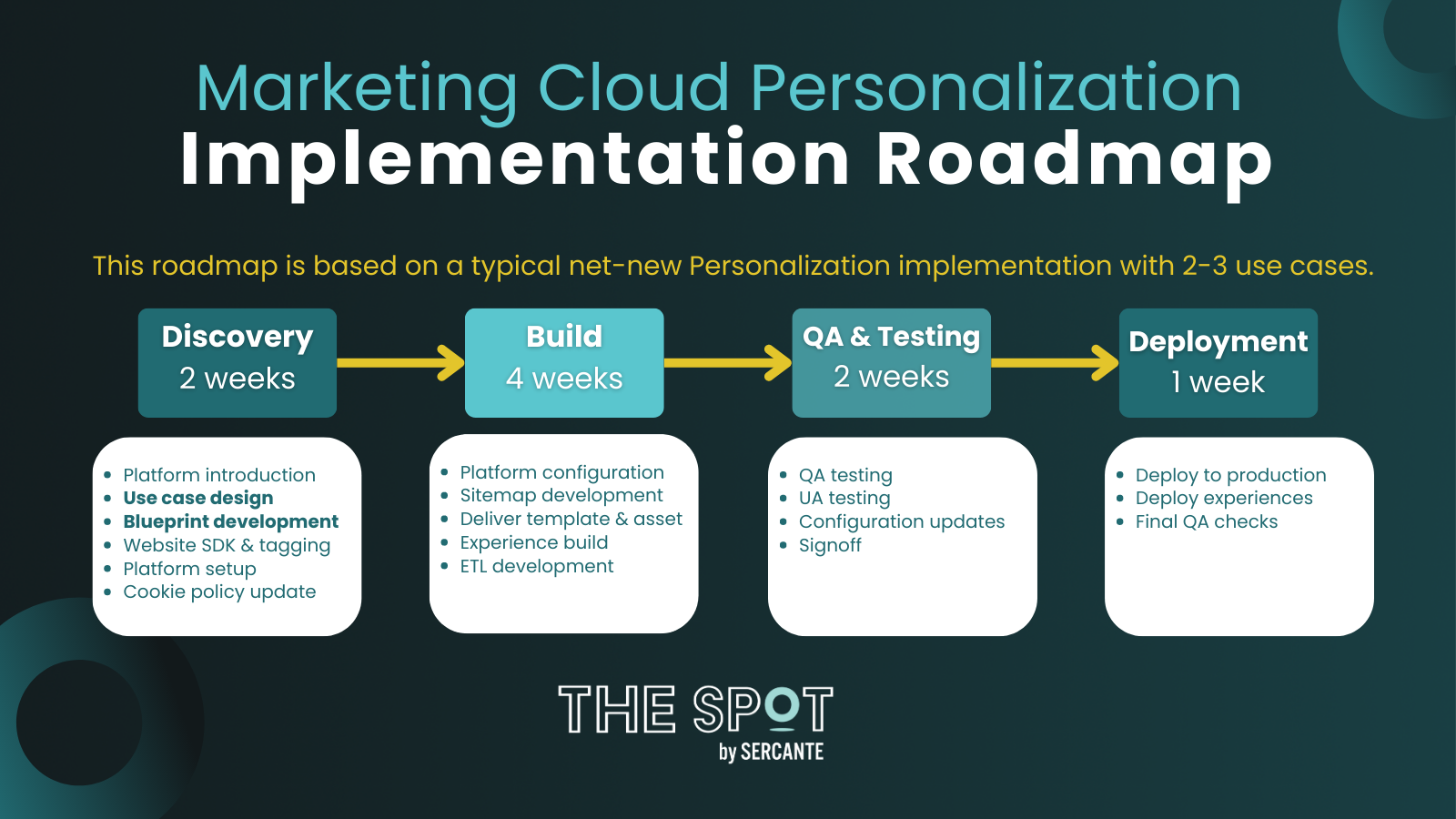
Obviously, the implementation roadmap will vary depending on the scope of your project and the implementation approach you’ve decided to use. However, there are some key milestones that will occur in all implementations, as shown in the diagram below, which is based on a typical net-new Personalization implementation with 2-3 use cases. 

Roadmap Diagram

From the diagram above, the two key milestones I’d pay the most attention to are the Use Case Discovery and the Blueprint Development

Regardless of the implementation method, defining a handful of clear and precise use cases before beginning the build is key to ensuring success. As mentioned, it’s easy to get caught up with the wide range of functionality Personalization offers. That’s why understanding the desired outcome is the most effective way of running a successful implementation and ensuring your company gets the most out of the platform. I’ll go on to share a few examples of good use cases later on. 

The blueprint document goes hand-in-hand with the sitemap — which is debatably the most crucial part of Personalization. The blueprint helps define which page categories exist, which triggers exist on those pages, what data can be scraped and where it can be scraped from (i.e. DOM vs Data-Layer) for each visit. 

Thankfully, to aid with your implementation, the Salesforce Partner Portal can provide a useful template that helps capture all of the information necessary to create your sitemap, and for implementing Personalization. The template covers everything from page types and content zones to events and attributes, and most importantly, where they can be found on your website to make it easier for the developers building the sitemap.  

Use Cases

Without sounding like a broken record, use cases can make or break a Personalization implementation. During my first implementation of Personalization, the goal I was given was to deliver Real-Time Web Personalization aka Personalization. 

There were no clear KPIs, the website was static and there was nothing to encourage returning visitors, and it made any experiences based on previous visits practically void. The end result was that our very expensive personalization engine sat on the shelf until we revisited the drawing board. 

Defining Your Use Cases

In order to avoid making my mistake, don’t be afraid to get granular with your use cases. Once established, it’s easier to build on top of existing use cases with future iterations. So really think about the following aspects when defining your use cases:

  1. Objective – What is it you’re trying to achieve with your personalization? Is it to increase the value per order? Or perhaps to encourage more users to download your app?
  2. KPIs – How are you going to measure the success of your personalization? Is it based on the number of successful completions? What percentage increase in order value would be considered successful? 
  3. Approach – Once you know what you’re trying to achieve, you then need to consider the approach. Is it based on visitors from a particular source (Rule-Based) or is it based on trending products (Recipe-based)?
  4. Measurement Approach – There’s no point in creating a personalized experience if there is no control to measure success. Consider what an adequate sample might look like and how long the campaign might last. 
  5. Channels – Is this going to be a web- or mobile-led campaign? 

There’s no right or wrong answer for use cases and it completely depends on your company’s objectives. But for a typical net-new implementation, 2-3 concise use cases similar to the ones below is a good starting point. 

Use Case Definition Example

Use Case ApproachChannelsKPIMeasurement Approach
Encourage users to complete the onboarding applicationRules BasedWeb, EmailNo. clicks on CTA, no. applications started, no. applications completed50% personalized, 50% control
Encourage mobile app downloadsRules BasedWeb, Mobile App, EmailNo. clicks on CTA, no. app downloads50% personalized, 50% control

Once you’ve defined your use cases, keep referring back to them throughout the implementation and when developing your blueprint. The use cases will help keep your implementation focused on the end goal, and help your developers build a sitemap that will be fit for purpose. 

Planning is Key to a Successful SFMC Personalization Implementation

As you’ve probably gathered by now, successfully implementing Personalization is closely linked with planning. Defining clear and concise use cases as well as developing an accurate and detailed blueprint, both of which are milestones during the Discovery Phase, are imperative for a smooth implementation. This is true regardless of your chosen implementation method.  

As final food for thought, don’t forget to consider your implementation team. Being the tool that it is, Personalization implementations often begin in the marketing department as it’s the marketers who want real-time personalization capabilities. However, even large marketing teams with wide-ranging skill sets will not be able to deliver Personalization alone. 

The Personalization Sitemap will require JavaScript developers. Building ETLs will require support from data architects. CRM integration will require CRM administrators. And creating experiences, although there are ready-made templates, may also require HTML and CSS experts. So, consider including wider teams early on in the implementation. 

Not only will this help to ensure that those resources are available to support and understand the ask, but it may also help to define use cases that are more relevant and that are also technically viable.

Need help filling the gaps on your team through your Salesforce Marketing Cloud Personalization implementation? Reach out to team Sercante to get their experts on the case.

Guess what? Big changes are coming to two Salesforce industry clouds. Salesforce is launching massive revamps this spring to target users working in the nonprofit and education sectors. The new Nonprofit Cloud and Education Cloud are a reimagining of the data model for these industries. 

What’s even better is that they are now inclusive of tools and features that you won’t find in the existing managed packages for those products.

Wait, didn’t Salesforce already offer Nonprofit Cloud and Education Cloud?

You may have seen mentions of these products before, but here’s how they’re different now. 

In the past, Nonprofit Cloud and Education Cloud were a set of solutions Salesforce packaged under an umbrella with those names. Or, many nonprofits relied on the managed package Nonprofit Success Pack (NPSP) in combination with Sales Cloud. Additional managed packages and services were stacked to build custom and highly individual solutions. 

For example, a university marketing department may have used Marketing Cloud Account Engagement (Pardot) while other divisions on campus are using Sales Cloud and third-party CRM for student admissions.

While the new offerings do not include customized marketing solutions like Pardot and Marketing Cloud, they do offer a single license solution that can take the place of Sales Cloud and third-party tools. 

Salesforce Nonprofit Cloud

The new Nonprofit Cloud takes the learnings from this industry and creates a single, unified product that is truly tailored to nonprofit needs. Get the full scoop from the Salesforce Spring ’23 Release Notes.

Say hello to a new product based on your feedback, and that is all about YOU, not adapting an existing product to fit. 

Salesforce Education Cloud

Education is also stepping into the spotlight at long last. You can take a closer look in the Salesforce Spring ’23 Release Notes.

To replace Salesforce Education Data Architecture (EDA) + Sales Cloud, the all new Education Cloud rolls out a single product for student recruitment and admissions.

Salesforce Nonprofit Cloud and Education Cloud Launch Dates & Product Details

So, when can you get your hands on the all-new Nonprofit Cloud and Education Cloud offerings? 

Today! New clients can evaluate these new products starting March 14, 2023.

Read more about the new Nonprofit Cloud and pricing here.

Who should consider Salesforce Nonprofit Cloud?

Here are questions you can ask yourself if you’re considering a move to the new Nonprofit Cloud:

  • Are you looking for a unified approach to program and case management that leverages the newest industry cloud tools like the Actionable Relationship Center? 
  • Is your team at a good place to go through a new implementation? 

Who should consider Salesforce Education Cloud?

You can ask yourself these questions if you’re thinking about moving to the new Education Cloud:

  • Are you looking for a unified solution to recruitment and admissions that leverages the newest industry cloud tools? 
  • Do you have the resources to complete a new implementation? 

Help! What if I already have NPSP or EDA as part of my solution?

Sit back, relax and enjoy new product demos (only if it doesn’t stress you out). Hopefully the demos will get you thinking about the possibilities the new offerings can bring.

Nonprofit Success Pack (NPSP), Education Data Architecture (EDA), and other existing products that currently support these industries will continue to be supported with no sunset on the horizon. 

Wait a minute — something’s missing here! 

More features will continue to be added to the impressive roster for Nonprofit and Education Clouds. 

For Nonprofit Cloud, you can expect to see fundraising, outcomes and engagement coming soon. And for Education Cloud, next up is Student Success. 

Learn more at the upcoming Salesforce.org Education Summit.

Get help figuring out your next steps

So, we may know where you can get help understanding these tools and how they fit into your team’s overall marketing and operational strategy. 

Whether you’re already using a set of Salesforce solutions and products or thinking about implementing one of the new ones, you can reach out to team Sercante for help understanding what’s best for your long-term vision.

Are you already using NPSP or other Salesforce solutions at a nonprofit or school? Tell us about your experiences with the tools in the comments!

The Salesforce Spring ’23 Release Notes are out and we’ve been combing through them to see how these changes will affect our clients and readers. 

In this blog post, we’ll share the Salesforce Spring ’23 Release things you should know if you’re a Marketing Cloud Account Engagement (Pardot) admin or user.

Engagement Optimizer BETA

An easier way to monitor and clean up your org? Yes, please! This new feature helps you: 

  1. Improve email send times
  2. Keep visitor tracking running smoothly
  3. Keep an eye on the overall status for your business unit
  4. Pause and prioritize actions

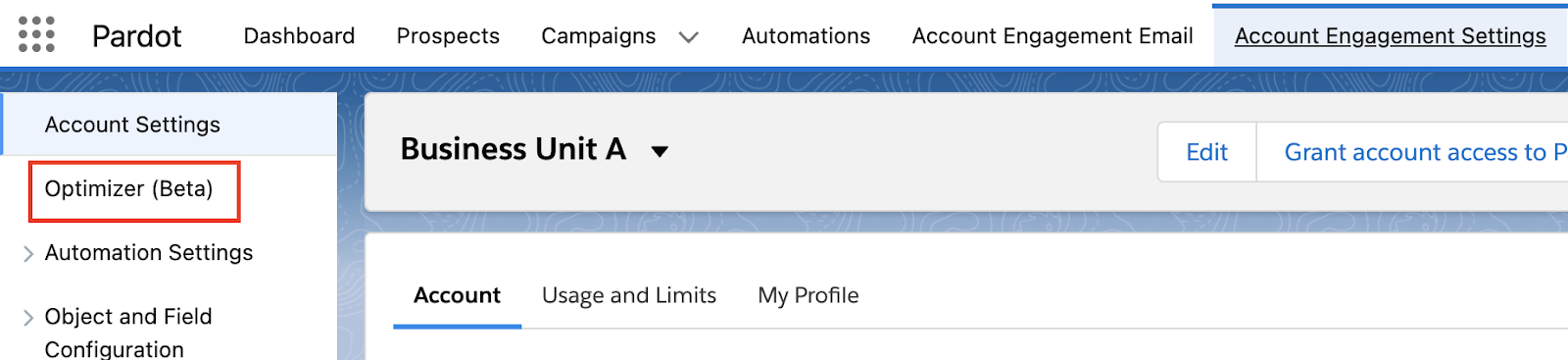
This feature is in BETA for all editions of Account Engagement, so if you want to go ahead and start using it, opt in by going to Account Engagement Settings and selecting Optimizer (Beta) from the left menu.

Once you enable the Optimizer, you’ll instantly see areas of your instance that can be cleaned up. The listed actions will include:

  • Reason for Alert
  • Priority
  • Feature Area
  • Recommendation 

Domain Validation Changes

Account Engagement is also making some changes to sending domain validation. This only affects domains validated after the Spring ‘23 release, so don’t worry about your existing Domains! 

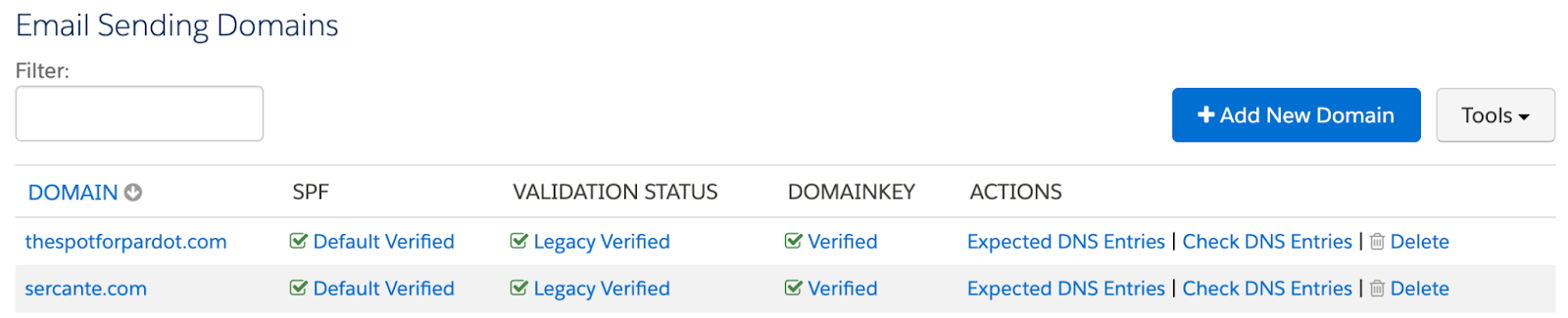
Validating a new domain now requires proof of ownership via a validation key that you’ll need your IT team to paste into the DNS. The DomainKey Policy section of the Domain page has also been retired as this is no longer required. 

These changes should make validating new sending domains a bit easier going forward!

Old View

New View

New Pardot Org Defaults

If you create a new Account Engagement Business Unit after the Spring ‘23 release there are new defaults that you’ll want to take note of.

  1. First Party Tracking is enabled 
  2. Force HTTPS is enabled
  3. The Honor Do Not Track (DNT Header) option is enabled
  4. Request opt-in from all visitors is enabled
  5. The Max Tracking Cookie Duration setting is set to 365 days 

These defaults aim to protect your Prospect’s privacy, but they can be overwritten by an Account Engagement Administrator, if desired. These settings can be found under Account Engagement Settings > Edit

External Actions Monitoring

With the Spring ‘23 release, you can now keep an eye on External Actions

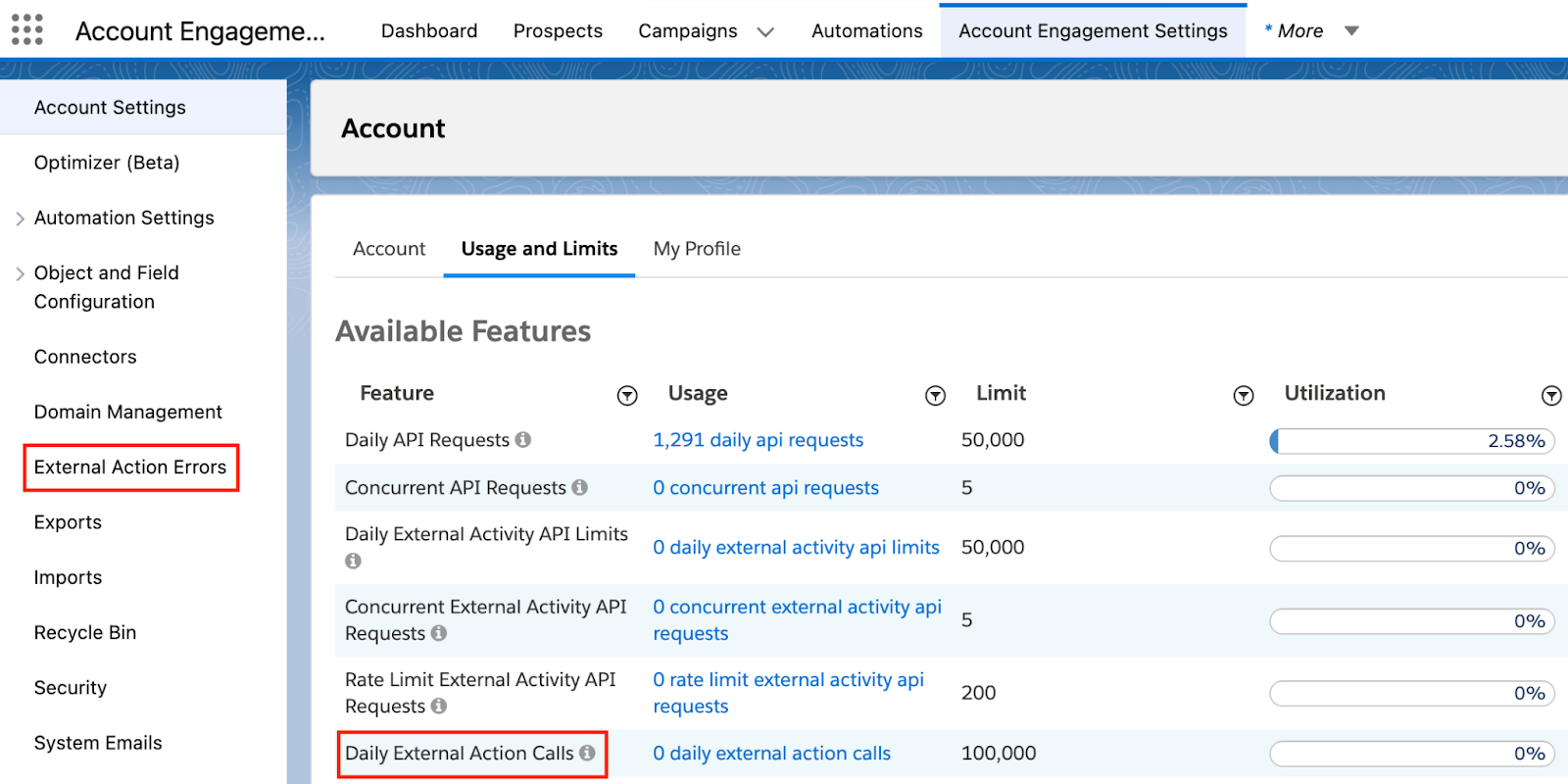
External Action Errors will now be available in a new report under Account Engagement Settings > External Action Errors and you can monitor External Action usage under your Account’s Usage and Limits report.

Retirements

Several connectors and one feature were retired this release:

  1. ReadyTalk was removed November 30th, 2022
  2. Webex retiring March 31, 2023 and removed from Pardot April 1st , 2023
  3. Account Engagement for Slack BETA is retiring February 23rd, 2023
  4. The Option to Run Automation Rules in Real Time Is Being Retired as discussed in the Winter ’23 release 

Not in the new release, but…

These two changes were not in the new release notes but they’re important to point out. 

Opt Out Field Changes

This is happening on February 26th so make sure you’ve chosen your syncing system of record or your Opt Out field will stop syncing with Salesforce! 

Check out the Preparing for Pardot Opt Out Field Sync Changes blog for guidance on this change.

Pardot Files Now Open in a New Tab

I don’t know why Salesforce didn’t shout this one from the rooftops, this is a long needed feature that will make a lot of marketers happy. 

As of January 23rd, files stored in Account Engagement will open in a new tab when clicked rather than automatically download (hello white paper and case study hosting!). 

This only affects files uploaded on/after January 23rd. But you can reupload your file over your existing one to get the new behavior.

Keep it Going

Spring ‘23 Salesforce Release: Platform Highlights
Brian Roff shared all the things that caught his attention from a Salesforce platform perspective in this blog post. Read it here.

Reach out to the team at Sercante to get help implementing these enhancements in your Salesforce org. And leave us a comment below to let us know what you think about the Spring ‘23 Release.

The Salesforce Spring ’23 Release Notes are out, and they include important features for Salesforce administrators and marketers who are on the platform. 

We get three major releases from Salesforce each year — Spring, Summer and Spring. Each Salesforce release includes upgrades and enhancements that affect Salesforce orgs in different ways. 

So, if you’re a Salesforce Admin or if you’re managing marketing operations for your company or organization and want to know more about Salesforce CRM, then you’re in the right place. We’re going to cover everything you need to know about the Salesforce Spring ‘23 Release if you’re an admin or a marketer who uses Salesforce.

14 Platform Highlights from the Salesforce Spring ‘23 Release

The theme I see in this release is about efficiency and clarity. Whether it is for users working in Salesforce or administrators building declarative solutions. If our teams can quickly get the right information at the right time, the whole organization will benefit. With that, here are 14 highlights.

Highlight #1: Create Personalized Report Filters

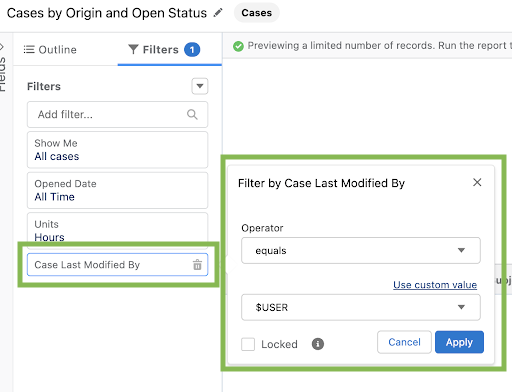
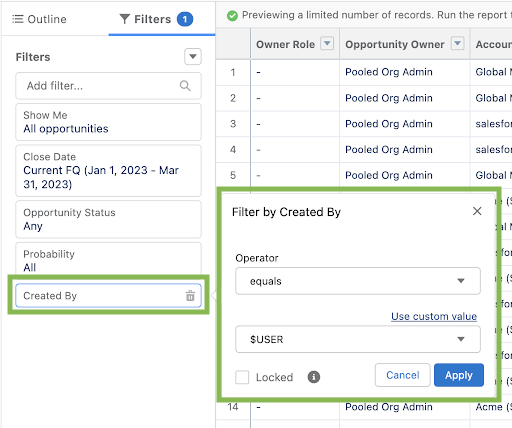
The addition of relative filtering for Owner fields in reports will allow admins and managers to build one report for their teams to see the records they are related to. Any field that relates to a user can use this feature. Think things like “Show me Cases where I was the last person to Modify” or “Show me Opportunities that I don’t own but Created”


This will also reduce technical debt built up by workarounds (i.e. custom formula checkbox fields to show logged in users). I dream of a day that we can find this feature on List Views, too.

Highlight #2: Subscribe to More Reports and Dashboards

As soon as customers see the power of report and dashboard subscriptions, they crave more. For companies with Unlimited edition, users will be able to schedule 15 reports and dashboards. The previous limit was 7 reports and 7 dashboards. That’s a 53% increase!

Highlight #3: Track Field History for Activities

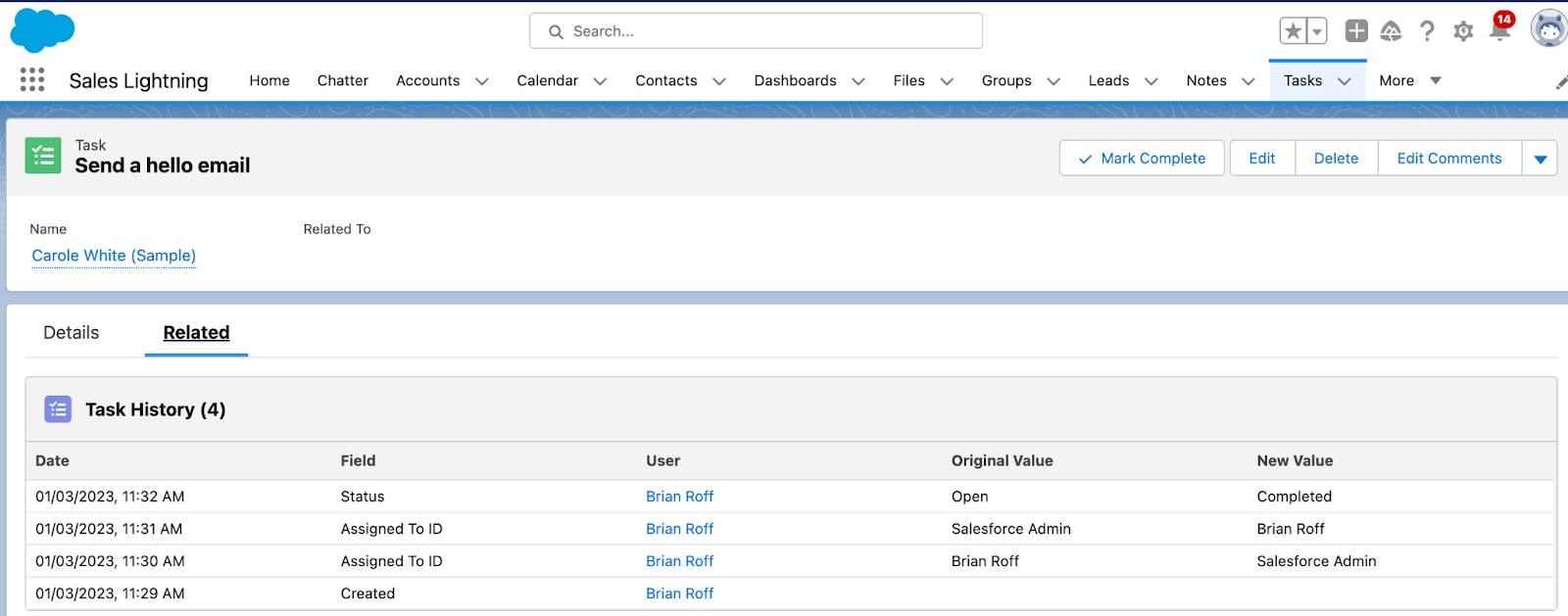
Finally in Spring ‘23, we’ll be able to track field history on Activities and Tasks. This has been a pain point for many admins that left them scratching their heads and wondering WHY can’t I see all of the people who passed the assignment of this Task around? Sadly there is a limit of 6 fields for tracking. Note, once activated, the Task History related list is added by default to the standard Task and Activity page layouts but needs to be manually added to any custom layouts.

Highlight #4: See More Records in Dynamic Related Lists

Dynamic related lists are truly an amazing enhancement to related lists in Lightning which allow admins to set dynamic conditions on what appears in a related list. The latest enhancement bring parity with standard related lists with the introduction of the View All link so users can see all related records rather than the current limit of just 30 on screen. Kudos to the development team for bringing this Idea to life!

Highlight #5:Convert Processes to Flows with the Migrate to Flow Tool

Admins will have a new tool in their toolbox to help with the migration of old Processes built with Process Builder over to Flows. This is great news for orgs that have many vital processes, but don’t forget that when Salesforce deprecates a feature, it is a chance to take a step back and determine if those old automations still make sense for the business today. Don’t just lift and shift! 

Highlight #6: Capture Inclusive Data with Gender Identity and Pronouns Fields

Any time Salesforce takes a step towards greater inclusivity and representation, I am all for it. Spring 23 will introduce new Pronouns and Gender Identity fields as optional picklist fields on the Lead, Contact, and Person Account objects. Just update the field visibility settings and add them to the layouts to start.

Highlight #7: Prevent Duplicate Cases with Lightning Threading in Email-To-Case

Lightning threading is a new Email-to-Case threading approach that matches incoming emails to cases using a combination of token- and header-based threading. What’s great about this new technology is it helps with a major pain point that Support teams and admins face with duplicate cases on incoming emails. Previously with the Case thread-id when a customer removed the unique thread I’d from their reply, a new Case would be created. 

Highlight #8: Shrink Outgoing Emails and Include Only New Content

Any support rep will know what a great improvement this is. When sending emails from Salesforce Cases, we will no longer reach size limits for outgoing emails (if they include new content only). It’s as simple as your admin checking a new box in the Email-to-Case setup.

Highlight #9: See Element Descriptions on the Flow Canvas

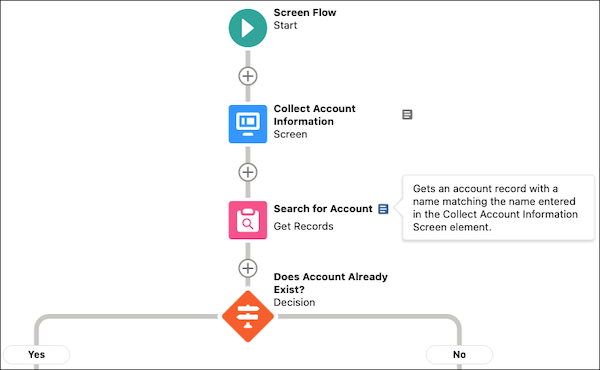
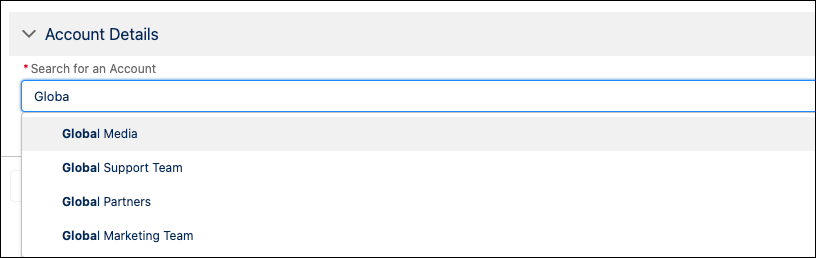
Sometimes Flows can get big and yes, confusing. The next release will see a great “quality of life” improvement with the new Element Descriptions. Flow developers will no longer have to click in and open up an element to see the description. We all know it is best practice to fill out the description when given the chance and this might give more incentive to do that!

Highlight #10: Select a Value from a List of Choices with the Choice Lookup Component (Beta)

For those jumping in on this Beta, they will see a set of features in this new Screen Flow component that is part “type ahead” functionality and part filter. Essentially you can set up a collection of choices for certain fields (picklists, record lookups) which will become searchable as a user interacts with the Screen. Will be very useful in cases where there are many values in a picklist but only a handful are relevant to the Flow at hand.

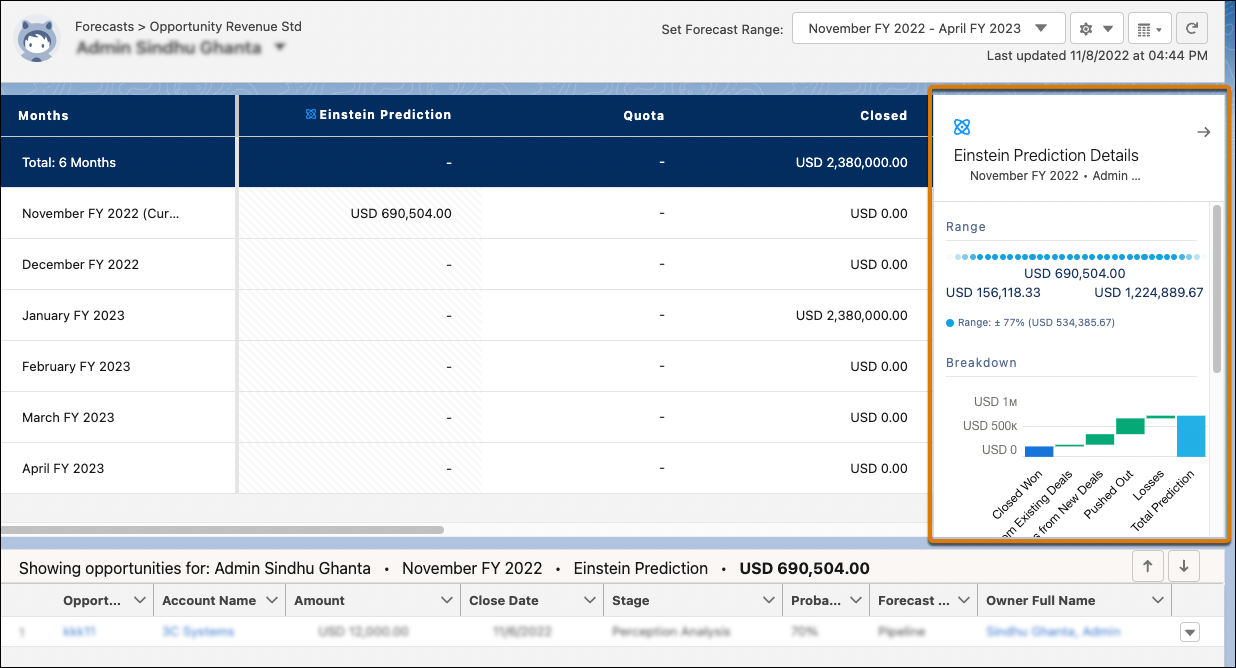
Highlight #11: Collaborative Forecast Modernization

I’m really excited that Salesforce is giving Collaborative forecasts some love in this release. There are 2 items to note.

Experience a Modern Forecasts Page

There is a reimagining of the whole Forecast experience that is designed to make navigating and reviewing the Forecast more intuitive for Sales leaders and sales people.

Build Custom Forecasts Pages That Work for Your Business
Here we will see the Forecast ​​Lightning page gain the ability to customize with components similar to other object Lightning pages using the Lightning App Builder interface. A great step forward!

Highlight #12: Take Action More Quickly in the Dynamic Activity Composer

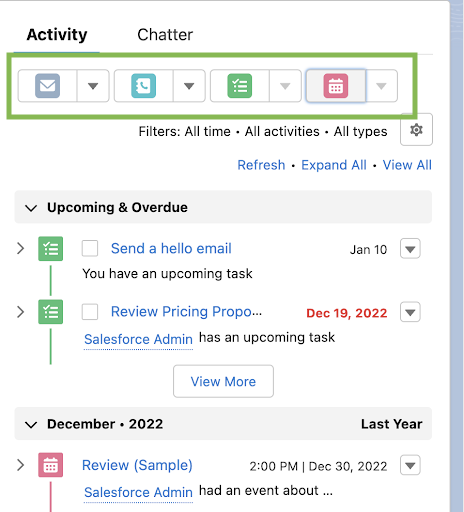
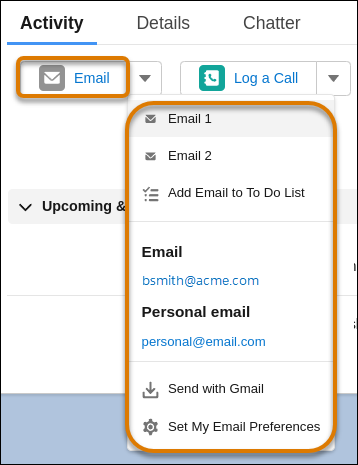
Sticking with the theme of greater access to key information and actions, the Dynamic Activity Composer packs features in each of the tabs in this new interface. For example, for those that have multiple email fields on Contact, the email tab allows more choices for which email to send to. Another cool addition is the ability to add to a To Do list Task from the Email and Call tabs.

Highlight #13: DevOps Center (Generally Available)

With the general release of Salesforce DevOps Center admins will have a robust set of dev ops tools for release management. Key features include automatic change tracking with source control, easy to migrate changes with clicks and enhanced environment management with sandbox swapping.

Highlight #14: Enhance Case and Lead Record Pages with Dynamic Forms

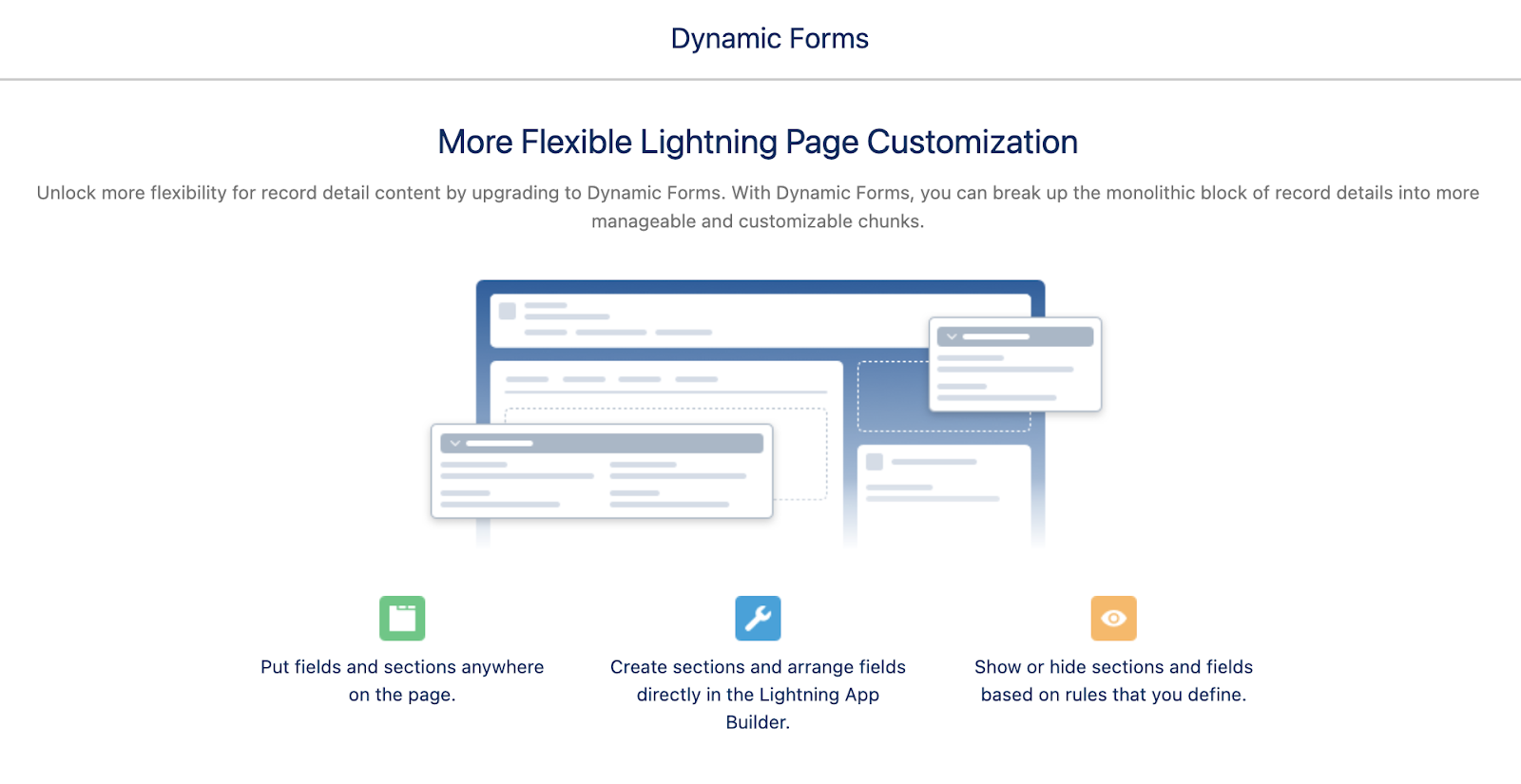
Here’s another great push into accessibility of Dynamic Forms for standard objects with the introduction of this feature for Cases and Leads (joining Accounts, Contacts, Person Accounts, and Opportunities). Dynamic Forms allow individual fields to be placed in a field section component anywhere on the Lightning Page for a highly customized experience. Those sections can be access controlled with filter rules. With this update, admins will be able to fine tune their Case and Lead pages for better efficiency and visibility of key information.

Salesforce is getting bigger and better all the time

Salesforce Administrators and B2B marketers who come to Salesforce are usually looking to scale their efforts and grow in a way that makes sense. Additionally, they want to make the experience of the users frictionless. These latest enhancements from the Salesforce Spring ‘23 Release get admins and marketers closer to those goals by saving them time and resources. Contact the team at Sercante to get help implementing these enhancements in your Salesforce org. And leave us a comment below to let us know what you think about the Spring ‘23 Release.

If you’re like me, you hate spending half your life looking for things that have been filed already. I have reports in CRM Analytics and Salesforce, and it feels like a waste of time to have to look in two places. 

I also hate having to “guess” what previous reports/ dashboard might already exist before I add to the fray by creating a new one. On top of that, in Salesforce I have to use up to 2 navigation tabs if I frequent both Reports and Dashboards often, using up valuable visual real estate…

Well, your “search” for a solution is over! In the Salesforce Winter ‘23 Release, you now have access to a really cool way to see ALL your reports and dashboards through a single pane of glass.

Introducing… The Unified Experience For Analytics Home.

unified analytics view

How will Unified Analytics change my life?

While it might not be life altering, the Unified Analytics experience is magical on many levels and will give you back precious moments throughout your day! 

How, you ask? A few examples:

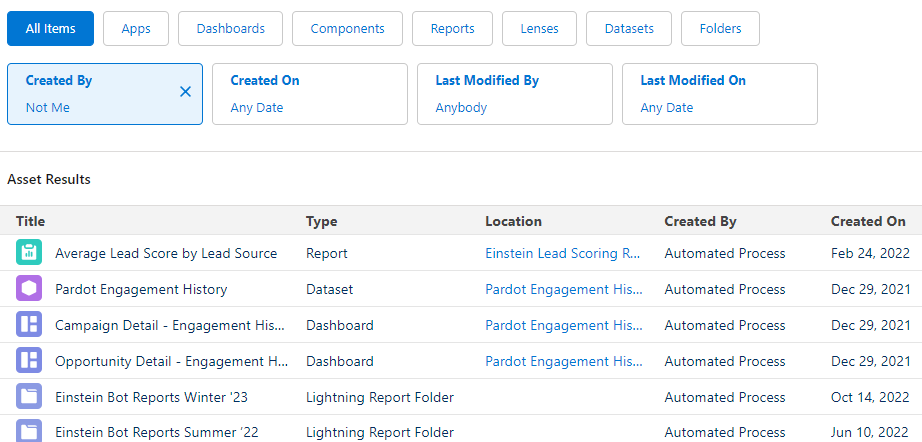
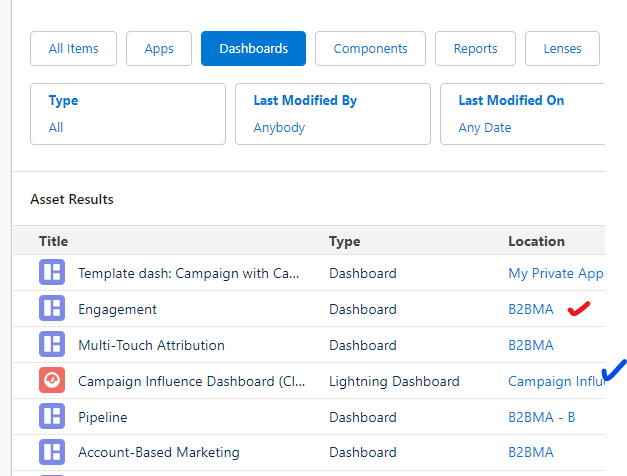
  1. Filter by Dashboard or reports (or lenses or Apps or Components) and see BOTH Salesforce AND CRM Analytics assets
unified analytics dashboard
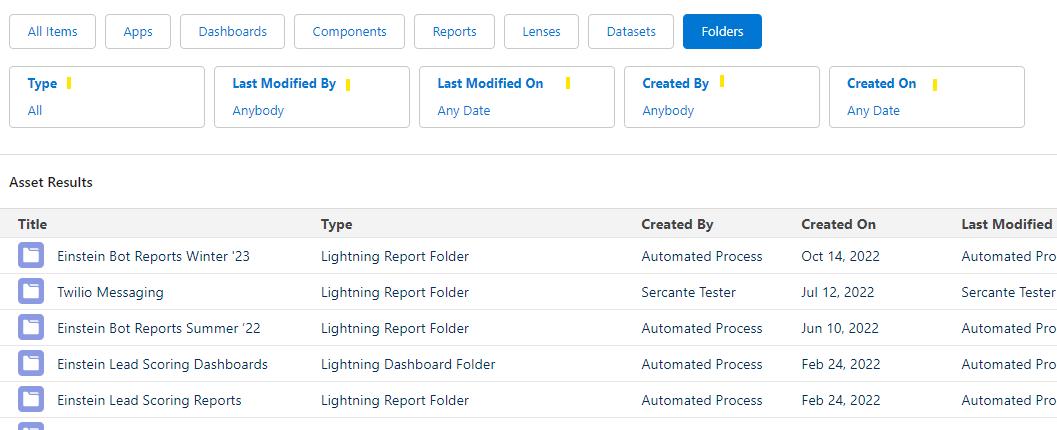
  1. Explore all reporting assets by date, type, modified date, created date creator
unified analytics folders
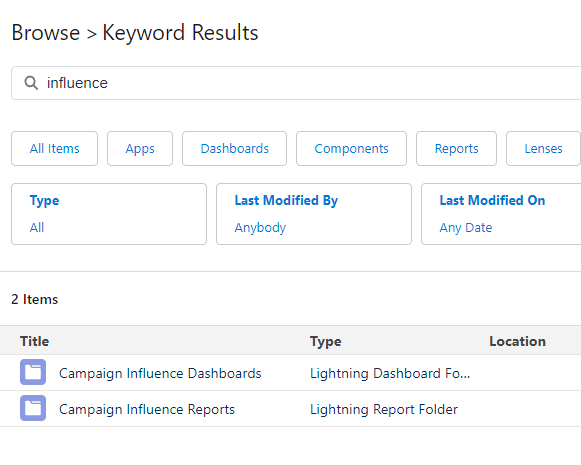
  1. Search across all analytics assets to find what you need with a single search
unified analytics keyword results

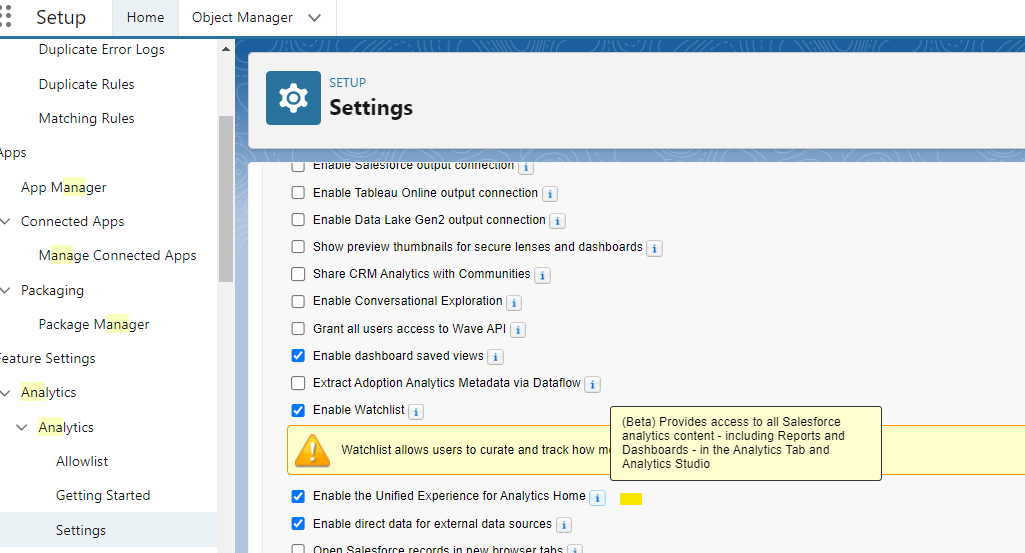
Turning on Unified Analytics

You can turn on Unified Analytics in a few simple steps:

  1. Go To Setup > Analytics > Setting
  2. Check the box for “Enable the Unified Experience for Analytics Home”

That’s it!

home object manager

Some Important notes

  • You need an Analytics CRM license to use this new feature
  • Once enabled, the experience will be available on Salesforce apps and through the browser
  • Collections can be created or accessed from apps or through the browser

There are tons of tidbits in the Winter ‘23 release. This one might be small, but if your organization is one of those with lots of reporting assets (and lots of people writing reports), then this little nugget might just be the gold you’ve been looking for. 

Onto the next adventure.

Learn more about Unified Analytics and Salesforce reporting

No more posts to show