Category

Jordyn Jaffer

The Salesforce Winter ’25 Release Notes are out, and they include important features for trailblazers who are on the Salesforce platform. 

We get three major releases from Salesforce each year — Spring, Summer and Winter. Each Salesforce release includes upgrades and enhancements that affect Salesforce orgs in different ways. 

Each release contains a substantial amount of information on a variety of products so it can often be daunting for admins or other trailblazers to find the features that are important to them and their organization.  Our team reviewed the notes for you and highlighted the following platform features as those for you to keep your eyes on the lookout when the release hits your Salesforce environments in the coming months.

Platform Highlights from the Salesforce Winter ‘25 Release

Those who use the Salesforce platform are getting lots of attention from the Salesforce Winter ‘25 Release. 

Some updates are changing the way we work to meet evolving technology demands. Others are saving us time by connecting the dots in a logical way.  Our team will guide you through these features so you will know how to take action on them before the release hits your Production org.

Highlight #1: Verifications Needed to Continue Sending Emails From Salesforce

The Winter ‘25 release will require customers to Create and Verify Your Default No-Reply Organization-Wide Email Address to Send Email and Verify Your Return Email Address for Sender Verification in order to continue allowing Users and/or automations to send emails from Salesforce.

If you Users do utilize any email functionality within Salesforce it will be important to instruct them to visit their ‘My Email Settings’ so they can verify the email address associated with their User account.  Similarly, overall as an organization, you will need to ensure there is a customer-defined Default No-Reply Organization-Wide Email Address moving forward.

Although the Default No-Reply Organization-Wide Email Address feature will be enforced this release, the individual Return Email Address verification will not be enforced until Spring ‘25.

Highlight #2: Salesforce Archive (Pilot)

Salesforce recently announced their acquisition of Own Company, currently known as the most credible Salesforce archive and backup third-party tool, however, they have also announced a pilot of their own Archive product.  If your team needs assistance with archival management of your data but either cannot afford a third-party tool or do not have time/resources to implement one of those tools, Salesforce Archive might be a solution to consider.

When Salesforce Archive becomes generally available, you can use it in production and sandbox environments, however the product is available in sandboxes as a pilot right now and can be requested to be enabled by your AE.  The product will become available to production orgs on a rolling basis starting in November 2024, but when it’s released for production use, it will need to be purchased as an add-on license.

Highlight #3: New Salesforce Platform Login License

The Salesforce Platform Login license allows you to assign access to custom apps built on Platform for internal users without the requirement to buy a seat-based license. With the Salesforce Platform Login license, you can pay per daily unique login for users who need infrequent or occasional access. 

This new license will become available starting October 15th for customers on Enterprise, Performance, Unlimited, and Developer editions.  Contact your AE to learn more about pricing details for these new licenses and to determine if they’re a right fit for your organization.

Highlight #4: User Permissions Updates

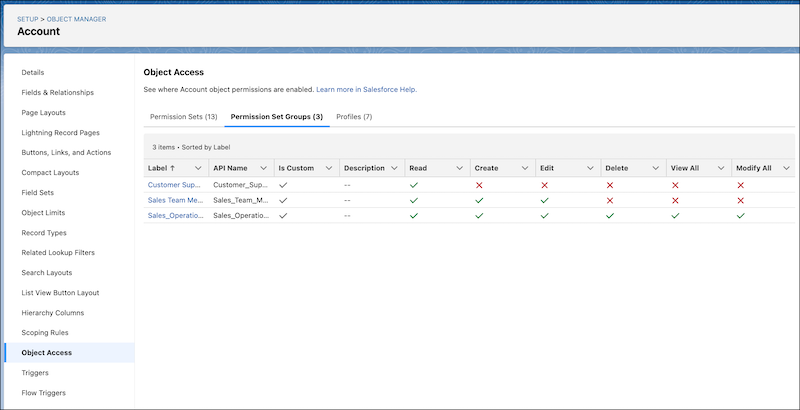
Improvement #1: See How Object Access Is Granted in Object Manager

The Winter ‘25 release continues with updates to ensure Salesforce Administrators are able to troubleshoot their User’s access and permission issues easier. One of these new features is the ability to use the Object Access Summary in Object Manager to quickly check object permissions when troubleshooting, completing reviews, or determining how to grant user access.
Improvement #2: Get Insight into How a User’s Permissions Are Granted

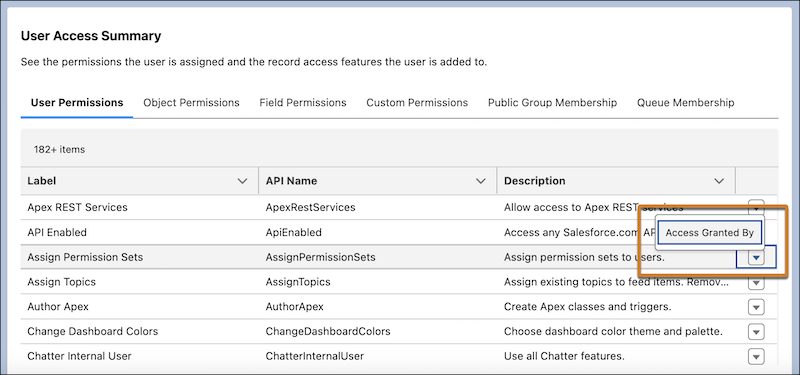
Last release we were able to access a Summary of an individual’s access and permissions directly from the user details record.  This enabled you to see what a user had access to without having to spend multiple clicks checking each profile, permission set, public group, or queue.

The Winter ‘25 release expands on that feature by including an additional feature to allow you to see what grants the User that particular permissions (i.e. via Profile or Permission Set) in case you need to revoke those permissions.
Highlight #5: Salesforce Flow Updates

You may have heard the phrase “Flow is the future” in Salesforce messaging over the past few years. This is because Salesforce is consistently releasing new Flow features to support the retirement of Process Builder and Workflow Rules in recent years. 

Here are some of our favorites from this release.

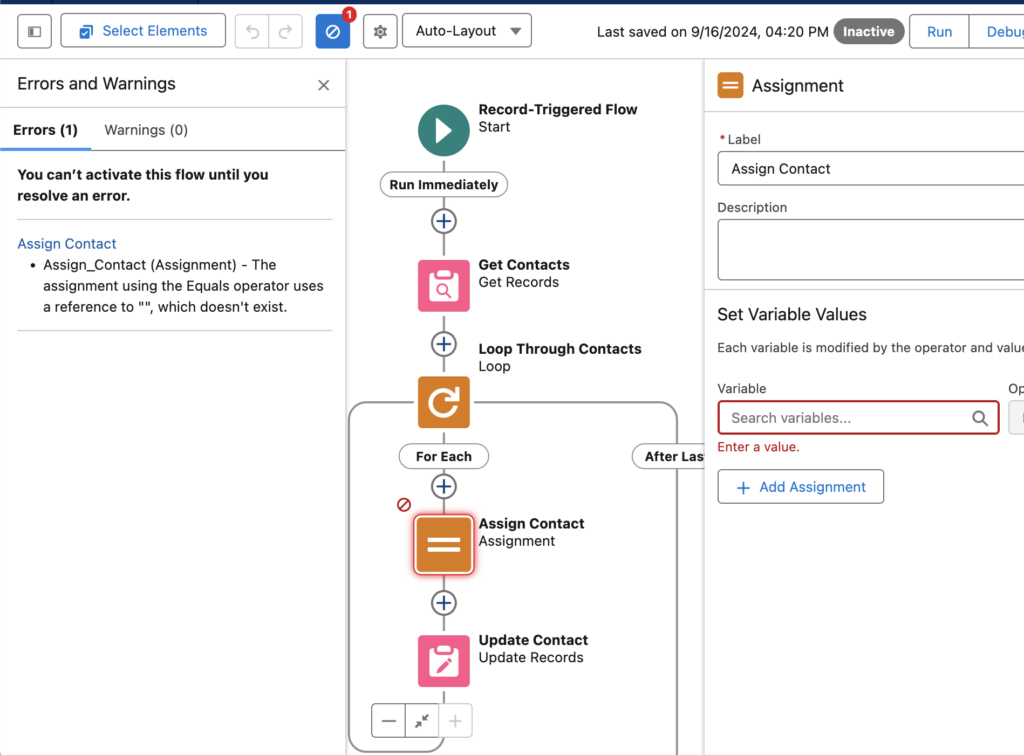
Improvement #1: New Errors and Warnings Pane in Flow Builder

The new Errors and Warnings pane lists issues that prevent you from saving and activating your flow as you work in an easy to scan format. This feature will be automatically available when trying to activate a Flow with errors following the release.
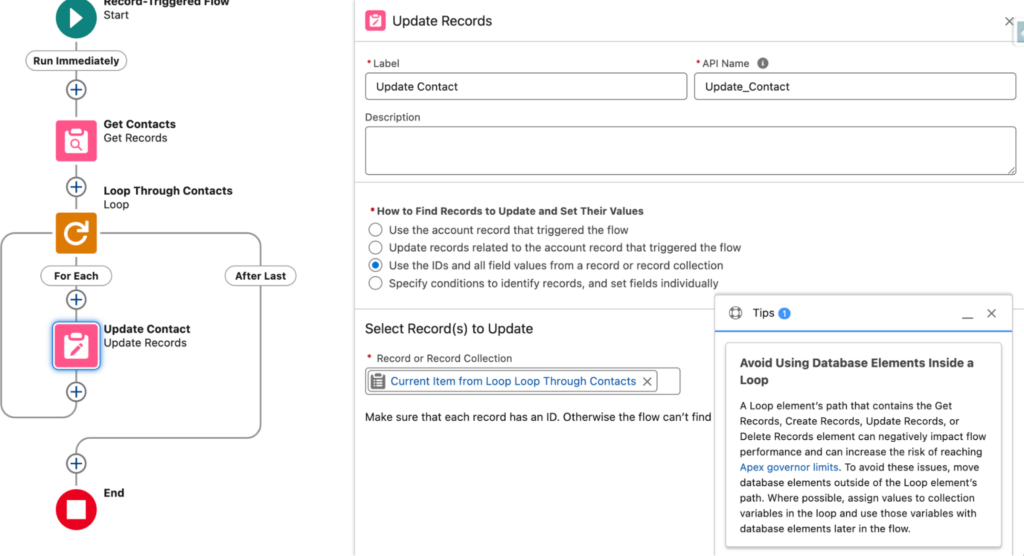
Improvement #2: Flow Design Tips

Another new feature within the Winter ‘25 release is the inclusion of new tips in Flow Builder to help you identify designs that can slow down your flows and increase the risk of reaching Apex governor limits.  This may not seem like much to some of us that have been building Flows for a couple years now, but this is a game changer for new Flow builders who are uncomfortable with the tool at first.
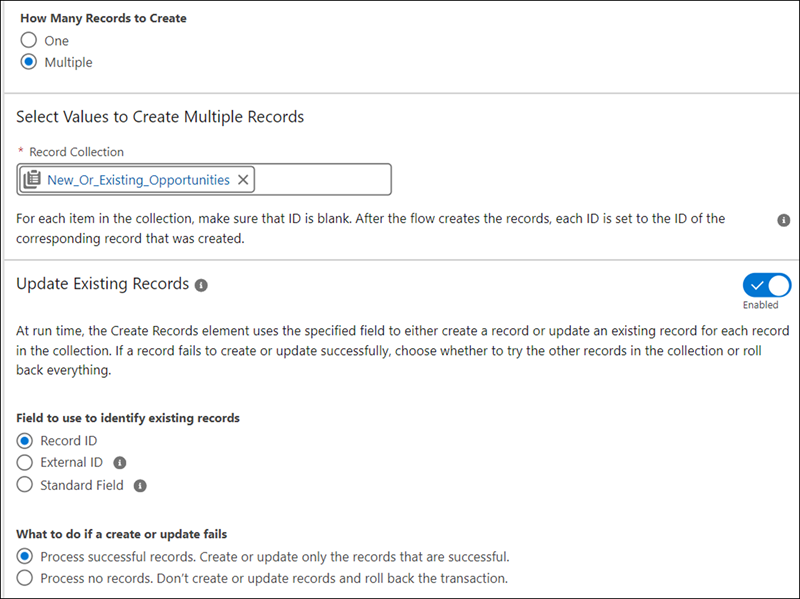
Improvement #3: Create or Update Records Efficiently with the Create Records Element

Last release we saw the beginning of an upsert feature within Flow Builder through the release of a new way to check against duplicates for a single record.  Well the Winter ‘25 releases further enhances this feature by enabling the upsert functionality against multiple records at once.  You’re able to compare against existing records with a Salesforce Id, External Id, or other field on the object.  

The Create Records element makes the process of saving records easier and faster, as you no longer check separately for existing records because the create and update elements are now merged into one element.  Admins can now configure and maintain flows more easily while reducing potential errors from separate operations.
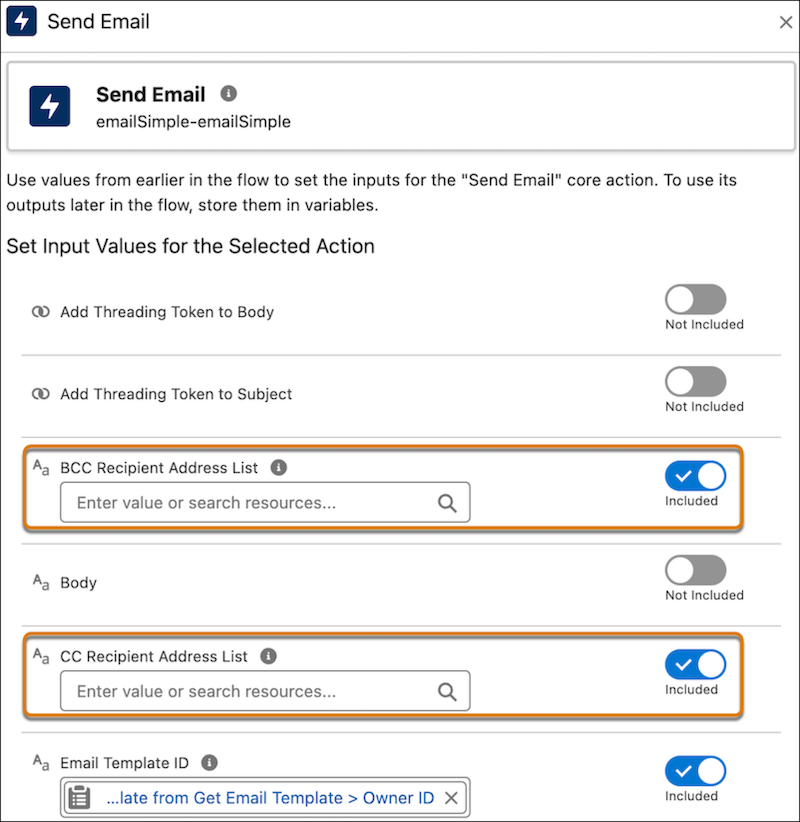
Improvement #4: Send Email Action Expanded

Two new enhancements have come to the ‘Send Email’ Action within Flow Builder. First, you are now able to include email addresses to include as cc or bcc on the email that is sent via the Flow. Any address entered in the CC field receives a copy of the email, and those in the BCC field also receive a copy, but their email addresses are hidden from all recipients. Secondly, there is an increase of the number of recipients you can include from originally 5 to now 150 recipients.
Highlight #6: Conditional Formatting on Record Pages

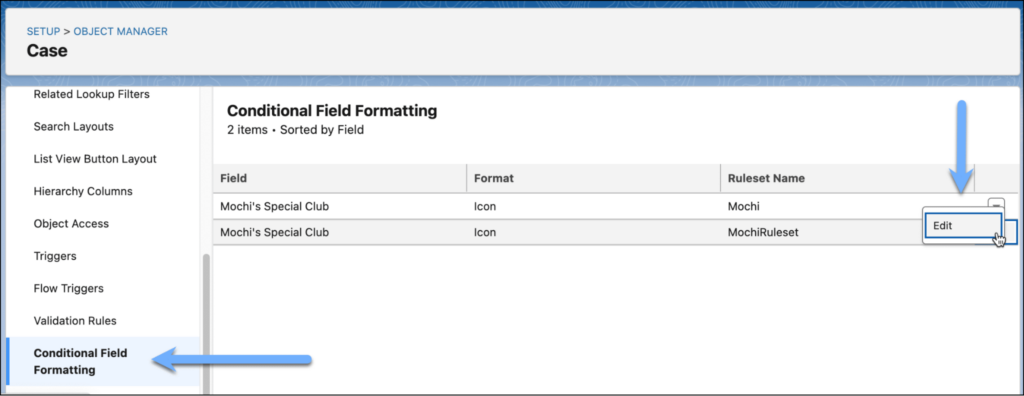
As Salesforce continues to push customers from Page Layouts to Lightning Record Pages, they continue to release new features in the Lightning App Builder to excite customers into the move.  Now customers will be able to give fields on Dynamic Forms-enabled pages custom icons and colors that can appear, disappear, and change color based on the criteria and rules that you define.  This can be a game changer for those of us who have previously created formula fields to manage or provide this functionality in the past.
Highlight #7: Account Plans

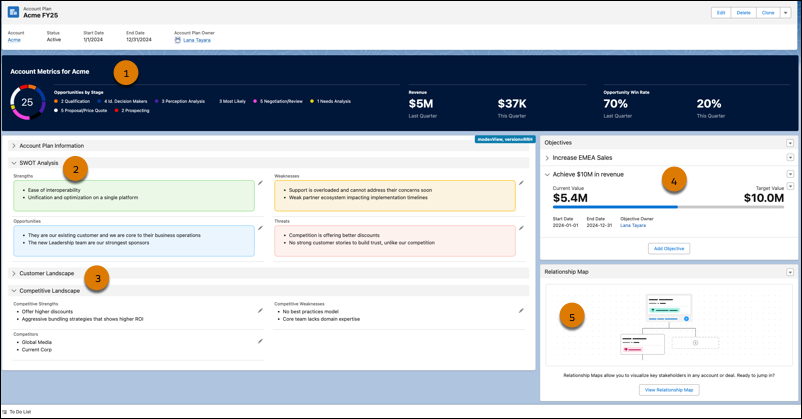
This feature is one our team is very interested in learning more about as new information is released as it can be a huge game changer for Sales teams.  The Account Plans feature provides a new UX providing a complete picture of the account with information such as metrics, objectives with actionable metrics, and tabs on growth and development, all from one repository within Salesforce.  

This feature will become available in Production on a rolling basis after the Winter ’25 release is complete and available to all customers in mid- to late November 2024.  Customers available to receive this feature are those with Enterprise, Performance, or Unlimited editions.

Once the feature becomes available in your Production org, go to the new Account Plans page in Setup and turn on Account Plans. Then, configure the Account Plans object in the Object Manager, add the Account Plans related list to the Account object, and optionally set up Relationship Maps.
Highlight #8: Marketing Cloud Account Engagement (Pardot) Updates

Please check out my colleague Erin Duncan’s blog post on all things Pardot from the Winter ’25 release.

Additional Highlight: Marketing Cloud Growth Updates

Erin Duncan has also written posted on some exciting announcements coming to Salesforce’s newest marketing product:

Salesforce is getting bigger and better all the time

Trailblazers who come to Salesforce are usually looking to scale their efforts and grow in a way that makes sense. These latest enhancements from the Salesforce Winter ‘25 Release get everyone closer to those goals by saving them time and resources.

Contact the team at Sercante to get help implementing these enhancements in your Salesforce org. And leave us a comment below to let us know what you think about the Winter ‘25 Release.


Those of you who have been followers of The Spot for a few years now know that we have shared our favorite Marketing Cloud Account Engagement (Pardot) Ideas from the Salesforce IdeaExchange either in blog posts or the Pardashians Slack group.  

This tradition started in 2017 with Andrea’s initial post highlighting 8 ideas on the IdeaExchange that Pardot admins should upvote.  We’ve seen great features come to life in the most recent Salesforce releases (looking at Conditional Options for Completion Actions), and we’re hoping you can help prioritize ideas for future releases.

Salesforce has three releases throughout the year and uses their IdeaExchange to help drive which features are prioritized in future releases. As a marketer, you have most likely entered a situation where your team is requesting a solution that is currently not available in Marketing Cloud Engagement or Marketing Cloud Account Engagement as a feature. 

Your first stop is to see if this feature/solution has been mentioned or resolved via the IdeaExchange. Checking there first is going to help you understand how others have solved it, and then you can add in your own vote to the idea.

What is the Salesforce IdeaExchange anyway?

Back in 2006, the Salesforce #Ideaexchange was born as a way to involve its customers (big and small) in a modern effort to crowdsource ideas for its product roadmap. This ensures the community gets a platform to contribute their ideas and wishes — you know, a place where the margods can go for inspiration if you will as they build the world of tomorrow.

How does one enter their idea into the Salesforce IdeaExchange?

  • Come up with an idea and submit it to the exchange
  • You then get trapped and spend 2-4 hours going through other people’s ideas (definitely optional, but highly encouraged). 
  • If your idea gets enough votes (10+ points for you) then a product manager gets involved
  • The idea is developed and then delivered, and we all cheer!

Need more details? We wrote a little about the history of the AppExchange.

Top Salesforce IdeaExchange items for marketers

As Salesforce continues to work on improving their marketing automation platforms, our team has put together a list of ideas that we recommend you upvoting and adding to your wish list in hopes of getting them added to the top of the prioritization list.

Here is our current list of Salesforce IdeaExchange items that marketers should check out and upvote.

Salesforce

  1. Ability to Customize Campaign Member Status Values for all Campaigns

This feature would help with needing to update campaign member statuses for each individual campaign. We wrote about how to fix this with Protected Campaign Member Statuses.

Upvote >>

Marketing Cloud Engagement

  1. Access to a Marketing Cloud Engagement Developer Edition

This feature would help trailblazers gain hands-on experience working within Marketing Cloud Engagement without being a customer.

Upvote >>

  1. Include Dynamic Links in Engagement Split Activity

This feature would ensure Journey Builder engagement splits based on clicks can monitor the clicks on any dynamic link as well as static links.

Upvote >>

  1. Access to a Recycle Bin in Marketing Cloud Engagement

This feature would give Marketing Cloud Engagement admins the same abilities as the Marketing Cloud Account Engagement recycle bin.

Upvote >>

  1. Include the “De-Duplicate by Email Address” Feature in Journey Builder

This feature would give users the same abilities they have when sending a normal email through Marketing Cloud Engagement.

Upvote >>

  1. Allow Data Extensions as Suppression Lists in Journey Builder

This feature would allow marketers to use data extensions for suppression lists in Journey Builder instead of lists.

Upvote >>

Marketing Cloud Account Engagement

  1. Track and Record Direct Replies to an Email Sent from Marketing Cloud Account Engagement

This feature would provide an additional, much needed KPI for marketers to be able to determine which CTAs are working for their emails that do not go directly to links or forms.

Upvote >>

  1. Reduce Errors Post-Sending Email

This feature would allow you to either recall or edit emails that have not been opened yet after an email is sent with an error.

Upvote >>

  1. Allow or Operational Email Sending in Engagement Programs

This feature would bring the operational email checkbox to the entire Engagement Program or individual Email steps to ensure those who need to receive these emails still are even when in an Engagement Program.

Upvote >>

  1. Audit changes to Marketing Cloud Account Engagement Assets

This feature would bring a tool similar to what Salesforce Admins have available to them to be able to view all changes made to lists and assets throughout Marketing Cloud Account Engagement.

Upvote >>

  1. Allow Variable Fields in SFDC Tasks

This feature would allow for more variability and customization when creating a Salesforce Task from within Marketing Cloud Account Engagement.

Upvote >>

  1. Notifications for SFDC Connector Errors

This feature would bring forth a notification system for your team to understand when there are Connector errors between Salesforce and Marketing Cloud Account Engagement.

Upvote >>

  1. BRING BACK “PARDOT”

This feature needs no explanation as many people are hoping we can reverse the name rebrand and move back to calling the tool “Pardot” at some point in the future.

Upvote >>

Analytics

  1. Ability to Include Cross Filters in Report Filter Logic

This feature would allow users to be able to use standard filters and cross filters together in a report with filter logic.

Upvote >>

  1. Reporting on Email Activity from Salesforce Inbox or Standard Inbox Integrations

This feature would bring email activity into the Activity records to allow for reporting between emails and other activities.

Upvote >>

  1. Allow Reference Lines on Dashboard Components

This feature would bring an amazing reporting feature to dashboards so marketers can include reference lines on any report chart within a dashboard.

Upvote >>

We Want to Hear From You!

While some Pardot admin recommendations get picked up and implemented faster than others, it all depends on community participation and perceived need from the Marketing Cloud product team. In fact, to help drive ideas, Salesforce created a prioritization system where you can see top feature suggestions across the ecosystem battle it out!

Are there any features or functionality you wish you could see? If so, let us know below. With a little bit of luck and support from your Salesforce Ohana, you might also uncover the secrets of the IdeaExchange and get your idea on the scoreboard.Don’t forget to vote for these ideas, submit your own and chat with us on Twitter, LinkedIn or simply subscribe to the blog. 

It’s been a few weeks since Andrea Tarrell and I spoke at Salesforce World Tour NYC about the journey to getting Salesforce certified. As someone with five years of experience in the ecosystem, I have been able to earn many Salesforce certifications along the way and have always wanted to help others achieve their certification goals as they have helped me. 

That’s why I am still so happy I was able to join Andrea as a co-presenter. Our team was excited to share our certification journeys and knowledge with the community, and we hope this post that recaps our World Tour presentation is helpful as you work toward earning Salesforce certified designations.

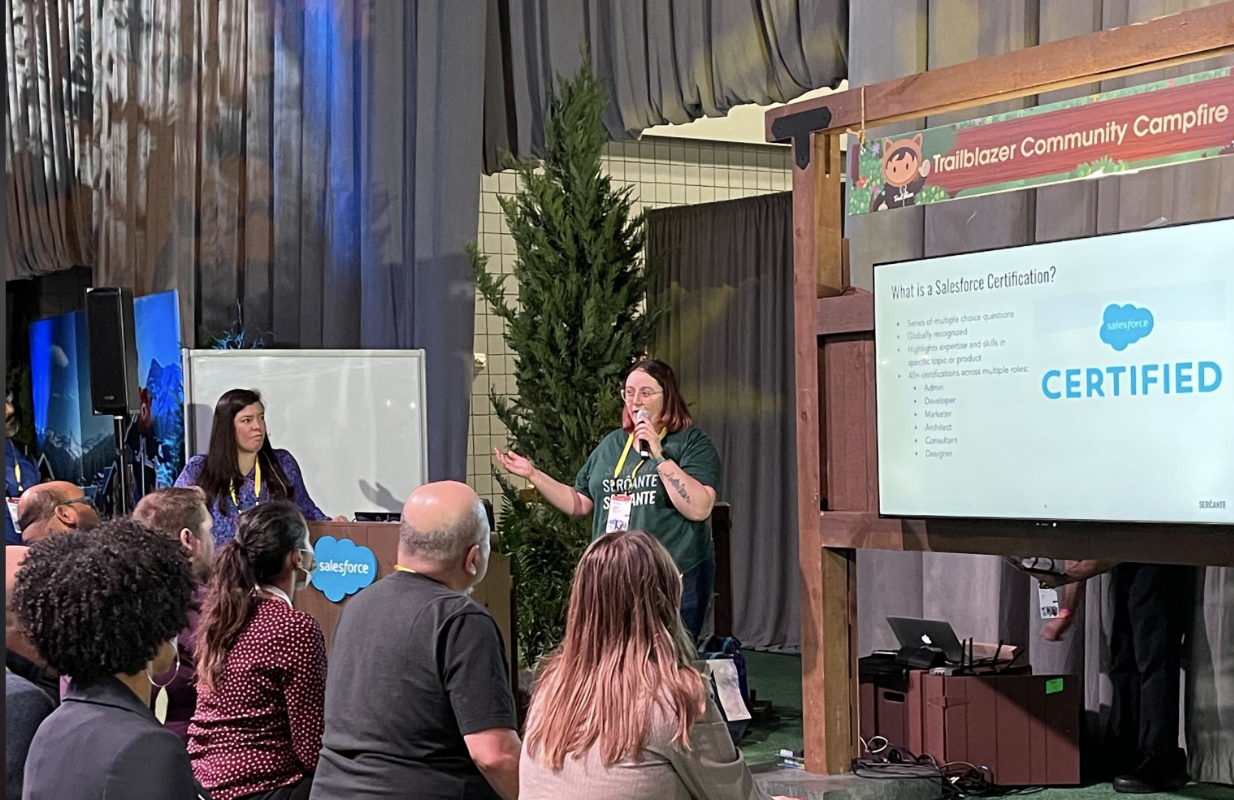
Jordyn Jaffer and Andrea Tarrell presenting at Salesforce World Tour New York in December 2022.

Salesforce Certified 101

If you’ve been in the ecosystem for a little bit, then you’re probably familiar with the process of becoming Salesforce certified and what certifications are available. But, you should still pay attention. 

The Salesforce certification program is constantly evolving. What used to be a collection of a handful of certifications has expanded to over 40 certifications across Salesforce roles over the years. The certifications are typically connected to a specific role customer and partner role persona that Salesforce has defined.

Salesforce Certified Persona Roles

 Salesforce certified personas are spread across six roles:

  • Admin
  • Developer
  • Marketer
  • Designer
  • Consultant
  • Architect

These certifications are globally recognized achievements that Trailblazers can earn to highlight their expertise and skills in a specific topic or product. Varying in skill level from the initial Salesforce Administrator exam up to the Technical Architect board review, there are plenty of certifications for you to consider in your journey. 

Check out the amazing visual on this page, which our friends at SalesforceBen put together to highlight the different certification pathways available to you.

Certification Exam Details

Each exam typically consists of 60-65 multiple choice questions. You’ll notice that each exam provides a specific percentage of questions you need to answer correctly to successfully pass the exam. 

These passing percentages are important to pay attention to as you prepare for your exam date. For example, you may be able to pass the Data Architect exam with only 58% of the questions correct, but the newer Business Analyst certification needs 72% correct for you to pass. 

For those who have attempted exams but might not have passed, some exams are moving toward just 3 multiple choice answers for each question and could make the experience easier for those who have a hard time picking the best answer for each question.

Why Should You Get Salesforce Certified?

So now you have some knowledge of what Salesforce certifications are, but you might be wondering “why should I bother getting certified?” 

Boost Your Career

As mentioned earlier, Salesforce certifications are widely recognized and can even potentially help when transitioning into other careers. That’s because they showcase transferable industry skills. They are also considered a resume-worthy accomplishment that will definitely help you stand out in the job market. 

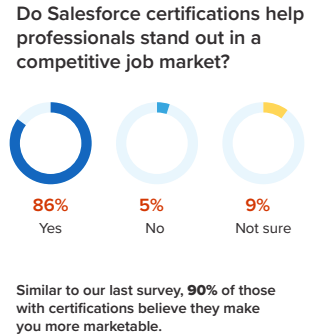
According to a survey from the 2022-23 Mason Frank Careers and Hiring Guide, 86% of respondents said Salesforce certifications help professionals stand out in a competitive job market, and 90% of Salesforce certified respondents said their certifications make them more marketable. 

Source: Mason Frank

Prove it to Yourself

For myself and many others, certifications have become a source of personal gratification. If you are doubting yourself when it comes to a specific topic, it’s amazing when you’re able to prove to yourself and to others that you have the knowledge of that Salesforce topic. 

It is worth noting that going after a Salesforce certification with minimal experience is not usually advised as a certification can never stand in the way of actual experience of a Salesforce product/feature. Finally, certifications showcase your commitment to your personal and professional development and can ultimately provide you an opportunity to boost your earning potential.

Story Time! How We Got Our Salesforce Certifications

Andrea and I have had very different experiences when it came to our Salesforce journeys, as with everyone else. But I love that our journeys have slightly connected as we both strive to provide the best experience to our clients at Sercante. 

I knew who Andrea was, especially since we were both based in Atlanta for two years. But I never imagined working for her company or speaking next to her at a Salesforce event. 

This is why I love when trailblazers share their journeys; people realize that they can have similar experiences as long as they show a willingness to learn and lean on the community. Who knows, maybe you’ll join us at Sercante in the future as well… (we’re hiring!)

Andrea’s Certification Journey

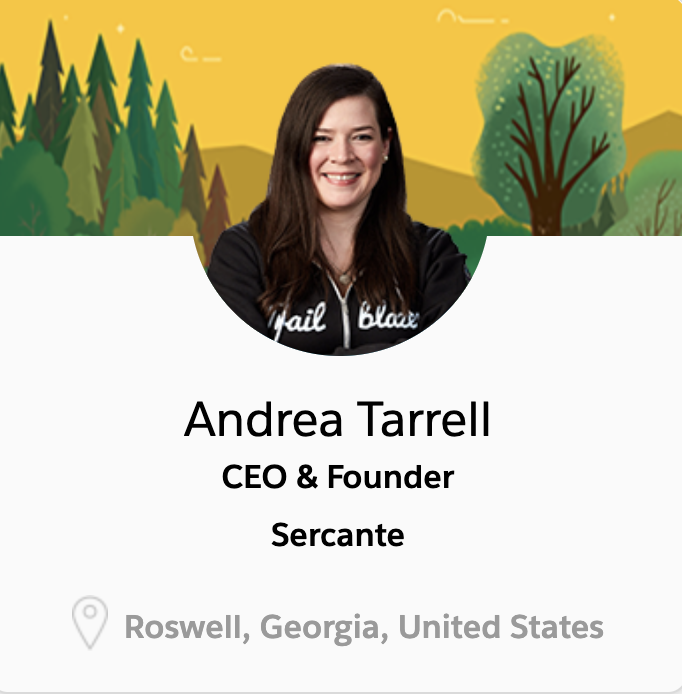
Andrea Tarrell, CEO and founder of Sercante and The Spot, began her Salesforce career as most of us have: as an accidental admin. 

Working as the one-woman marketing department for an insurance brokerage, Andrea was tasked with learning Salesforce at HNI Risk as the company didn’t have a Salesforce administrator at the time.

Andrea wasn’t interested in getting a certification during this time because she didn’t see the value in them. But, she started to appreciate the Salesforce ecosystem when she caught the Salesforce bug at Dreamforce in 2011. “Without exaggeration, attending Dreamforce was truly a pivotal moment in my career trajectory,” Andrea said. This was also her first introduction to Marketing Cloud Account Engagement (Pardot), and the experience led her to implementing Pardot at HNI shortly after.

Joining the Salesforce Partner Community

During the Summer of 2016, Andrea decided to leave the Wisconsin area to head down to Atlanta, Georgia without any jobs or friends in place. She later joined the Salesforce partner, Configuro, as the Pardot practice lead and director of marketing and suddenly had a reason to get certified. 

Salesforce consultancies usually request their employees get certain certifications to determine their tier ranking in the Salesforce AppExchange. So, Andrea knew she had to make up for lost time. 

Over the course of a year at Configuro, she achieved six Salesforce certifications, including the retired Marketing Cloud Social Specialist certification. During this time, she also leaned on the Trailblazer Community heavily to network as much as she could.

Founding a Salesforce Consulting Firm

After starting The Spot for Pardot (now officially The Spot) in September 2017, Andrea started to consider opening up her own consultancy as well. Sercante was born and has grown into a nearly 70-employee consultancy with expertise in Salesforce, Marketing Cloud Account Engagement (Pardot), Marketing Cloud Engagement (OG Marketing Cloud/Exact Target), and various other services such as analytics and digital services. 

Andrea noticed a new fire to continue learning things relevant to her clients early on and achieved an additional six certifications over the course of a few months. She has also been named a Salesforce MVP as well as a Salesforce Marketing Champion and serves on a few Partner Advisory Boards as she continues to strive to make marketers successful on the Salesforce platform.

Still not sure about getting Salesforce certified? Read Andrea’s hot take on the value of certifications in this blog post.

My Certification Journey

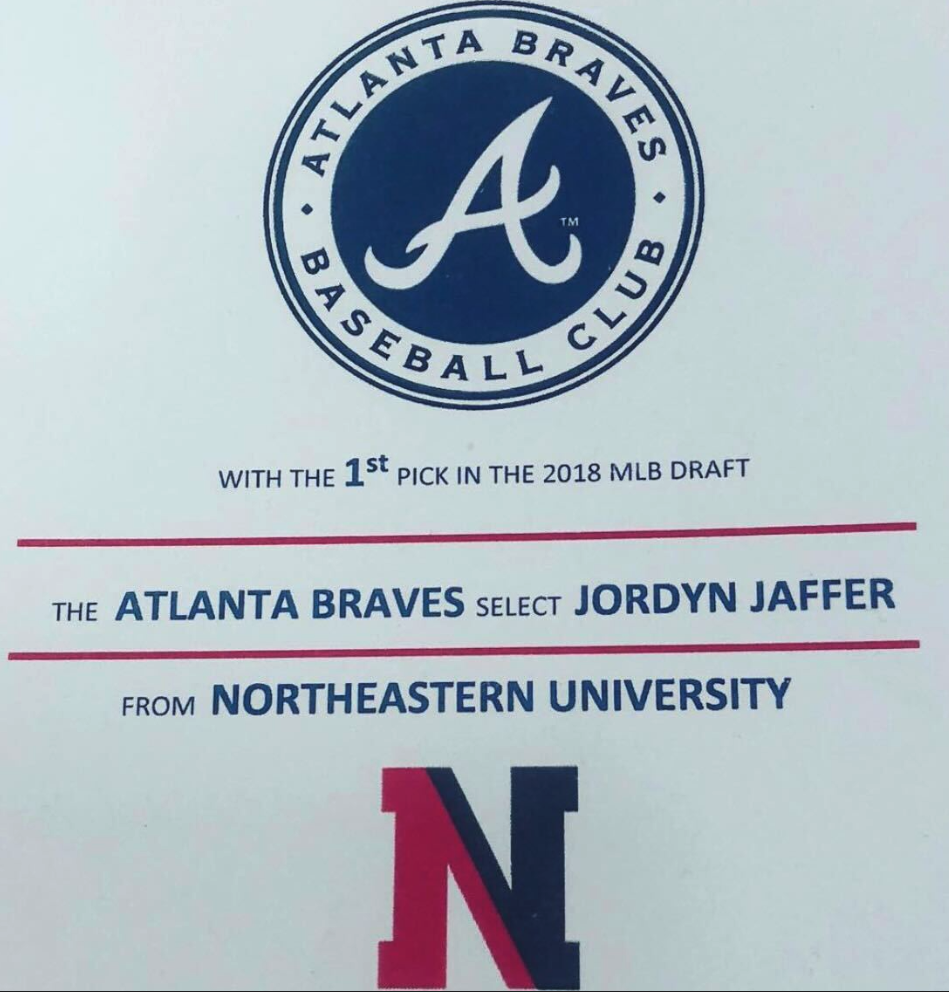
Similar to Andrea, my Salesforce career began right out of college when I moved down to Atlanta, Georgia to join the Atlanta Braves as a CRM and Analytics Trainee. 

The Braves were using Microsoft Dynamics at the time, and they were beginning their migration to Salesforce. While completing data analysis tasks, I started to learn Salesforce on my own when I saw a need within the organization. 

Getting Promoted to an Accidental Admin Role

By the time we went live with the implementation in July 2018, I was promoted to CRM specialist and served as the Salesforce and Pardot admin while working closely with the newly hired Salesforce developer. I went for my first certification in December of that year. Then I tackled three more in an effort to prove to myself and my coworkers that I was worthy of the Salesforce and Pardot admin role. 

When I decided to move on from my role at the Atlanta Braves, I took three certifications in the same weekend (Sales Cloud, Service Cloud, and Advanced Admin) to bolster my resume for future roles right before I left Atlanta.

Focusing on Community

In December 2019, I moved back up to Boston, Massachusetts with no job prospects in place. Thankfully, I was able to find a job with my alma mater, Northeastern University. 

During this time, I took a step back from my focus on learning to focusing on getting more involved in the Salesforce community. I was happy to serve as a co-leader of the Boston Women in Tech community group. 

The community group leadership role inspired me to apply for a spot in the inaugural Salesforce Marketing Champion class, to which I was accepted. It was definitely a shock to me at the time since I was no longer in a marketing-related role when I worked at Northeastern. That’s why I worked to earn my Pardot Consultant certification.  I wanted to prove that I was worthy of being a Marketing Champion. 

After achieving the Pardot Consultant certification, I earned one more certification during two years at Northeastern: Education Cloud Consultant. I ended my time with Northeastern just one certification shy of my ultimate 10 certification goal.

Becoming a Salesforce Consultant

Now onto my third and current Salesforce job. I started my consulting career with Sercante in September 2021. I came in with certification goals in mind, but working at Sercante has provided me with a new perspective on certifications. 

My focus should not only be on my personal growth, but also on the company’s growth as we look to take on new clients with different needs. I went for three certifications in the first few months to reach my goal of 10 and display some of the more recent experience I had, such as Experience Cloud from Northeastern, and Nonprofit Cloud from my first major Salesforce implementation at Sercante.

Now as I have moved into a more technical role at Sercante and have failed exams that I was nowhere ready to take (looking at you CPQ Specialist), my career and certification goals have become more defined. I am now looking to move toward the Application Architect and B2B Solution Architect certifications over the next year while continuing to learn new features and products to serve my clients’ needs. 

If you want to learn more about my overall Salesforce journey and my answer to the commonly asked question: “Can someone have too many certifications?” stay tuned for more articles from me. You can also get my take on how to keep imposter syndrome at bay in this blog post.

Tips for Success

Now that you’ve learned about Andrea’s and my certification journey, you may be wondering what certification you should work toward. While I believe everyone’s journey is different and do not need to follow the same path, we wanted to highlight which certifications are best to start with depending on which role path makes the most sense for you.

Which Salesforce Certification to Earn First

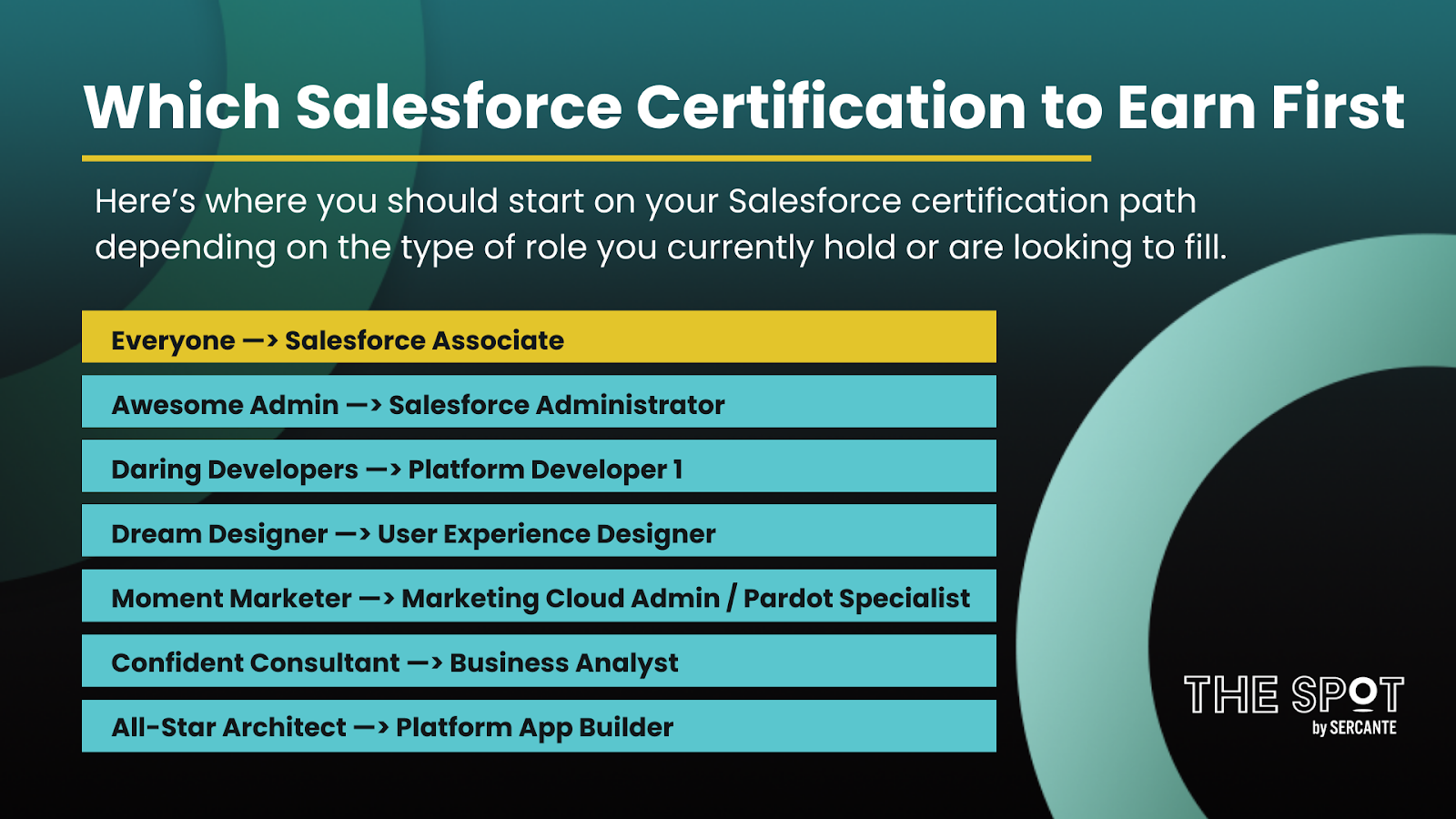
Here’s where you should start on your Salesforce certification path depending on the type of role you currently hold or are looking to fill.

Which Salesforce Certification to Earn First

Everyone —> Salesforce Associate
Awesome Admin —> Salesforce Administrator
Daring Developers —> Platform Developer 1
Dream Designer —> User Experience Designer
Moment Marketer —> Marketing Cloud Administrator / Pardot Specialist
Confident Consultant —> Business Analyst
All-Star Architect —> Platform App Builder

Regardless of which role path you take, we also recommend that you start with the new Salesforce Associate certification as a great introduction to the Salesforce platform as a whole. Read a guide to earning that certification in this blog post.

How to Study for Salesforce Certification Exams

When if comes to studying for your exams, there are multiple places you can go to get the expertise and knowledge you need to take the exam:

  • Trailhead: This should be your first stop on any certification journey as you’ll be able to find the following for nearly every certification. View all Salesforce credential guides here.
    • Certification Exam Guides
    • Certification Trailmixes
    • Superbadges
  • Community User Groups: There are user groups all over the world that are run by members of the community, similar to myself. The discussion topic of the meetings vary by time of year and by group, but some might be specific to certain certifications. I helped develop an annual (virtual) certification camp amongst the Boston groups that have met two years now and already have plans to come back in Fall 2023 to tackle another certification. Find all Trailblazer Community Group listings here.
  • Training Courses: You will find many training courses out there, but I highly recommend you look at reviews and make sure the content in the course is accurate. If you are in the marketing space, I highly recommend you check out one of Sercante’s training courses in the new year. I’m taking the Salesforce Marketing Cloud Bootcamp Course starting in January and would love to see some of you there as well!
  • Salesforce Certification Days: These are half day webinars that Salesforce periodically runs for multiple certifications such as Admin, Sales Cloud Consultant, Platform Developer 1, and more.
  • Amplify Study Groups: Amplify is a nonprofit organization that amplifies historically excluded voices in technology, and those who support them, to become fearless leaders. They offer study groups to their members, typically on a seasonal basis, for certain certifications. You can also sign up to be a facilitator for these study groups as well if you’re looking to share your knowledge. Become a member here.
  • Blog Posts: This one might seem obvious as you’re already on our blog site, but many Salesforce blogs share articles on specific certifications to help provide tips and tricks on how to pass them. Here’s the blogs that Sercante has produced so far:

Next Steps Toward Getting Salesforce Certified

We hope the resources and perspectives in this post are helpful to you as you work toward your own Salesforce certifications.

Hot Tip: Check out this page to read more about the certification journeys of my colleagues. 

We would also love to hear from you on your certification journeys! Please leave a comment below or mention us online using the #certificationjourney hashtag.

The Salesforce Winter ’23 Release Notes are out, and they include important features for marketers who are on the Salesforce platform. 

We get three major releases from Salesforce each year — Spring, Summer and Winter. Each Salesforce release includes upgrades and enhancements that affect Salesforce orgs in different ways. 

So, if you’re using and managing marketing operations for your company or organization and want to know more about Salesforce CRM, then you’re in the right place. We’re going to cover everything you need to know about the Salesforce Winter ‘23 Release if you’re a marketer who uses Salesforce.

Marketing-Focused Platform Highlights  from the Salesforce Winter ‘23 Release

Marketers who use the Salesforce platform are getting lots of attention from the Salesforce Winter ‘23 Release. 

Some updates are changing the way we work to meet evolving technology demands. Others are saving us time by connecting the dots in a logical way. 

All we know is, this release includes big updates for people in the marketing world.

Highlight #1: MFA Enhancement for Smaller Orgs

The Winter ‘23 release will enable multi-factor authentication (MFA) for direct logins to Salesforce for orgs with fewer than 100 active users. This update will then become enforced when the Spring ‘23 release comes around early next year. 

If your Salesforce org falls under the 100 active user threshold, it’s best to make sure you are fully compliant with the MFA requirement now and make sure any MFA-exempt user types are prevented from being affected by this update.

Any Salesforce org that has more than 100 active users will experience this update in a future release.

Highlight #2: Dynamic Forms for Standard Objects

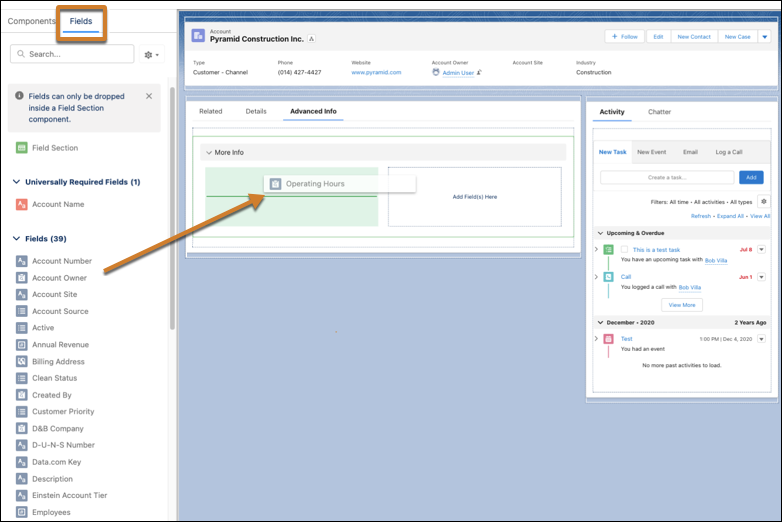
Dynamic Forms are now finally available for Accounts, Person Accounts, Contacts, and Opportunities! Dynamic Forms are components you can add to your Lightning Record Page to help customize your page layouts even more. 

Instead of using the standard page layout component, you can add specific fields and sections to the Lightning Record Page and add visibility rules to show users only what they need at that time. 

You can also automate the process of creating dynamic forms by migrating the Record Detail component to a Dynamic Form component with just one button.

Record Component

Highlight #3: Salesforce Reports and Dashboards Updates

Salesforce continues to ensure that Reports and Dashboards get new updates with each release throughout the year. 

Enhancement #1: Filter Custom Report Types by Salesforce Fields (Beta)

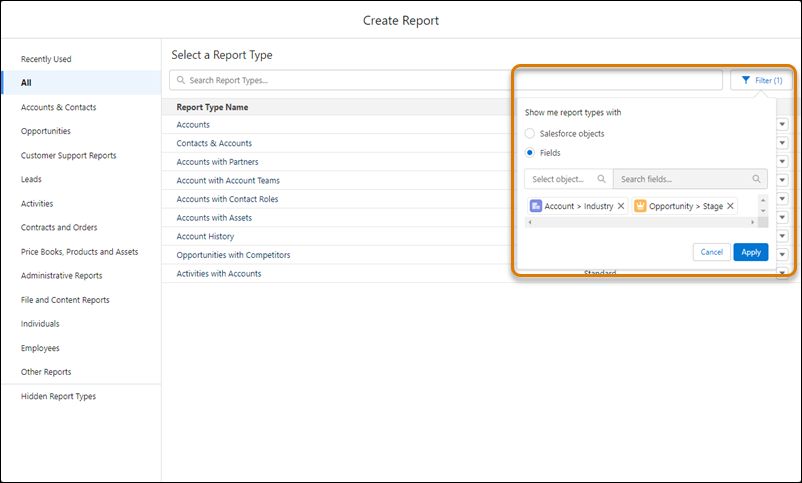
Salesforce continues to provide enhancements to help ensure users can pick the best report type for any use case. Users can now filter custom report types by specific fields to ensure that report type contains the fields needed for the report. 

This feature is extremely useful for finding the right custom report type and allows users to filter by up to 20 fields that are required for the specific report they are building.

The "Create Report" modal, with an orange box around a "Filter" button to the right of the "Search Report Types..." bar. Below the filter button is a modal that reads "Show me report types with". In the modal are an unselected "Salesforce objects" radio button and a selected "Fields" radio button. Below the options are a "Select Object" text input and a "Search Fields" text input. Below that are two sample selected fields: "Account > Industry" and "Opportunity > Stage". Below that are "Cancel" and "Apply" buttons.

Enhancement #2: Review a Custom Report Type’s Structure During Report Creation

When getting ready to select a custom report type, users are now able to review the structure of that report type before moving forward with creating a new report. 

The details panel for the custom report type will now include a section that shows the relationships between the joined objects and provides useful information on the outcomes of the joins that were set up for the report type.

Highlight #4: User Permissions Updates

Improvement #1: Manage Your Permission Assignments with the User Access and Permission Assistant

Previously known as the Permissions Helper, the User Access and Permissions Assistant is an app through the Salesforce AppExchange to help analyze and report on permission assignments. 

Following the Salesforce best practice to approach user management by applying the principle of least privilege, this tool can help with monitoring and managing permissions across your org. 

Some features available through this tool are:

  • Analyzing permissions by user, permission set, or permission set group to understand who has a particular permission.
  • Converting a profile to a permission set
  • Reporting on users, permission sets, or permission set groups to further understand who has what permissions.
    • You can also report on permission dependency and visualize it so you can see everything that’s dependent on a specific permission.

Improvement #2: Set Field-Level Security for a Field on Permission Sets During Field Creation

As Salesforce moves its customers toward using Permission Sets over Profiles, it will continue to push out new updates for Permission Sets to become more powerful. 

When creating new fields on an object, you will now have the ability to set field-level security on permission sets instead of profiles to help follow security best practices.

To use this new beta feature, you should enable it through the User Management Settings in your Salesforce Setup.

Highlight #5: Salesforce Flow Updates

You may have heard the phrase “Flow is the future” in Salesforce messaging over the past couple of years. This is because Salesforce is consistently releasing new Flow features to prepare for the retirement of Process Builder and Workflow Rules in the upcoming years. 

You should anticipate seeing awesome features for Salesforce Flow being included in every release moving forward for a while.

Here are some of our favorites from this release.

Improvement #1: Cut and Paste Flow Elements

If you’ve ever had to move a Flow element from one section to another you know how frustrating it has been in the past. We were required to copy a component, paste in the new section, update any references to the old version of the component, and then delete the old component. 

Salesforce has answered this frustration by providing a new feature where you can cut and paste a Flow element that eliminates all of the extra steps of cleaning up your Flow when you move an element.

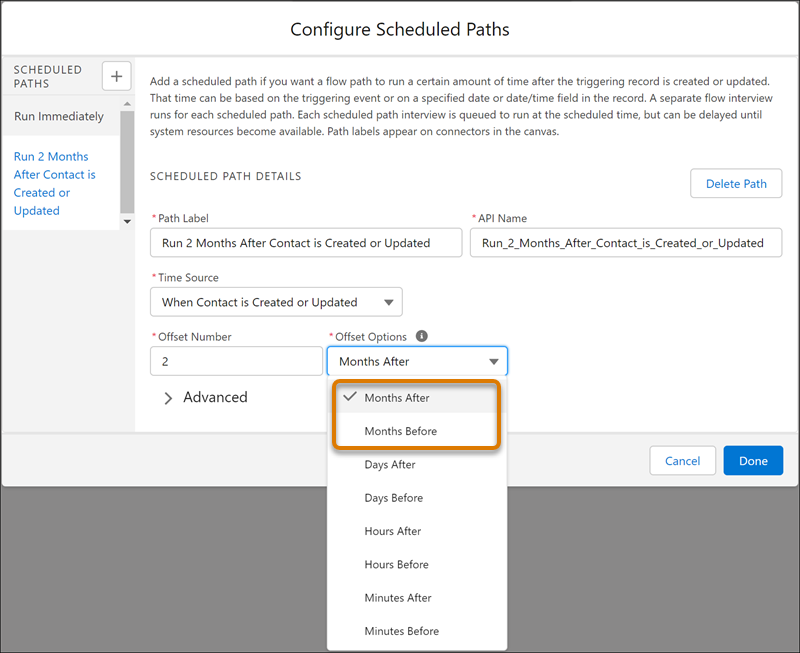
Improvement #2: Specify Time Offsets in Months for Scheduled Paths

Before the Winter ‘23 release, Salesforce users were only able to set up scheduled paths by looking at the time since a trigger in minutes, hours, or days. 

This new Salesforce feature now includes the ability to schedule your path to run on the same calendar day of another month.

configure scheduled paths

Improvement #3: Use In and Not In Operations to Find Related Records

Flows are getting new operators that can be used in Get Records, Update Records, and Delete Records elements. 

These new operators, In and Not In, can help users get related records without using a Loop element and reduce the number of SOQL queries and DML statements within the Flow.

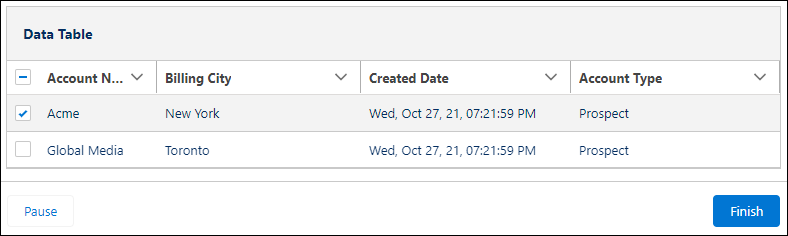
Improvement #4: Select Multiple Records from a Table in a Screen Flow (Beta)

The new Data Table screen flow component is available to display a list of records on a flow screen. When building the screen flow, you can set the table to ready only or provide your users the ability to select multiple records to use later in the flow.

Data Table

Improvement #5: Use Record-Triggered Flows to Update Related Records

The Winter ‘23 release brings a new feature where you can use record-triggered flows to update any record that is related to the record that originally triggers the Flow. 

With this feature, users are also able to set filters to only update specific related records instead of all related records.

Improvement #6: Workflow Rule Creation will no longer be available

The Winter ‘23 Release will now block Salesforce users from creating any new Workflow Rules moving forward. This is the next big step toward retiring Workflow Rules entirely as Salesforce continues to push users to move toward Flows. 

This update will not affect your current Workflow Rules as you will still be able to activate, deactivate, and edit your existing automations.

Check out our other blog post on migrating your current Workflow Rules and Process Builder to Flow through the new conversion to learn more about how you can prepare for the Workflow Rule retirement.

Highlight #6: Sales Cloud for Slack (Generally Available)

Since Salesforce purchased Slack in July 2021, they have been working hard to connect these two systems in a way that will improve Sales productivity. 

This release brings a new feature where sales teams can access important information and get notifications about their accounts and opportunities directly in Slack. The new Sales Cloud for Slack app provides the ability for your sales team to collaborate in opportunity-focused channels and to automate record update notifications to be pushed into Slack directly from Salesforce.

Highlight #7: Marketing Cloud Account Engagement (Pardot) Updates

Please check out my colleague Erin Duncan’s blog post on all things Pardot from the Winter ’23 release.

Salesforce is getting bigger and better all the time

B2B marketers who come to Salesforce are usually looking to scale their efforts and grow in a way that makes sense. These latest enhancements from the Salesforce Winter ‘23 Release get marketers closer to those goals by saving them time and resources. Contact the team at Sercante to get help implementing these enhancements in your Salesforce org. And leave us a comment below to let us know what you think about the Winter ‘23 Release.

The Salesforce Summer ‘22 Release Notes are out, and they include important features for marketers who are on the Salesforce platform. 

We get three major releases from Salesforce each year — Spring, Summer and Winter. Each Salesforce release includes upgrades and enhancements that affect Salesforce orgs in different ways. 

So, if you’re using and managing marketing operations for your company or organization and want to know more about Salesforce, then you’re in the right place. We’re going to cover everything you need to know about the Salesforce Summer ‘22 Release if you’re a marketer who uses Salesforce.

Salesforce Summer ’22 Release: Highlights for Marketers

Marketers who use the Salesforce platform are getting lots of attention from the Salesforce Summer ‘22 Release. 

Some updates are changing the way we work to meet evolving technology demands. Others are saving us time by connecting the dots in a logical way. 

All we know is, this release includes big updates for people in the marketing world.

Highlight #1: Enabling Person Accounts

For any organization who has considered Person Accounts, you know that you have to reach out to Salesforce Support to get them to enable Person Accounts in your Salesforce environment.

With the Summer ‘22 release, organizations are now able to enable Person Accounts on their own through Salesforce Setup. Similar to the previous process, enabling Person Accounts cannot be reversed from your Salesforce environment.

If you are looking to implement Person Accounts for your business and are looking for a partner to assist you with it, please reach out to us to find out more on how we can help you through the implementation process.

Stay tuned… we’re working on a blog about how Person Accounts work with different Salesforce products.

Highlight #2: Custom Field and Related List Updates

Improvement #1: Custom Address Field (Beta)

Salesforce Administrators have been wondering for years “how can I create a custom Address field so I can record multiple addresses on my customer records?” 

 Our questions have finally been answered with the new beta feature of creating custom Address fields on various objects. These custom fields will mimic the behavior of the standard Address fields you see on the Contact and Account objects. 

It will be interesting to see how new custom Address fields will play with Pardot if your organization decides to sync those fields over.

Improvement #2: Picklist Enhancements

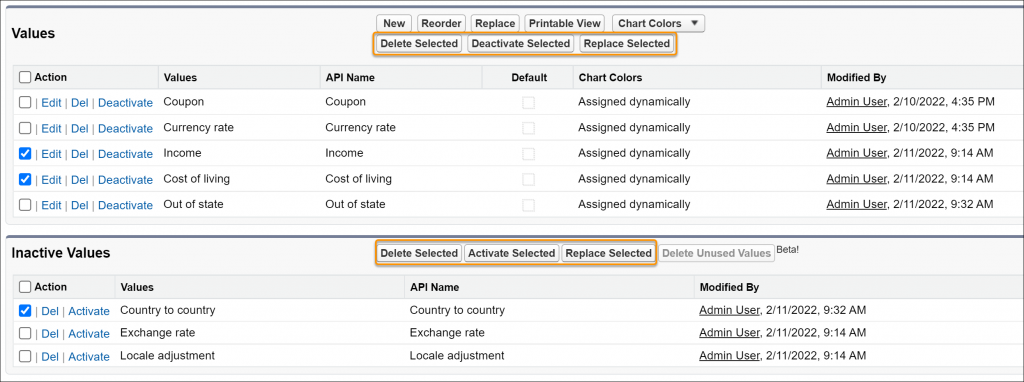
Have you ever needed to inactive multiple picklist values and realize you’ll be clicking “deactive” for nearly five minutes? 

Salesforce has finally improved this process by providing the option to manage picklist values in bulk

This is a beta feature that you will need to enable in Setup. It gives you the option to select multiple picklist values at one time and perform various actions on those values.

There is also a new picklist feature where you can get an email sent to you if your custom picklist fields have more than 4,000 inactive values. You will then be able to bulk delete these inactive values through the feature above.

Improvement #3: Dynamic Related Lists

This is probably my favorite feature in this release. The introduction of Dynamic Related Lists will bring amazing opportunities to customize your org’s Lightning Pages. 

With this improvement, you can add the new Dynamic Related List – Single component on your Lightning Page. You’ll select the fields you would like to display, and then apply filters to ensure only certain records show in your new related list. 

You can create multiple related lists for the same object if you would like to display different groups of records, such as filtering on Opportunity Record Type.

Highlight #3: Reports and Dashboards Updates

Salesforce continues to ensure that Reports and Dashboards get new updates with each release throughout the year. Some features that were in Beta during the last release are now Generally Available, while there are new features entering the Beta phase.

Improvement #1: Find the Right Report Type for New Reports (GA)

This improvement was highlighted in our Spring ‘22 Release Article when it was a Beta feature. It is now Generally Available to all Salesforce customers.

Improvement #2: Edit Multiple Fields on the Report Run Page (GA)

Similar to the improvement above, we highlighted this feature in our Spring ‘22 Release Article when it was just a Beta feature, and it is now Generally Available to all Salesforce customers.

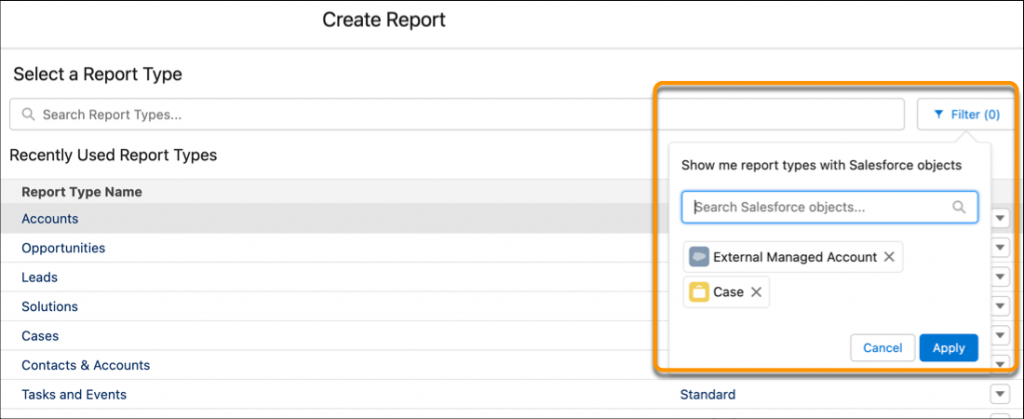
Improvement #3: Create Reports Based on Selected Salesforce Objects (Beta)

Have you ever had to scroll through all of your report types to try to find the ones that contain the specific object you are looking for? This new Salesforce beta feature allows you to filter the report types on the specific objects you need to ensure are in your report. 

This feature, along with Improvement #1, compliment each other in a way that will help you find the right report type faster.

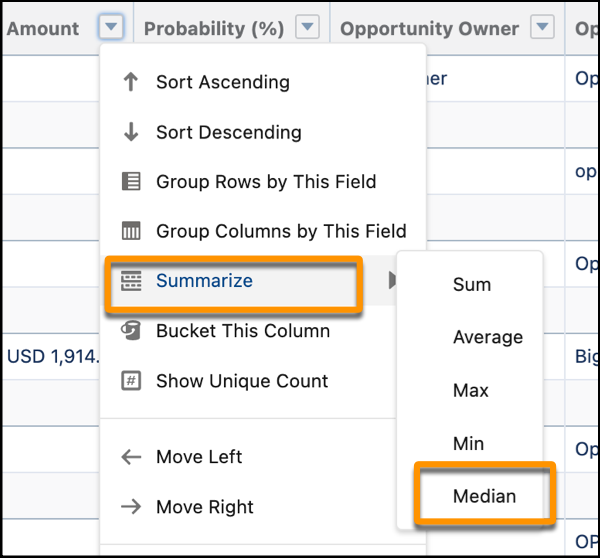
Improvement #4: Use Median as a Summary Function in Reports

One of the smaller features in this release, this improvement provides the ability to summarize your fields in a report based on the median action along with the previously available actions.

Highlight #4: Salesforce Flow Updates

You may have heard the phrase “Flow is the future” in Salesforce messaging over the past couple of years. This is because Salesforce is consistently releasing new Flow features to prepare for the retirement of Process Builder and Workflow Rules in the upcoming years. 

You should anticipate seeing awesome features for Flow being included in every release moving forward for a while. And be sure to check out this solution from Mike Morris on how to manage Salesforce campaign activation with a simple flow.

Here are some of our favorites from this release.

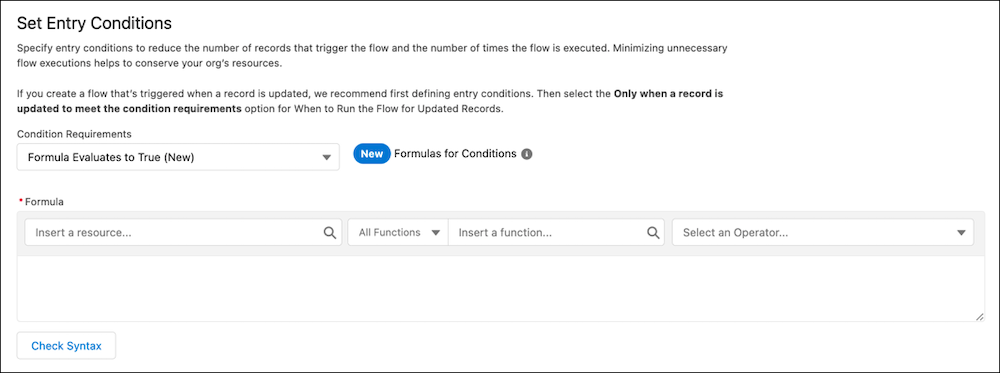
Improvement #1: Use Formulas as Flow Entry Conditions

Flows will now have the opportunity to use formulas as entry conditions instead of just field value criteria. This improvement provides so much more flexibility then we previously had, and it’s something I am very excited to implement in my client’s Flows to help optimize them even more.

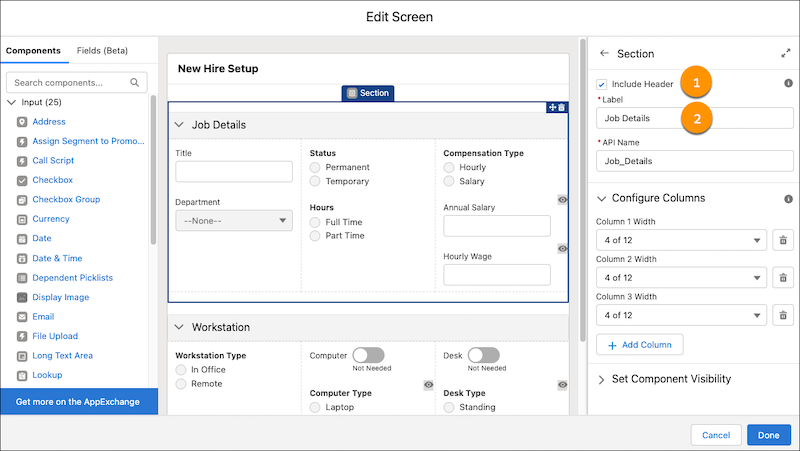
Improvement #2: Add Section Headers Screen Flows

Screen Flows will also receive a couple updates during the Summer ‘22 release. 

You will now be able to add a Section component to your Screen Element that can be collapsible to make the screen flow completion more efficient.

Along with this feature, there will be a new beta feature to place Name and Address Record fields directly on your Flow Screens

Through this feature, your screen flows can become even more efficient as you can have these fields populated with either existing values and even have autocomplete functionality with the Address record fields.

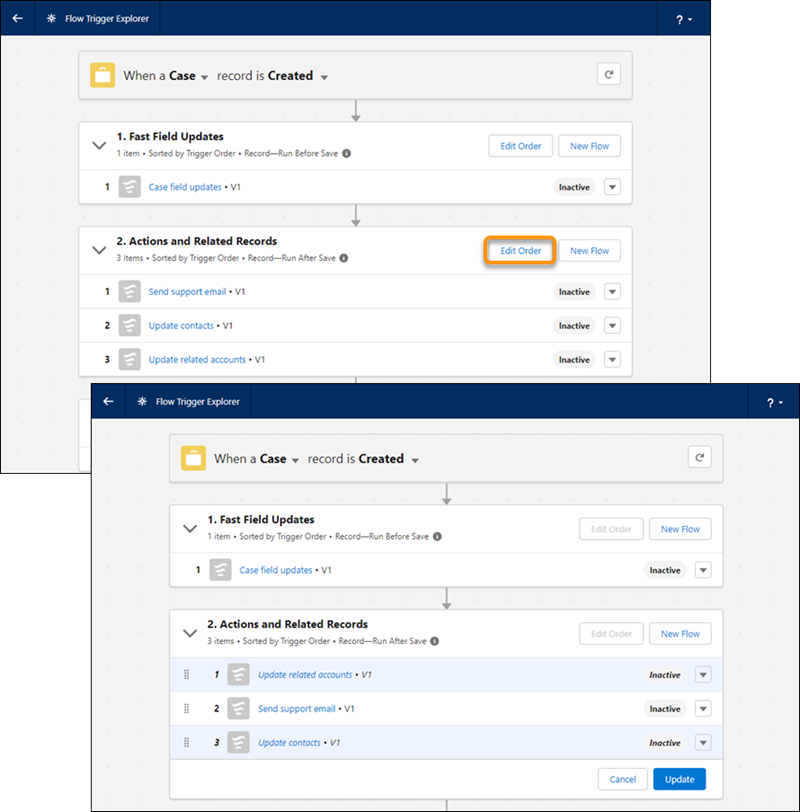
Improvement #3: Manage the Run Order of Flows from Flow Trigger Explorer

The Summer ‘22 release brings the ability to easily update the run order of your record-trigger flows without needing to open and edit the individual flows themselves. 

Through the easy-to-use UI, you can ensure that your record-trigger flows are executing in the exact order you specify for an individual object.

Improvement #4: Convert Workflow Rules to Flows with the Migrate to Flow Tool (GA)

Salesforce will continue to push its customers to Flow in preparation of the retirement of Process Builder and Workflow Rules. Thankfully we are provided tools to help make the migration process a lot easier than just creating flows ourselves. The Migrate to Flow Tool was already available for certain Workflow Rules in the previous release, but now supports more kinds of workflow rules. THe tool will now support the following:

  • Equal to null
  • Not equal to null
  • Rule criteria formula

Stay tuned for a  blog post on migrating Workflow Rules and Process Builder to Flow through this tool to learn more about it. 

Highlight #5: Marketing Cloud Account Engagement (Pardot) Updates

Probably the biggest update to Pardot during the Summer ‘22 release is the name change to Marketing Cloud Account Engagement that was announced recently. 

The name will always be Pardot in our hearts and therefore deserves its own section for feature highlights from this upcoming release.

Here’s a musical tribute to the Pardot name for your listening pleasure.

Improvement #1: Conditional Completion Actions

Every Pardot Admin probably screamed with glee when they saw this feature was finally being released. We are now able to include conditions on Completion Actions to ensure that subsets of your prospects are meeting the criteria for certain completion actions. Previously we could only include completion actions that fired for each prospect that completed the asset so this improvement will help all companies enhance their marketing automation efforts.

If you want to read more information about this feature, check out Marcos Duran’s preview blog post exclusively on Conditional Completion Actions.

Improvement #2: Review Email Bounce Data in One Report 

The Summer ‘22 release will bring a single report for you to review all of the bounced email addresses from the past year for each email sent. This is a huge improvement from needing to view individual list email reports in order to find the prospects that had bounced email addresses for that email.

Check out Laura Curtis’ blog post on the Pardot Email Bounce report to learn more about this awesome feature.

Improvement #3: Get Improved Mailability Insights on List Email Reports 

The Summer ‘22 release will bring four new fields to your list email reports:

  • Total Prospects on recipient lists
  • Total suppressed Prospects
  • Total unmailable Prospects
  • Total duplicate Prospects

These new fields will provide a more accurate picture of who is receiving your emails and give you more information to help with your prospect management decisions.

Highlight #6: Marketing Cloud Updates

Please check out my colleague Kirsten Schlau’s blog post on all things Marketing Cloud from the Summer ‘22 release.

Salesforce is getting bigger and better all the time

B2B marketers who come to Salesforce are usually looking to scale their efforts and grow in a way that makes sense. These latest enhancements from the Salesforce Summer ‘22 Release get marketers closer to those goals by saving them time and resources. Contact the team at Sercante to get help implementing these enhancements in your Salesforce org. And leave us a comment below to let us know what you think about the Summer ‘22 Release.

Salesforce Marketing Cloud is a platform brought into the Salesforce ecosystem in 2013 when Salesforce acquired ExactTarget (a company that previously acquired Pardot). It can be considered a one-stop shop for all things digital marketing. That includes email marketing, social media, mobile marketing, website building, and more through various studios and builders. 

When Salesforce made the announcement that Pardot was being brought under the Marketing Cloud umbrella and rebranded as “Account Engagement,” marketers throughout the ecosystem were shocked and confused. 

We were always trained to view Marketing Cloud and Pardot are two separate entities that solved separate problems for companies, but the rebrand challenged that notion. I highly recommend checking out Andrea Tarrell’s post on the matter

This article is going to give a “hi, how are you” the main tools on the platform previously called Marketing Cloud and now known as Marketing Cloud Engagement. 

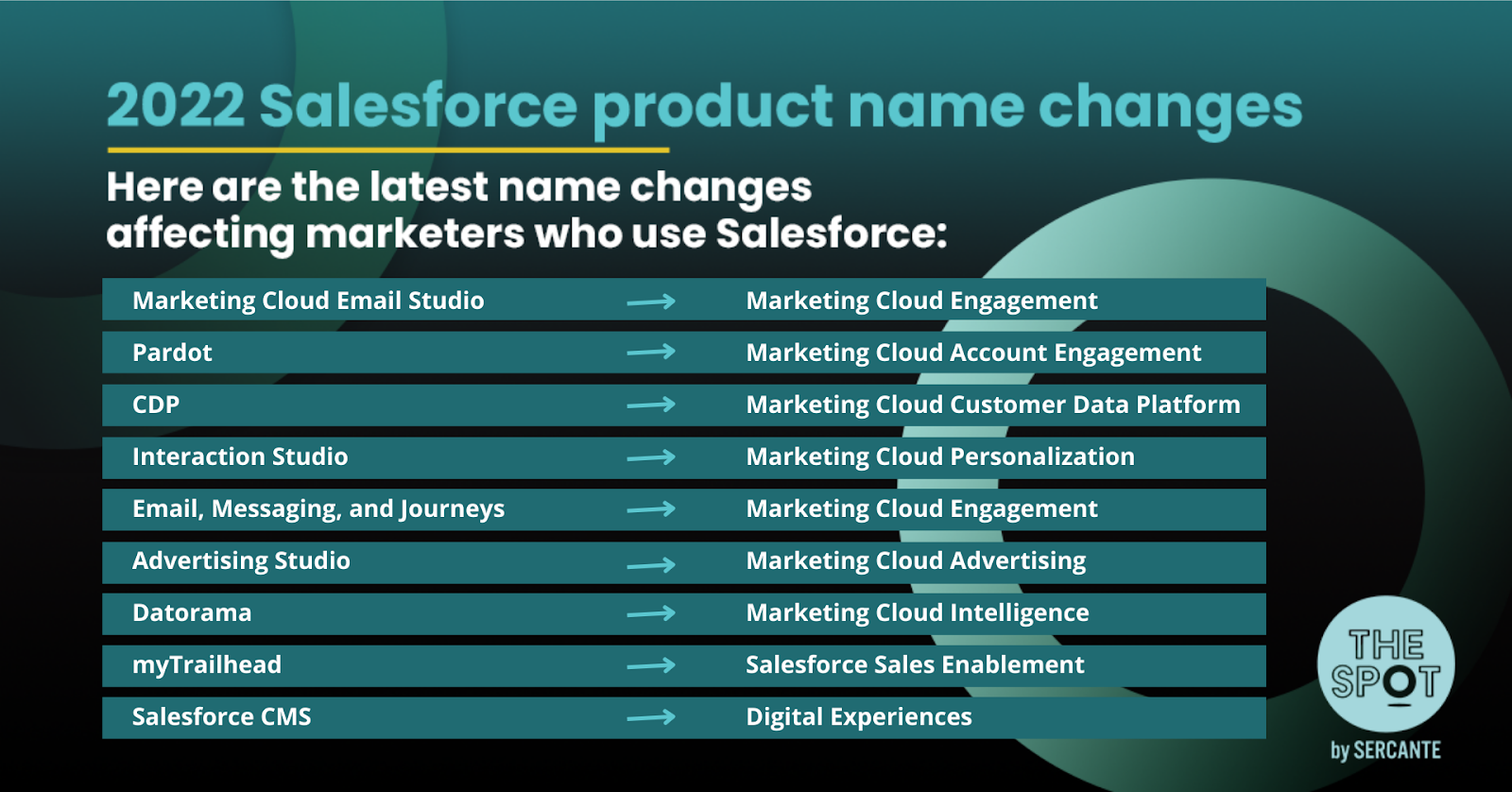
Before we do a deep dive into each Marketing Cloud Engagement product, it’s important to remind us of all of the recent Salesforce Marketing Cloud product rebrands. Check out the infographic below for a refresher.

Email Studio (Marketing Cloud Engagement)

Email Studio is the primary product in the Marketing Cloud suite and typically what most people think of when they hear “Marketing Cloud.” 

This studio focuses on email marketing and is complemented by Content Builder (discussed below) in ensuring that your team can construct the perfect email template for sending. Marketers will use the product to preview, test, and send one-off emails that can be highly customized through template elements and Marketing Cloud’s scripting language: AMPscript. 

Content Builder

 As mentioned above, Content Builder complements Email Studio as it is the backbone of personalizing your email templates. Marketers not only work on building out their emails through Content Builder, but can also build out landing page templates, and text message content. 

One great feature of this product is that you can build content blocks to use across all Marketing Cloud Studios that keep your brand consistent across all platforms.

Journey Builder (Marketing Cloud Engagement)

If you have ever used Pardot, then you know how powerful of a tool Engagement Studio is. Think of Journey Builder as a similar product that will help automate marketing campaigns across multiple channels. 

Due to its powerful features and connection to Email Studio, the Marketing Cloud rebrand brought Journey Builder and Email Studio together as Marketing Cloud Engagement. The journeys that are built through this tool can contain multiple paths for customers, use Einstein features, and send tasks and data to Salesforce through Marketing Cloud Connect.

Advertising Studio (Marketing Cloud Advertising)

Advertising Studio works tremendously well with Journey Builder to help your organization connect with customers beyond email, text, and social messages. 

The tool will give you access to produce ads across multiple digital platforms, including social media: Instagram, Twitter, Facebook, LinkedIn, and other platforms such as Google and YouTube. Using your Salesforce data, along with lookalike data from Facebook and other audiences, you can target new prospects who are most likely to become a customer in the future.

Social Studio

Poor one out for Social Studio. Salesforce’s newest soon-to-be-retired product (November 2024) was my first introduction to Marketing Cloud and definitely one of my favorite tools to use – I started using it right when they retired the Marketing Cloud Social Specialist Certification and I’m so sad I never achieved it. 

Previously known as radian6, Social Studio was focused on social listening, measurement, and engagement. Marketers could schedule social posts, monitor their social accounts, and listen for keywords and hashtags through the Social Studio platform. It was complemented with Social Studio Automate, a tool that would process and sort social media content in an automated fashion and could send data over to Salesforce. 

Check out the following blog to learn more about other Social Listening products you can explore for your company: Social Studio Sails into the Sunset.

Mobile Studio

Similar to the other studios, Mobile Studio is a one-stop-shop for sending messages to a consumer’s Mobile Device. These messages can be crafted within Mobile Studio and can be delivered via SMS, MMS, or Push Notifications via an app. 

You are even able to monitor opens and clicks on your SMS messages like you can do with your email messages. When considering this product it is best to start small with unidirectional messages before you implement a full-scale messaging channel that could offer support via mobile. 

Web Studio

Web Studio is a lesser known studio within the Marketing Cloud suite, but it’s a great tool for building out your organization’s web experiences. 

Using the CloudPages application, you are able to create dynamic web pages with personalized content and provide a seamless experience for your customers. Companies can collect data from website visits and form completion to further personalize the experiences provided to customers online.

Datorama (Marketing Cloud Intelligence)

Datorama is an amazing marketing analytics tool that unifies your company’s data from each marketing platform you use so you can report on all data at once. 

Platforms that you can connect include Google, Instagram, Youtube, and various other platforms through out-of-the-box connections available on the Datorama platform. Using data from your Marketing Cloud instance, you can track ROI and growth across all of our email, social, advertising, web, and sales channels.

Do you consider yourself a Datorama expert? Sercante is expanding our team and looking for a Datorama Architect to join our analytics practice and implement Datorama across multiple clients and business needs.

Interaction Studio (Marketing Cloud Personalization)

Interaction Studio has many use cases, but as the new rebrand states, it is the perfect tool for providing an amazing level of personalization for your customers across your web experiences. 

As your customers/prospects complete actions on your website, Interaction Studio will take this behavior to dynamically update messaging across web pages to tailor the experience to that individual customer. The tool will update their experience again to ensure messaging correlates with the new product interest — given that a customer’s behavior is the best indication they are interested in a new product.

Salesforce CDP (Marketing Cloud Customer Data Platform)

Another product that’s been through the rebrand treatment is Salesforce CDP. It’s a tool that can compile every data point across multiple platforms for each customer in your database. 

This tool compliments your other Marketing Cloud products as you can use this data from all of your platforms to create very specific segmentation lists. This enables companies to ensure the right prospects are being contacted at the right time about the perfect product/solution for them to help increase ROl across the business.

Pay attention to the big picture

Marketing Cloud can definitely seem like a daunting product if you don’t understand too much about the products/tools within it. It’s important to not overwhelm yourself with all of the features each product has to offer. Instead, focus on the tools that would benefit your organization if you decide to implement Marketing Cloud. 

These are just basic overviews of the most popular Marketing Cloud topics so our team advises that you fully investigate and learn about a product before you make any purchasing decisions.

If you are looking to implement Marketing Cloud for your business and are looking for a partner to assist you with it, please reach out to us to find out more on how we can help you through the implementation process.

No more posts to show