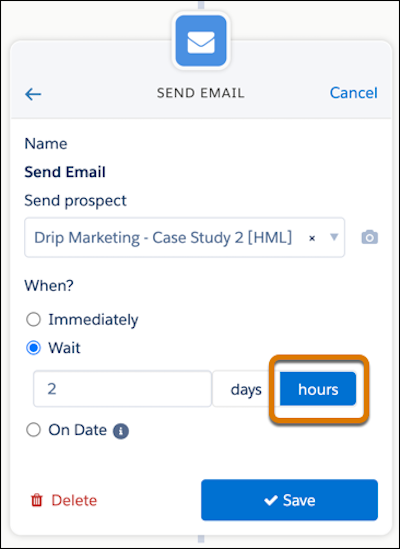
For Account Engagement users, the most exciting feature coming with the Salesforce Winter ‘24 release is the ability to get more precise with wait steps in Engagement Studio Programs. Gone are the days waiting a full day to trigger an action, we can now set wait steps anywhere from 2-8 hours. This provides more flexibility with our programs and what we are able to do.
How do we get started with shorter wait steps in Engagement Studio?
In Engagement Studio, we’ve always had the ability to add wait steps. We were able to do this in day long increments after an event took place. We’ve used these for things like, sending follow up emails after a form fill, or sending an additional email days after an initial send.
Sometimes, a day seemed like too long of a wait, but that was all we had to work with.
Now, we can use these new hour increments. When adding an action to an Engagement Studio Program, click “wait”, then toggle to “hours” and set the desired amount of hours. That’s it!
When you should use hour wait steps…
Wondering how you can make the most of this feature? We’ve compiled a list of scenarios that we think would be best suited for a short, hours-long wait period.
Welcome Programs
Prospects signed up for your mailing list or were imported? Add an hour wait step to send that first welcome email instead of waiting days.
Post Form Follow Up Emails from Sales Team Members
If your follow up emails are sent immediately, prospects know it’s automated, and waiting days to follow up can lead you to miss out on an opportunity. With a wait step of just a couple hours, it gives your prospects time to finish looking at your website, gives your internal assignment processes time to complete, and feels more personal than an automated reply.
System Processing Time For List Evaluation
When using automations that evaluate which lists a prospect is on, a two hour wait step will ensure your dynamic lists have time to run and prospects newly added to the list are included.
Custom Redirect/ Page Action Follow Ups
Set up custom redirects or page actions on high priority pages and have them funnel leads into an Engagement Studio Program. From there, suggest the next step a prospect should take or the next piece of content the prospect might be interested in a few hours after they have left your website.
Time to get started with shorter wait times in Engagement Studio
This feature is one that hundreds of trailblazers have been asking for because it can be so useful in customizing programs. Once it becomes available, we recommend revisiting your existing engagement studio programs and seeing if this would be a better fit for some of the current day long wait steps you are currently using.
Being able to take action in hours, rather than days can really help personalize the experience you give to prospects.
GDPR, CPRA, the end of third-party cookies: data privacy is a hot topic among digital marketers, but it’s not just advertisers who should be worried. If your marketing strategy’s success is founded on clicks and email open rates, the data privacy landscape of the future could be an unpleasant awakening.
Data privacy tools can impact your email strategy in a number of key ways:
User-controlled features like Apple Mail Privacy Protection make it look like an email has more opens that it actually does
Security bots may inflate click rates in email reports
The good news is that Marketing Cloud Account Engagement (Pardot) offers out-of-the-box tools that can support email marketers through some of these changes. Let’s take a look at the options.
View Email Clients in a Send Report
If part of reporting on your email successes relies on email open rates, the first tool Account Engagement offers that you will want to utilize is the “Email Clients” report.
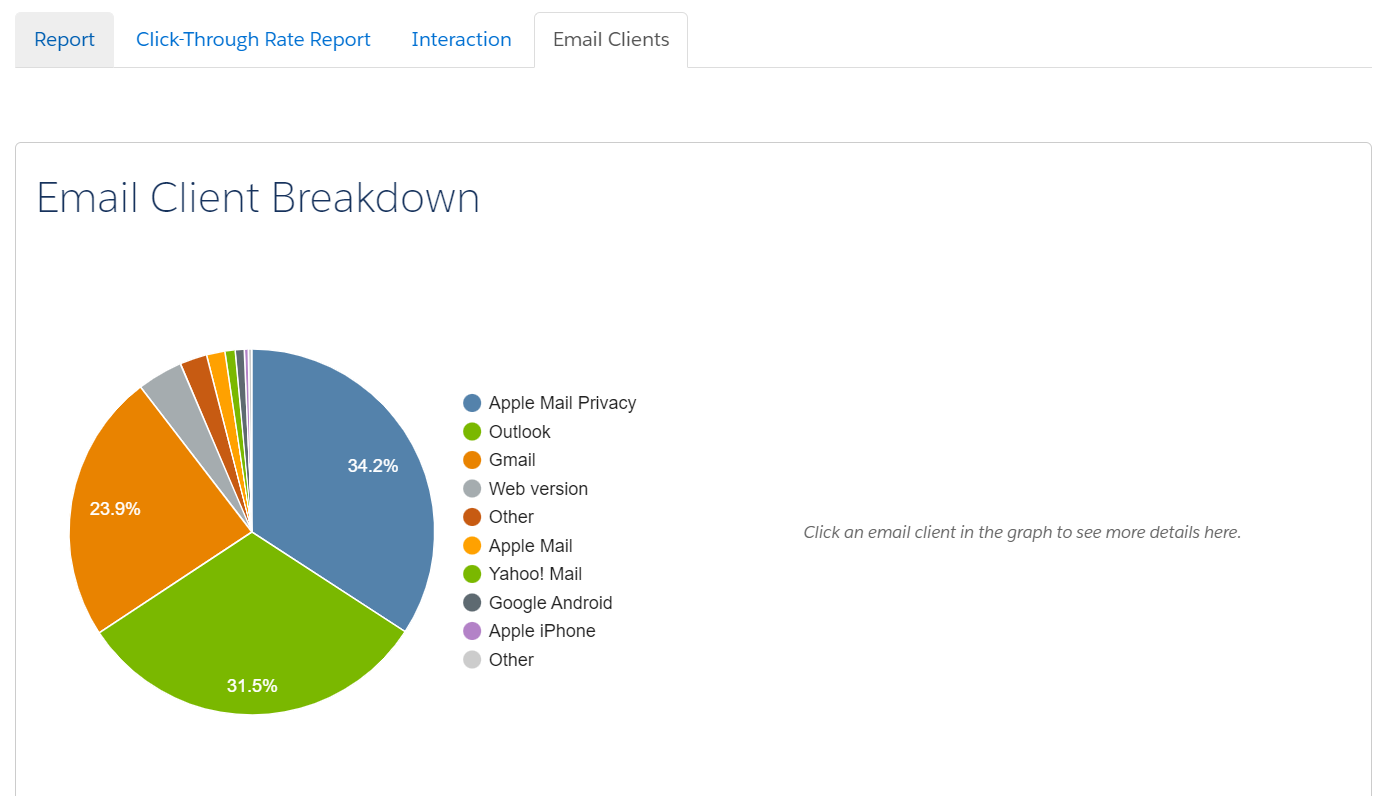
Found as a tab in a Sent Email report, this tool will give a breakdown of all email clients your recipients are using, including how many are using Apple Mail Privacy Protection and/or Outlook:
Viewing this report will give you a sense of how reliable your email open rate metrics actually are. For example, if you have a high percentage of recipients leveraging Apple Mail Privacy in your report, that is a signal that your email open rates will likely be artificially higher than they should be. That’s because Apple MPP is pre-opening every email sent and “hiding” true opens from marketing tools like Account Engagement — thus, a person could show as an open even if they have not actually opened your email.
Email Open Rate Considerations for Outlook Users
On the other side of this is Outlook. If you’re a B2B marketer, you likely have a sizable chunk of recipients opening your emails on Outlook.
This isn’t new, but you may not have known that an email “open” is recorded when a pixel is triggered — often in the form of an image pixel. This means that if a recipient doesn’t download images and doesn’t click on a link, their open will likely not be captured. If you’re sending long-form emails with lots of relevant information and few links to click through, you could be missing the actual impact of that email if you’re only looking at open rates.
Email Open Rate Considerations for DuckDuckGo Users
Not pictured here is the impact of something like DuckDuckGo’s inbox that, like its browser counterpart, is designed to “hide” things like email opens or link clicks from marketers.
As consumers continue to search for ways to keep their user data private from marketers, we can expect inbox providers to allow for greater user-based controls like this. Those tools are just one more reason to consider moving away from reporting on email opens at all.
Automations and Email Open Rates
If your email client reports are indicating a big impact in your open rate credibility, your next step needs to be an assessment of your Engagement Studios, Automation Rules, and Dynamic Lists that are using email opens. Fortunately, Account Engagement has an out-of-the-box tool for this as well!
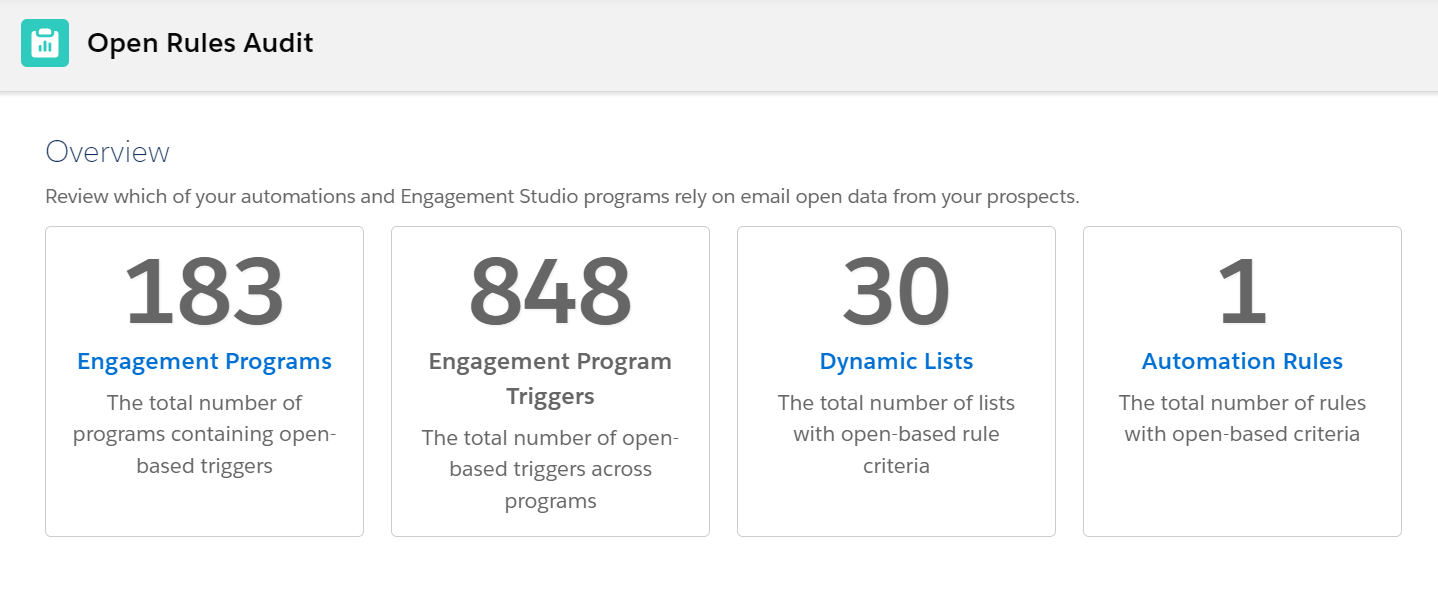
In Account Engagement, navigate to “Reports,” then “Marketing Assets,” then “Automations.” You should see “Open Rules Audit” as a selection. Opening that report will pull a quick calculation of where your account is using email opens to trigger an action, like branching in an Engagement Studio, adding a person to a Dynamic List (see examples in this post), or triggering an Automation Rule if they “open” an email:
Keep in mind that not all of these will be active, so you will still have to do a bit of discovery on what needs to be edited and what should be simply archived. However, if you have multiple people creating assets and campaigns in your Account Engagement account, this report is a great resource for determining who should be involved in updating your automations with other engagement metrics (like clicks).
Taking Extra Steps: Evaluating Bot Clicks in Email Opens
If you’re also triggering automations off email clicks, this is a good opportunity to check your recipient lists for email security tools. These tools will pre-click every link in an email before delivering it to the recipient, who may then also click the links that are most interesting to them.
You may have noticed this show up in your email reports or in a prospect report, where it might look like a recipient clicked every link in your email — including your social media links and privacy policies — in under a minute. Impressive, if it were true!
Custom Redirect Solution for Catching Bot Clicks
Some industries appear to be more likely than others to use these, so the impact can be tricky to determine without a little bit of work on your end. Fortunately, using Account Engagement, you can use custom redirect links to lessen the impact.
First, be sure that you have Visitor Filters in place under Admin > Automation Settings > Visitor Filters. This is a great place to start, and it will filter out most engagement from a number of security tools.
Second, you can use a Custom Redirect link and hide it in your email templates. That way, if it gets clicked, you know that only a bot could click and and you know which recipients are impacted. Then you can filter them out of automations that use email clicks.
You can use something simple as your hidden link — just make sure the image is small (one pixel by one pixel is fine) and is the same color as your background.
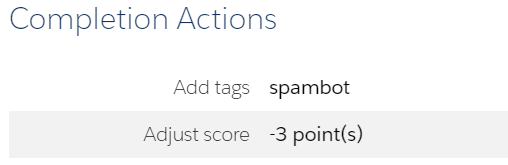
You can also use this strategy to decrease your scores for anyone who clicks on the link or add a tag that helps you understand your account-wide impact:
Adapting What You Report on Email Marketing
So if you can’t leverage email opens to determine if your recipients are interested in your email content, what can you report on? This is where Account Engagement’s integration to Salesforce is so great.
You can report on website or landing page visits via Google Analytics, pull in interest from campaign members in Salesforce, or even look at your email report Interaction tab to see what percentage skimmed, read, or glanced at your emails.
Importantly, the time has come to look beyond opens as a success metric — and Account Engagement can help you get there.
Adobe’s Marketo and Marketing Cloud Account Engagement (f.k.a. Pardot) are two of the most common marketing automation platforms I’ve worked with in my career as a marketer. When migrating from Marketo to Account Engagement, there is a lot to keep in mind to make sure you:
Transform marketing processes to properly work in the new system.
Are aware of how features differ between the systems.
Keep the migration running smoothly.
Now, both Account Engagement and Marketo have their pros and cons. And this blog isn’t to convince you one is better than the other (I’d probably be a little too biased in the matter). This post is designed to guide those who are migrating from Marketo to Account Engagement to ensure your migration goes as smoothly as possible.
Things to be mindful of when migrating from Marketo to Account Engagement
These are the main considerations to make during a Marketo to Account Engagement migration.
Difference in the Email field
One big difference between Marketo and Account Engagement is how each platform treats the “Email” field.
In Marketo, the email field can be blank and it can also be an invalid value (i.e. “[email protected] – only send newsletters”).
In Account Engagement, the email field is required, always, there are no workarounds that I have found. The email value also needs to have the correct format, so you can’t enter spaces or just text without an “@” and “.”. These restrictions help protect your deliverability rate and ensure only accurately formatted data is entered.
Account Engagement also restricts role based emails from being imported or emailed to protect your account’s sending reputation. These are emails that may go to a distribution group rather than one person, so it makes opt-in consent murky (i.e. Sales@, Marketing@, info@ etc.). Account Engagement does allow you to lift this restriction, but you will need to open a support ticket to do so.
Firing when a Field Is Changed
Marketo automations have the ability to fire when a prospect’s field is changed. So, if a prospect’s job title is updated, you might run them through a process that sets the correct Job Role. Account Engagement only works with what the field value is at any current moment.
You can see a field’s previous value in the Audit table, but you can’t fire an automation off of this activity. Within Account Engagement, you can work around this by having your automations repeat on a regular basis or by creating a date field and using a Salesforce flow to stamp the date everytime the field changes.
Program Statuses versus Campaign Member Statuses
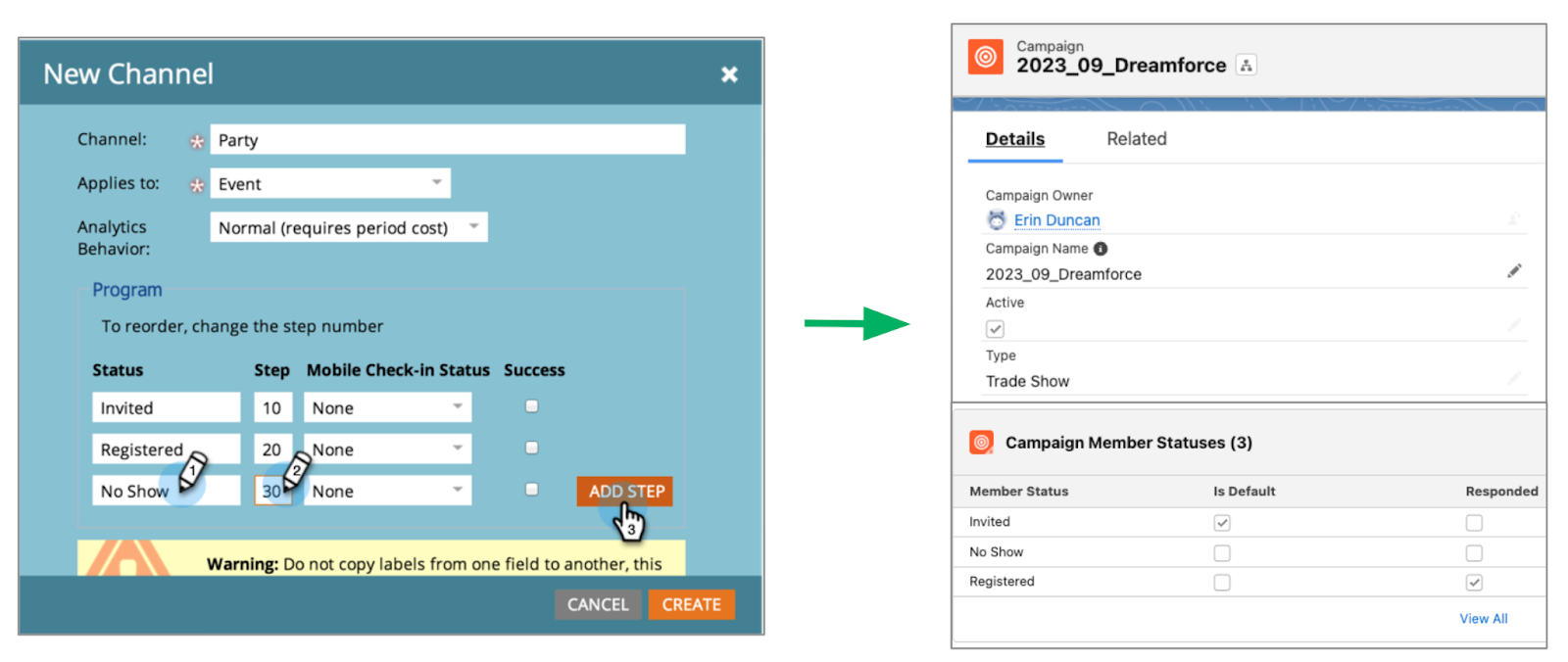
Marketo has ‘Programs’ for marketing initiatives such as events, nurtures, emails, etc. These programs have statues that designate where the prospect is within the program. This mirrors how Account Engagement uses campaigns and campaign member statuses.
Campaign member statuses can be used in the same way as Marketo program statuses, you’ll just want to make sure your users understand this change in process.
Lead Qualification
Marketo focuses solely on scores in three different scoring categories:
Behavior Scoring is implicit, it’s based off of the person’s interactions with your marketing resources or your website.
Account Engagement also has Scoring Categories that allow you to gain insight into which solution, service, or topic the prospect is most interested in.
Demographic Scoring is explicit, it’s based on other observable information such as Job Title/ Role, Company Size, and Industry.
Negative Scoring is also implicit, it’s based on what the person doesn’t do and reduces their score based on inactivity.
This can be replicated in Account Engagement with Score decay.
When migrating your Prospects from Marketo to Account Engagement, you may want them to start with their Marketo Behavior Score as their Account Engagement Score. If so, make sure you include the score in your import file for Account Engagement.
Forms
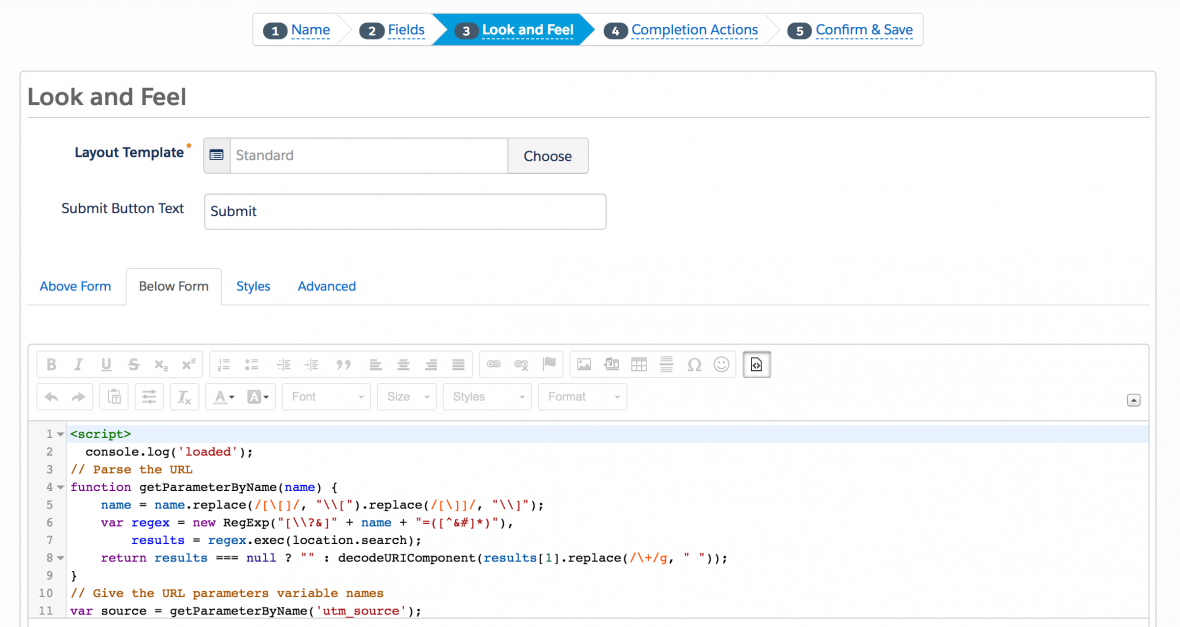
Marketo has a variety of built in options to support advanced operations, such as inserting text in the middle of the form, in form calculations, or multiple redirects depending on form values. Account Engagement relies on Javascript for these advanced configurations.
Custom JavaScript can be placed within your Account Engagement forms under the Look and Feel tab, in the Below Form section.
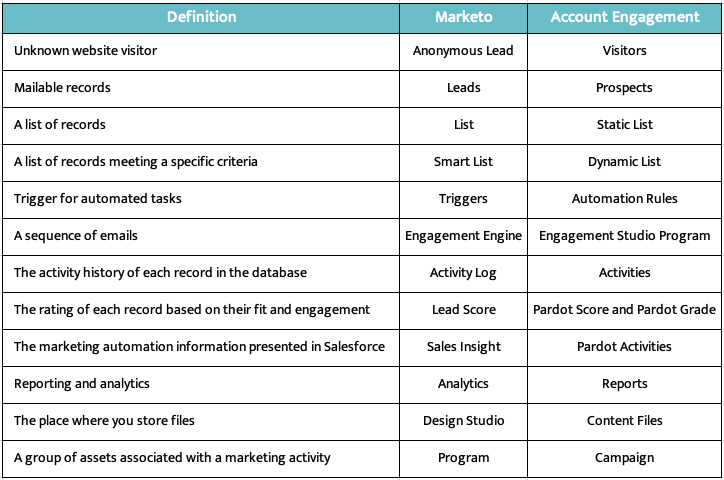
Marketo and Account Engagement Terminology Differences
Below is a quick guide to the terminology differences between the two systems. Make sure your users have this guide early to avoid confusion and frustration during your migration!
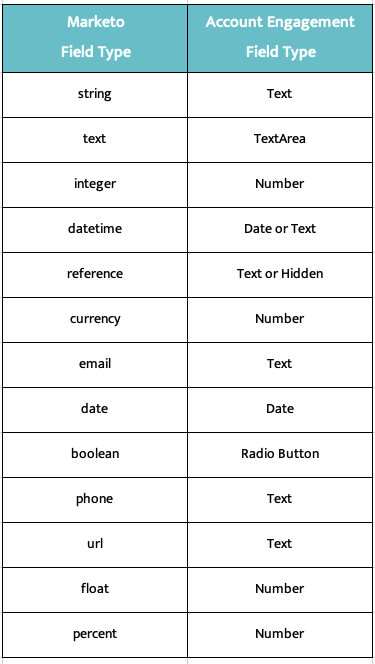
Marketo and Account Engagement Field Types
Account Engagement and Marketo field types are a bit different, but the below table will guide you when creating your new fields in Account Engagement.
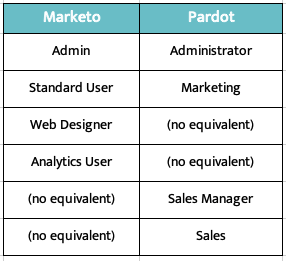
Marketo and Account Engagement User Roles
User Roles also differ between the two systems. Account Engagement’s Premium and Advanced editions provide the ability to use default user roles or create Custom User Roles so you can create a role with the exact permission needed.
Additional Tips
Marketo has restrictions on exports, typically 500MB per day. So plan accordingly, and keep in mind that you may not be able to export all your Marketo prospects in one day!
Account Engagement Automation Rule and Dynamic List criteria is limited to about 250 characters per rule (factoring in separator and spaces), while Marketo is limited to 5,000 characters. Creuz Your Data can help you split up your rule criteria into 250 character chunks, or Prospect Updater can help you circumvent this limitation entirely.
Marketers often overlook code literacy, outsourcing anything code related to website or email developers. But understanding some coding basics, such as HTML, benefits the everyday marketer more than they realize.
By learning the fundamentals of HTML, you can:
Better communicate your vision to the web developers
Understand how web pages are designed and where pieces of code need to go
Create richer, more engaging email and website content
Improve their search engine rankings
“But I don’t need to know how to code. It’s scary.”
That’s where we come in!
HTML coding basics for marketers
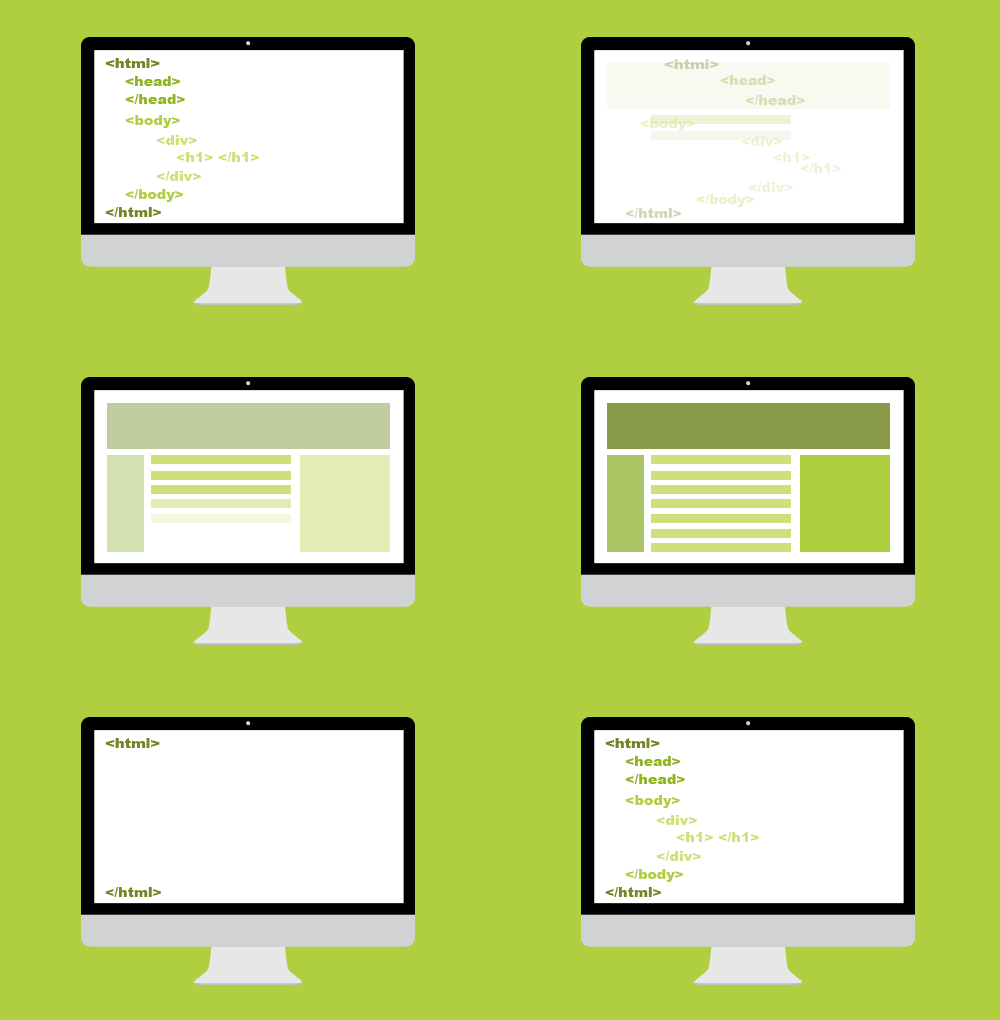
Hypertext markup language, aka HTML, is the code that tells your web browser what it should show when you go to a website. When you go to a webpage, your browser reads through the HTML tags and then presents it visually. This blog page even uses HTML to display its design and content to you in a way that is easy to read and understand.
With even the most basic knowledge of HTML code, you can better break up your page’s content in a way that will better engage your audience.
Code formatting
Each HTML tag you add must have a matching set of open and close tags. Without a close tag, any code you write will cause errors in how the info is displayed.
If we were to use the standard paragraph code, <b>, we would need to add </b> after we’re done.
<b>This tag makes text bold!</b> becomes This tag makes text bold!
HTML page structure
These tags will be utilized on every webpage. While you may not need to write them yourself, they are important to know and understand.
<head>
Any additional code for a page will go inside of the tag. This covers everything from general page design, additional styling, or Javascript code. Most tracking codes will go here as well.
<body>
This will be the main content for your website page.
<link>
If your page needs to link to a Cascading Stylesheet Sheet (CSS), it will do so inside of a tag.
<title>
Each page needs a title. What you place in the title tag will appear in search engine results as well as the name of the browser tab.
<div>
This is a structural element that goes inside the tag. Web pages and emails can be broken down into a series of nested tables. Div tags act as a single cell inside of this high level structure.
Building richer, more readable content
A main way marketers effectively use HTML is breaking up walls of text into something that is easier for a reader to sift through.
Content is meant to be read — not just for search engines to crawl. The more readable your landing page or email, the better your customers will understand the message you’re trying to convey.
With HTML, you add rich text formatting to make key points stand out or build a list of reasons why your product is awesome.
Here are some important tags to spice up your copy!
Coding basics for stronger search engine optimization
SEO is the name of the online content game. Marketers are always on the lookout for ways to improve their search engine rankings. But HTML provides some simple ways to gain a boost – no hard thinking required.
The importance of alt tags
Google can do a lot of things except look at images. So how does it know what photos to show as relevant when I search for something online?
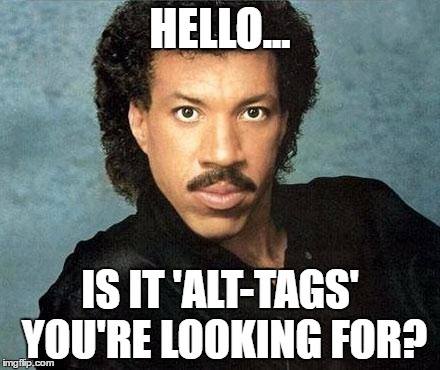
Alt text! Alt tags, also known as alt descriptions or alt text, describe the images you post to the search engine. They also allow customers who require certain accessibility tools to enjoy your more visual content.
And if an image is taking a while to load (or doesn’t load at all), the alt text will display.
To add an alt tag to an image in HTML, you would use the following format:
<img src=”(Image URL)” alt=”A meme with the text Hello… is it alt-tags you’re looking for? over a photo Lionel Richie’s face”>
Use HTML header hierarchies
Search engines like it when pages lay out what is most important. When you utilize H1, H2, etc. tags on your page, you are laying out a table of contents of what content is connected and how important each piece is.
By placing a keyword in an H1 tag, compared to an H4 tag, you tell Google that the keyword in the H1 tag is one of the most important pieces of context about what is on your landing page.
All header tags can be stylized to make the most important ones stand out visually, which assist with readability.
Let’s get meta with meta tags
Meta tags may not directly impact your SEO rankings, but by adding in appropriate meta descriptions, this tells search engines like Google know what to display on their search results page. The more accurate and correct the meta description on the results page, the higher the chance someone will click on your website’s link because your result looks more relevant to the searcher.
If you don’t set a meta description yourself, Google then gets to guess what content to put here based on what exists on your page. Also another reason why header hierarchy is vital.
These type of tags usually fall under the main <head> tag for a page and look like the following:
<head>

<title>Let’s Get Meta</title>

<meta name=”keywords” content=”HTML, Meta Tags, Meta Description, Metadata” />

<meta name =”description” content=”Answering all of your questions about meta tags!” />

</head>
Basic coding is not so scary, right?
Simple coding doesn’t have to be scary. Knowing the basics of HTML makes a difference when it comes to having stand out landing pages and email copy. And understanding how code works will help you communicate with your web developers.
If you want to learn more about code that helps marketers, check out Code School for Marketers, a 6-week interactive online course to give you the tools to improve your code literacy!
Account-based marketing (ABM) is a powerful strategy to target and engage high-value audiences. But to work effectively, it requires a significant operational lift to ensure that your team is making the most out of every marketing effort. That’s where account hierarchies are essential.
For starters, understanding and focusing on your audience of interest will help your team start to develop their strategy. But trying to identify target accounts, understand where those accounts sit within an enterprise-level company, and hone in on key stakeholders is frustrating with misaligned and disconnected account data.
This is especially true when you’re targeting companies with hundreds of subsidiaries or ones that have gone through recent mergers or acquisitions. You could be throwing marketing dollars down the drain and creating friction between sales, marketing, and your customer.
If you want to ensure your marketing team’s success, they need the right tools, processes, and insights in place to manage and nurture leads into customers. And the groundwork for this starts with an account hierarchy strategy that has clean, connected account data to serve as a frame of reference for your entire go-to-market team.
Don’t know what an account hierarchy is? We’ll explain.
What are Account Hierarchies in Salesforce?
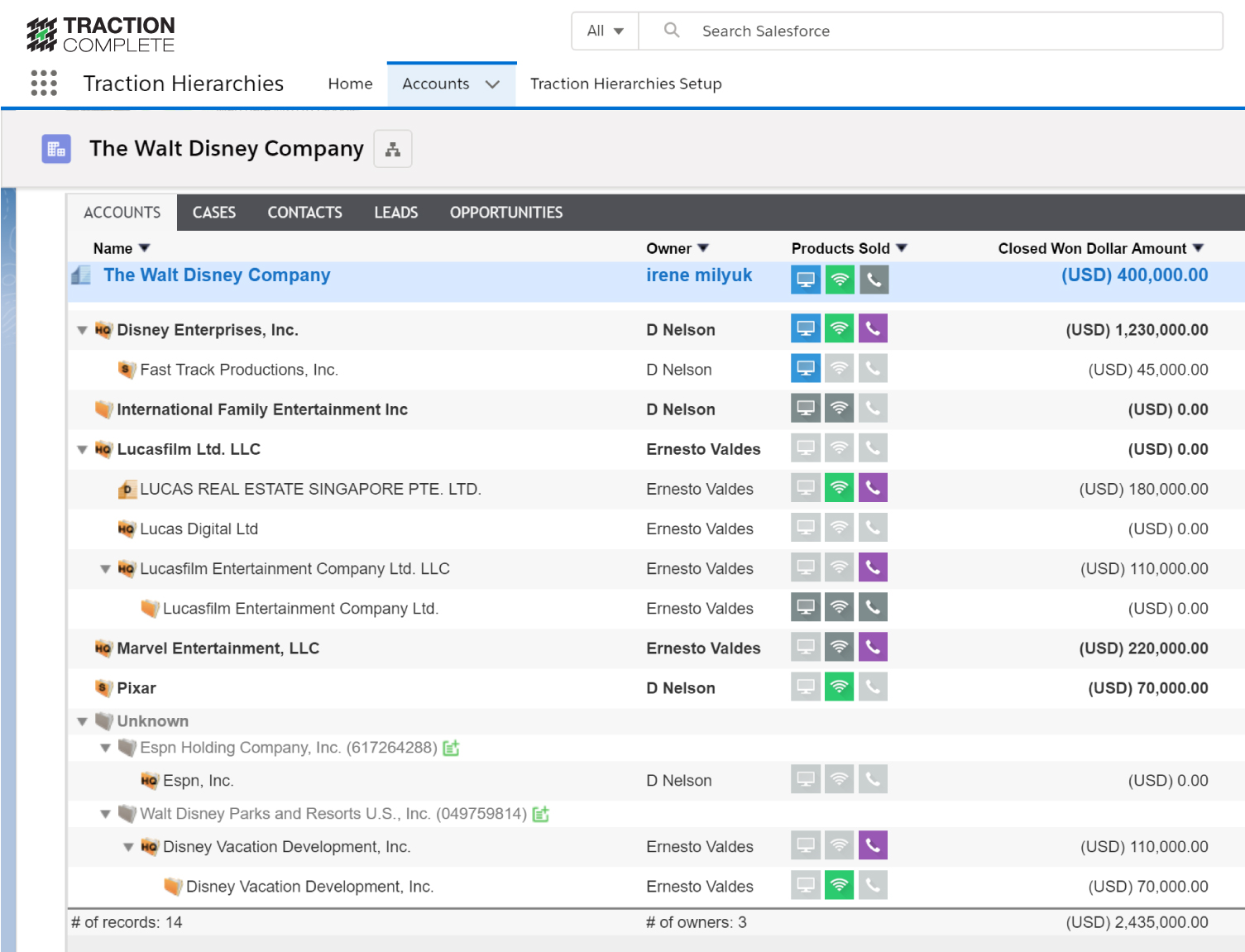
An account hierarchy in Salesforce is an organizational structure that creates a connected view of a company. Account hierarchies can help visualize the subsidiaries of a parent company, business units, important contacts, opportunities, and other valuable information.
Why should you care?
If you’re all about bridging the customer journey between systems and teams, having a full view of how your accounts are connected is the difference between looking at a pile of puzzle pieces and putting them together to make a complete picture.
Aligning target accounts between marketing and sales makes your account-based strategy more effective. If everyone has the same view of the enterprise account structure, everyone works together for a more complete customer journey. Your sales teams will have the context they need for quality conversations and your marketing operations teams can make data-driven decisions for their campaigns.
Why Account Hierarchies Take Your Account-Based Marketing Strategy to the Next Level
For your ABM strategy to be as effective as possible, it’s critical to have a clear picture of your target accounts. When marketing operations can effectively understand the relationships between the accounts, the risk of mistargeting is reduced and your account-based marketing strategy becomes an account-based everything strategy.
Here are four reasons why account hierarchies are key to the success of an ABM strategy:
1. Enhance targeting & segmentation with a complete view of accounts
It’s difficult to make data-driven decisions when you can’t trust your data. Having an automated account hierarchy tool in place helps marketing operations teams better understand the relationship between different accounts and the individuals within them.
With this information available, your team will have the knowledge they need to influence an ideal customer profile (ICP) and identify the most high-value accounts to target. This is the foundation for creating personalized marketing campaigns and increasing the likelihood of generating a high ROI.
2. Strengthen marketing & sales collaboration with enterprise account alignment
Implementing a strong ABM strategy helps you optimize the time invested by both your marketing and sales teams.
Are you sending leads to sales that aren’t being followed up on? Clear account hierarchies provide a common framework that makes it possible to collaborate effectively and ensure all teams are working towards the same goals and target accounts.
For example, marketing can implement a “land and expand” approach to ABM, where you “land” a deal with one contact and “expand” to other departments or selling across the entire account hierarchy. Marketing matches the efforts of sales by targeting efforts to accounts within the same family tree and everyone is happy.
3. Improve customer experience with more accurate matching and routing
Messy data leads to a messy experience for both you and your prospects.
Enterprise sales is a complex selling motion and without account hierarchies, you run the risk of ineffective matching and routing or duplicate accounts. Both sales and marketing teams can experience serious consequences as a result of these scenarios.
For example, an account conflict can occur if a small or midsize business is routed to an enterprise representative or lead-to-opportunity conversions can be negatively impacted. This can cause internal confusion and frustration and prospects might even fall under the impression that your organization is not suitable for them to be doing business with.
4. Streamline reporting and analytics with better data quality
At the end of the day, you want to evaluate which of your marketing efforts were most effective. Being able to report on your account hierarchies makes it easier to track customer interactions and attribute different touchpoints to specific contacts and accounts. That’s a big win for marketing attribution!
Account hierarchies also reduce duplicate accounts. So with improved data quality and a reduced account footprint, it’s easier to make sense of what works and what doesn’t for additional retargeting campaigns.
Hierarchies in action: It’s time to look at the full picture
The key to building a strong account-based strategy is gaining a holistic understanding of your customer. To do that, you need clean, connected account data. Account hierarchies use a framework that can provide you with both to help you supercharge your account-based efforts.
With insights into an organization’s structure, account hierarchies enable:
Better targeting and personalization that improve sales and marketing alignment
Enhanced account intelligence
Streamlined lead-to-account matching
More efficient resource allocation
We’ll also add that it makes life for your revenue team easier, too! Account hierarchies can be built manually or with tools that automate the building and maintenance. Due to the complex nature of account relationships, an automated approach often mitigates the time and effort needed to keep hierarchies up to date and built around your go-to-market strategy.
To automatically build and visualize account hierarchies in your Salesforce org, Complete Hierarchies can create a complete and accurate picture of an entire corporate family tree. Complete Hierarchies is the first automated account hierarchy solution for Salesforce and has been used by 1Password, Zoom, and Asana to help overcome the limitations of Salesforce.
Get Help with Account Hierarchies and ABM Strategies
Want to learn more? You can visit Traction Complete to discover their suite of Salesforce solutions for automated account hierarchies, lead routing, and data cleanup. And then reach out to the team at Sercante to get the tools all integrated into your marketing strategy.
Migrating from one marketing automation platform (MAP) to another can be nerve wracking. You are bound to be overwhelmed and not know where to start. But I once had a high school coach say “nervousness equals readiness.” And while that didn’t always ease the nerves before a big race, it has stuck with me all these years. So embrace the change as you prepare for your marketing automation platform migration!
I have been on both sides of a marketing automation platform migration project — both as a person who owns the platform and as a consultant. I want to share some of the learnings from those experiences to make the process a little less painful for anyone who’s just getting started.
Remember the reasons you are changing MAPs
Since we work through so many marketing automation migration projects where we help our clients switch to Marketing Cloud Account Engagement (Pardot), we’ll use those migrations as an example for the purposes of this blog post.
Marketing teams are usually migrating to Account Engagement for one of a few reasons:
It works better with Salesforce
Their current MAP is not easy to understand
They are looking for better support
Budget
Migrating to Account Engagement means you get one unified platform for sales and marketing, which for marketers means one less system to have to log into!
With Engagement History on leads, contacts, and accounts, your sales team has insight into engagement with marketing activities right on their record. And a lot of marketing technology (martech) integrates with Salesforce.
That means you can, more often than not, pull that information into Account Engagement to use in your audience segmentation.
Account Engagement is not ‘Insert Marketing Automation Platform Name Here’
Regardless of the reason you are migrating to Account Engagement, you need to remember that Account Engagement might not be able to do everything the same way as your existing MAP — but that isn’t a bad thing! There is most likely a solution for it using native functionality or customizing code.
I have seen clients say they want everything in Account Engagement to be how it is in their current MAP. This approach will most likely cause some headaches down the road. Take a step back and get an understanding of what the end goal of your process is today so it can be translated into Account Engagement, and then look at how it can be done within Account Engagement.
Make sure you spend time on Trailhead to get an understanding of the basics of how Account Engagement works before you dive into migrating systems.
Documentation will be critical for success — marketing ops rejoice!
The first step before starting to move over assets is to make sure that you have your processes documented. Not only will this help during migration but it will allow you to take a good look at how things are done today and try to improve where possible.
Here are a few to make sure you document:
User management – Who needs access? What type of access do they need?
Lead routing – When does a lead go to sales? What information is required before it goes to sales? Who is it assigned to? What happens if the lead is not ready?
Reporting – What are your KPIs? What system does reporting need to happen in? How do you need reporting – by campaign, by channel, by quarter, by month?
Lead and customer journeys – How and when do you engage with a lead? What about a customer?
Legal requirements – Is there specific language on forms, emails, and landing pages that we need to have?
Overall martech stack – What tools are in your tech stack? How do they all work together? Do you have any new tech you are adding soon?
Channel your inner Marie Kondo throughout your MAP migration
Regardless of how clean you think your current MAP is there will always be old assets and outdated processes. Channel your inner Marie Kondo and make sure you only migrate over what brings you joy — well, migrate what is still necessary for the future. Don’t worry you can always export reporting on old assets so you are losing that data.
This is not only about cleaning up your assets, now is the time to take a good look at what isn’t working well today and make improvements. This applies not only to processes but nurture programs and email and landing page experiences.
While yes, technically, you can do a migration in 30 days, I suggest taking as much time as you can. This is especially true if you have lots of nurture programs, email templates, and complex processes to migrate to the new system.
This is not always possible. There are so many factors that go into this — especially budget and resources.
So, have an honest conversation with your team about the timeline. Don’t forget to factor in overlap with your current MAP (at least a month), and try to give yourself a little padding for the unexpected and time off.
Something will not go as planned
No matter how much you plan and prepare for a migration, something will not go as expected. AND THAT IS OKAY!!!
You might find some custom code on a form you weren’t aware of. Or you could experience sync errors with Salesforce due to a validation rule you didn’t know existed.
Just take a deep breath and know that it can be fixed.
You don’t have to go through a MAP migration alone
Again, migration projects are scary. But you can work with consulting companies that go through these MAP migrations every day. Not only do they know all the processes and logistics for migrating to the new platform, but they’ve worked with companies that weren’t fully utilizing their MAP investment and found ways to improve user experience and adoption.
Working with a partner, like Sercante, can help make it less scary and make sure you get the maximum value out of your tools.
Reach out to the team at Sercante as you get ready for your marketing automation platform migration. We’ve seen it all, so bring us your juiciest challenges!