These are the features we’re going to start using ASAP.
What CRM Analytics features are there to love in the Salesforce Summer ‘22 Release?
They said it was coming. They said it would be here soon. Now it’s here. The CRM Analytics data manager has gotten a facelift and some groovy new features.
Flows are headed out the door. Hello recipe driven data sets! Will you be ready?
Read ahead to find out how some of these new features will change the way you use CRM Analytics
Reviewing Usage of CRM Analytics limits
Viewing usage is now a breeze! No more wondering what the limits are or how close you are to reaching them. This usage is unique to what’s used by CRM Analytics. I’ve been using this feature since the beta so I can’t even remember how we did it before.
All recipes, all the recipes, all the time (well pretty soon)
The retirement of flows is imminent. No, they won’t disappear, but this release shows that a strong “nudge” is being given to moving away from Data Flow (happy dance on my part).
Side note: the Flow to Recipe conversion (Beta) does not appear to be ready for primetime and flows are not going anywhere any time too soon!
As part of this transformation, new Recipe features are being released to close the gap.
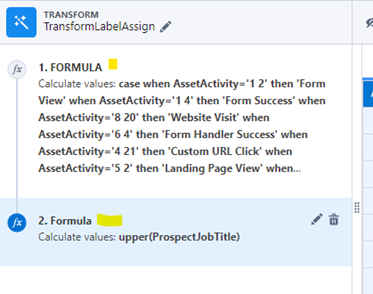
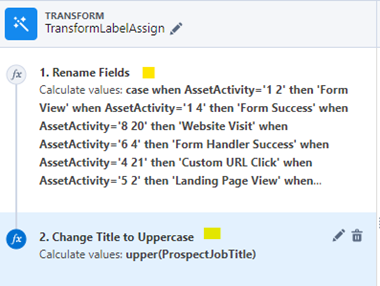
You now can give each step in a transform a name in a recipe
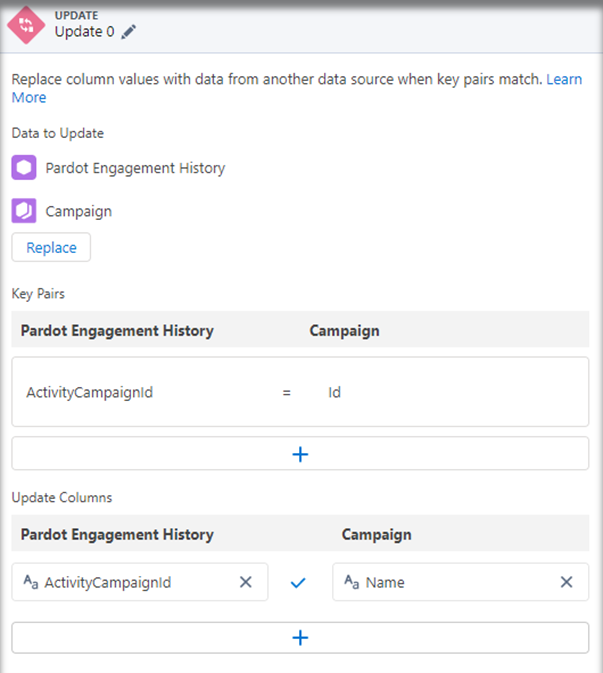
Use Case: The update can be used to replace fields with those from another table. For example, instead of joining and adding a bunch of fields, you can update the Campaign name directly in related objects — less complexity and mess!
Improved Data Sampling in Recipes
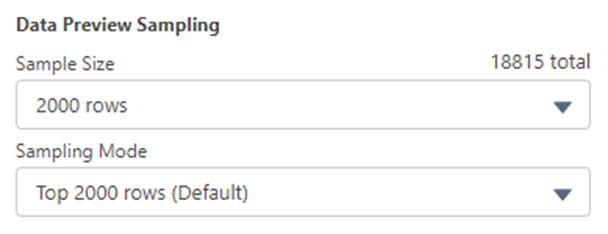
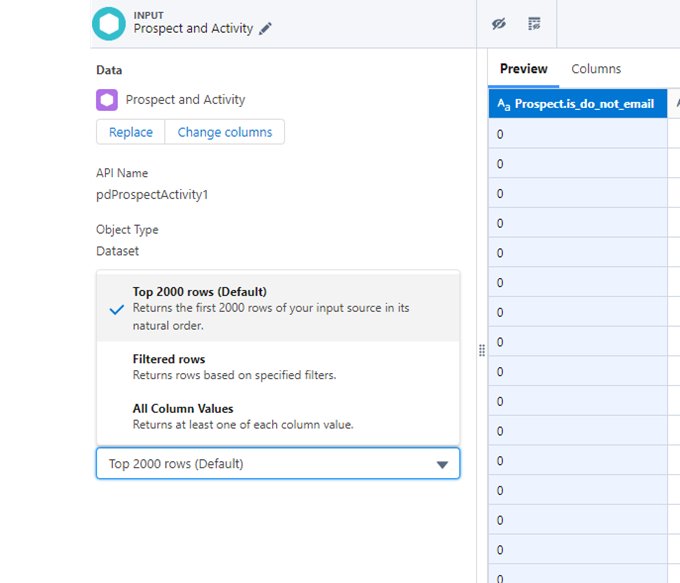
Select how you want the preview to work!
You can now select a “sampling mode.” This is REALLY useful when the results you want to see might not exist in the initial rows returned (like when you are selecting filters). No more guessing when bucketing and filtering your values!
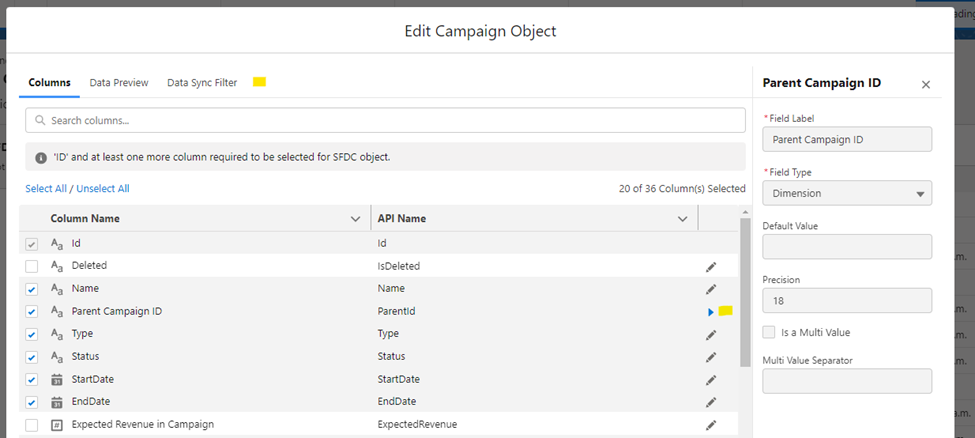
The connections area now has a simpler layout. That means seeing what’s available for use has never been easier. You can also view filters, multi values and other specific information about your connected data sources in one screen.
When selecting connectors (add connector) you can now pick the type easily and see what options are available (and the list is growing). Open any object to see the new streamlined layout!
Improved Data Manager Layout
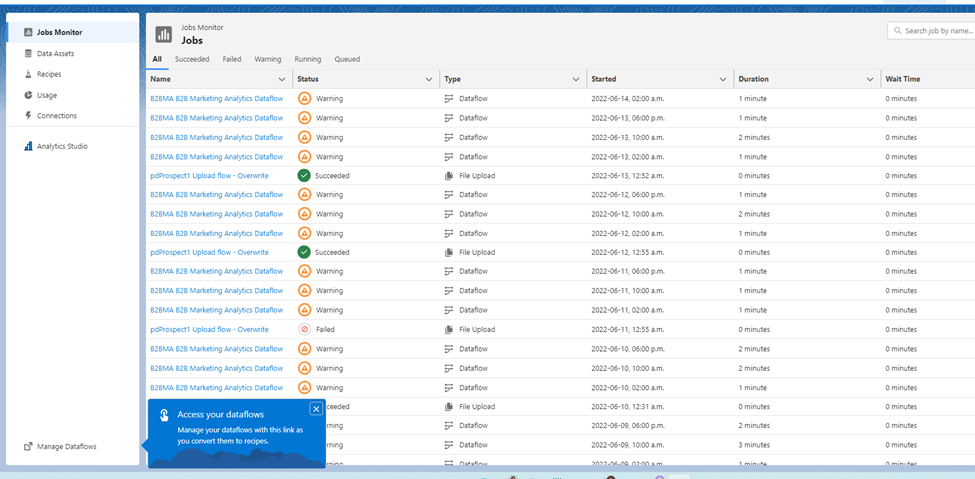
It’s now super easy to see what’s happening, happened or will happen!
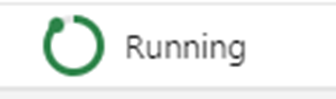
And finally, a small but wonderful change…. The status “circle” in Data manager now actually means something. The “green” shows how much of the recipe/dataflow has run so you can have some idea of how far into the process your data generation has gone!
Maybe one of the most compelling things about the changes has nothing to do with what you can do, but with what you can now easily SEE. With all the possibilities becoming more visible, I anticipate many CRM Analytics admins and users digging into more of what the product has to offer.
Let us know what you’re working on in the comments section or reach out to us here.
We get three major releases from Salesforce each year — Spring, Summer and Winter. Each Salesforce release includes upgrades and enhancements that affect Salesforce orgs in different ways.
So, if you’re using and managing marketing operations for your company or organization and want to know more about Salesforce, then you’re in the right place. We’re going to cover everything you need to know about the Salesforce Summer ‘22 Release if you’re a marketer who uses Salesforce.
Salesforce Summer ’22 Release: Highlights for Marketers
Marketers who use the Salesforce platform are getting lots of attention from the Salesforce Summer ‘22 Release.
Some updates are changing the way we work to meet evolving technology demands. Others are saving us time by connecting the dots in a logical way.
All we know is, this release includes big updates for people in the marketing world.
Highlight #1: Enabling Person Accounts
For any organization who has considered Person Accounts, you know that you have to reach out to Salesforce Support to get them to enable Person Accounts in your Salesforce environment.
With the Summer ‘22 release, organizations are now able to enable Person Accounts on their own through Salesforce Setup. Similar to the previous process, enabling Person Accounts cannot be reversed from your Salesforce environment.
If you are looking to implement Person Accounts for your business and are looking for a partner to assist you with it, please reach out to us to find out more on how we can help you through the implementation process.
Stay tuned… we’re working on a blog about how Person Accounts work with different Salesforce products.
Highlight #2: Custom Field and Related List Updates
Salesforce Administrators have been wondering for years “how can I create a custom Address field so I can record multiple addresses on my customer records?”
Our questions have finally been answered with the new beta feature of creating custom Address fields on various objects. These custom fields will mimic the behavior of the standard Address fields you see on the Contact and Account objects.
It will be interesting to see how new custom Address fields will play with Pardot if your organization decides to sync those fields over.
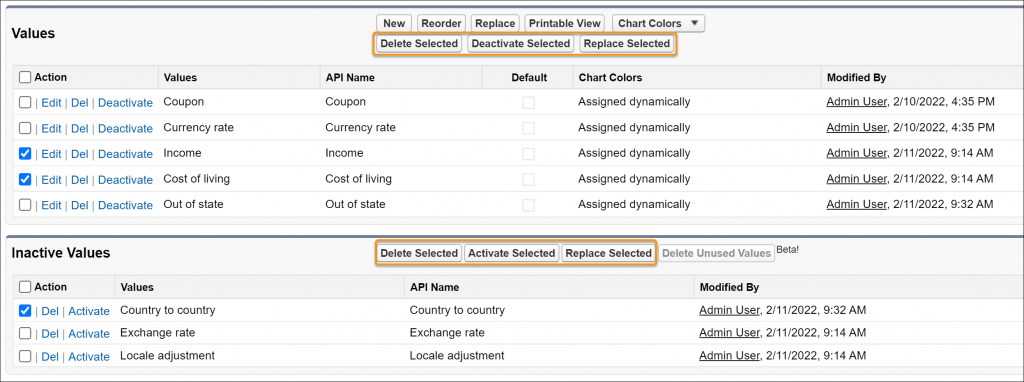
Improvement #2: Picklist Enhancements
Have you ever needed to inactive multiple picklist values and realize you’ll be clicking “deactive” for nearly five minutes?
This is a beta feature that you will need to enable in Setup. It gives you the option to select multiple picklist values at one time and perform various actions on those values.
This is probably my favorite feature in this release. The introduction of Dynamic Related Lists will bring amazing opportunities to customize your org’s Lightning Pages.
With this improvement, you can add the new Dynamic Related List – Single component on your Lightning Page. You’ll select the fields you would like to display, and then apply filters to ensure only certain records show in your new related list.
You can create multiple related lists for the same object if you would like to display different groups of records, such as filtering on Opportunity Record Type.
Highlight #3: Reports and Dashboards Updates
Salesforce continues to ensure that Reports and Dashboards get new updates with each release throughout the year. Some features that were in Beta during the last release are now Generally Available, while there are new features entering the Beta phase.
This improvement was highlighted in our Spring ‘22 Release Article when it was a Beta feature. It is now Generally Available to all Salesforce customers.
Similar to the improvement above, we highlighted this feature in our Spring ‘22 Release Article when it was just a Beta feature, and it is now Generally Available to all Salesforce customers.
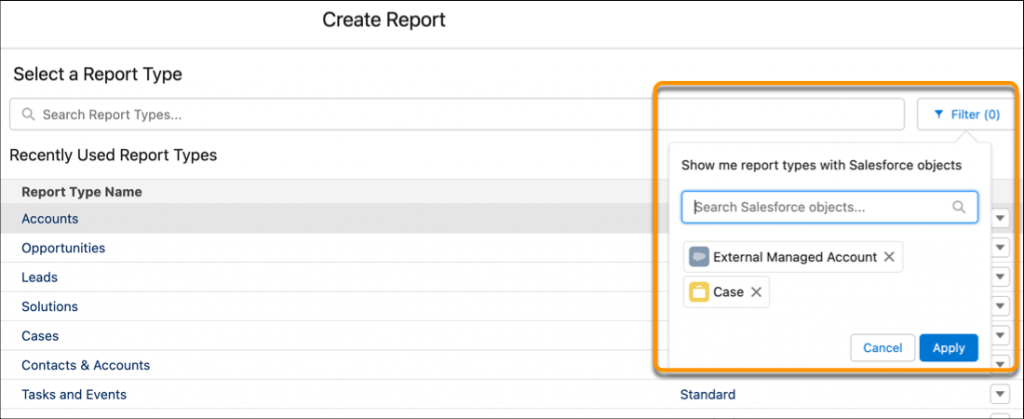
Have you ever had to scroll through all of your report types to try to find the ones that contain the specific object you are looking for? This new Salesforce beta feature allows you to filter the report types on the specific objects you need to ensure are in your report.
This feature, along with Improvement #1, compliment each other in a way that will help you find the right report type faster.
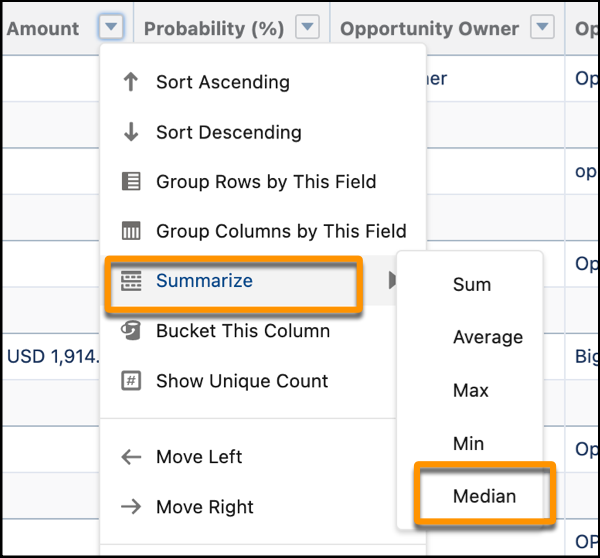
One of the smaller features in this release, this improvement provides the ability to summarize your fields in a report based on the median action along with the previously available actions.
Highlight #4: Salesforce Flow Updates
You may have heard the phrase “Flow is the future” in Salesforce messaging over the past couple of years. This is because Salesforce is consistently releasing new Flow features to prepare for the retirement of Process Builder and Workflow Rules in the upcoming years.
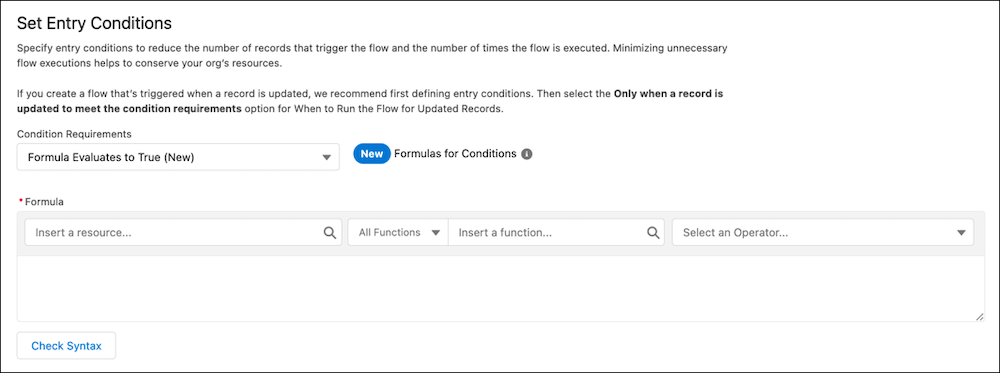
Flows will now have the opportunity to use formulas as entry conditions instead of just field value criteria. This improvement provides so much more flexibility then we previously had, and it’s something I am very excited to implement in my client’s Flows to help optimize them even more.
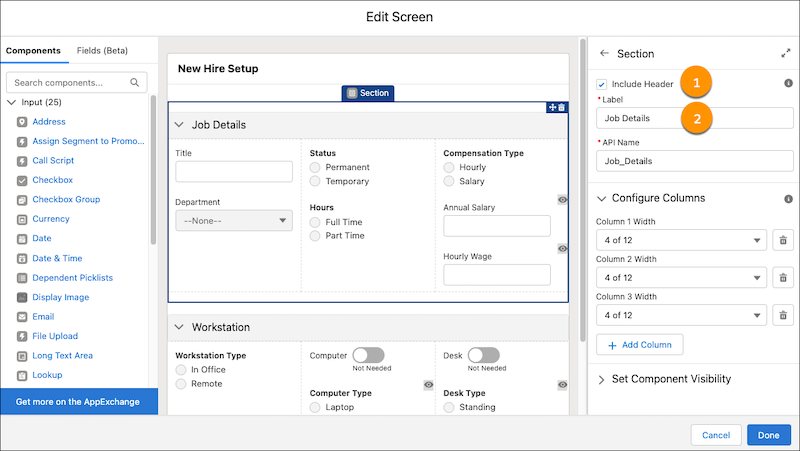
Through this feature, your screen flows can become even more efficient as you can have these fields populated with either existing values and even have autocomplete functionality with the Address record fields.
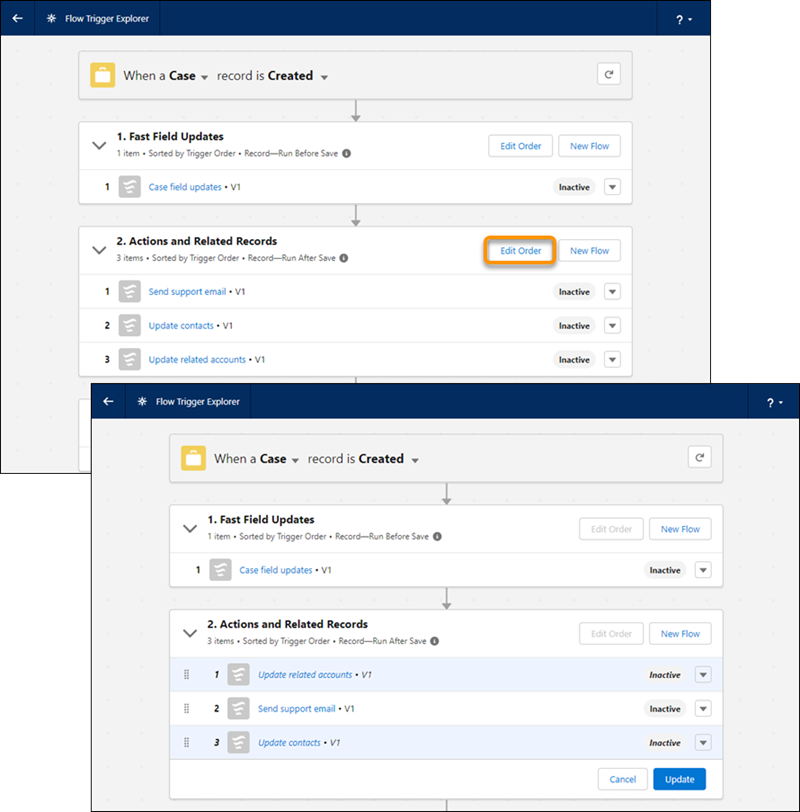
The Summer ‘22 release brings the ability to easily update the run order of your record-trigger flows without needing to open and edit the individual flows themselves.
Through the easy-to-use UI, you can ensure that your record-trigger flows are executing in the exact order you specify for an individual object.
Salesforce will continue to push its customers to Flow in preparation of the retirement of Process Builder and Workflow Rules. Thankfully we are provided tools to help make the migration process a lot easier than just creating flows ourselves. The Migrate to Flow Tool was already available for certain Workflow Rules in the previous release, but now supports more kinds of workflow rules. THe tool will now support the following:
Equal to null
Not equal to null
Rule criteria formula
Stay tuned for a blog post on migrating Workflow Rules and Process Builder to Flow through this tool to learn more about it.
Every Pardot Admin probably screamed with glee when they saw this feature was finally being released. We are now able to include conditions on Completion Actions to ensure that subsets of your prospects are meeting the criteria for certain completion actions. Previously we could only include completion actions that fired for each prospect that completed the asset so this improvement will help all companies enhance their marketing automation efforts.
The Summer ‘22 release will bring a single report for you to review all of the bounced email addresses from the past year for each email sent. This is a huge improvement from needing to view individual list email reports in order to find the prospects that had bounced email addresses for that email.
The Summer ‘22 release will bring four new fields to your list email reports:
Total Prospects on recipient lists
Total suppressed Prospects
Total unmailable Prospects
Total duplicate Prospects
These new fields will provide a more accurate picture of who is receiving your emails and give you more information to help with your prospect management decisions.
Salesforce is getting bigger and better all the time
B2B marketers who come to Salesforce are usually looking to scale their efforts and grow in a way that makes sense. These latest enhancements from the Salesforce Summer ‘22 Release get marketers closer to those goals by saving them time and resources. Contact the team at Sercante to get help implementing these enhancements in your Salesforce org. And leave us a comment below to let us know what you think about the Summer ‘22 Release.
If you’ve ever experienced email bounces in Pardot (and chances are you have), you’ll know that reporting on and exporting them has been a labor-intensive task.
That all changes now.
As part of the Summer ‘22 Release, marketers have been blessed with a new tool for Marketing Cloud Account Engagement (Pardot) called Email Bounce Report.
It’s a feature that shows who, when and why prospects bounced. And it also allows you to export all that insightful data.
That’s right, our prayers have been answered. We no longer need to manually pull this data from each and every email report.
What is an email bounce rate?
First, let’s understand what a bounce rate is.
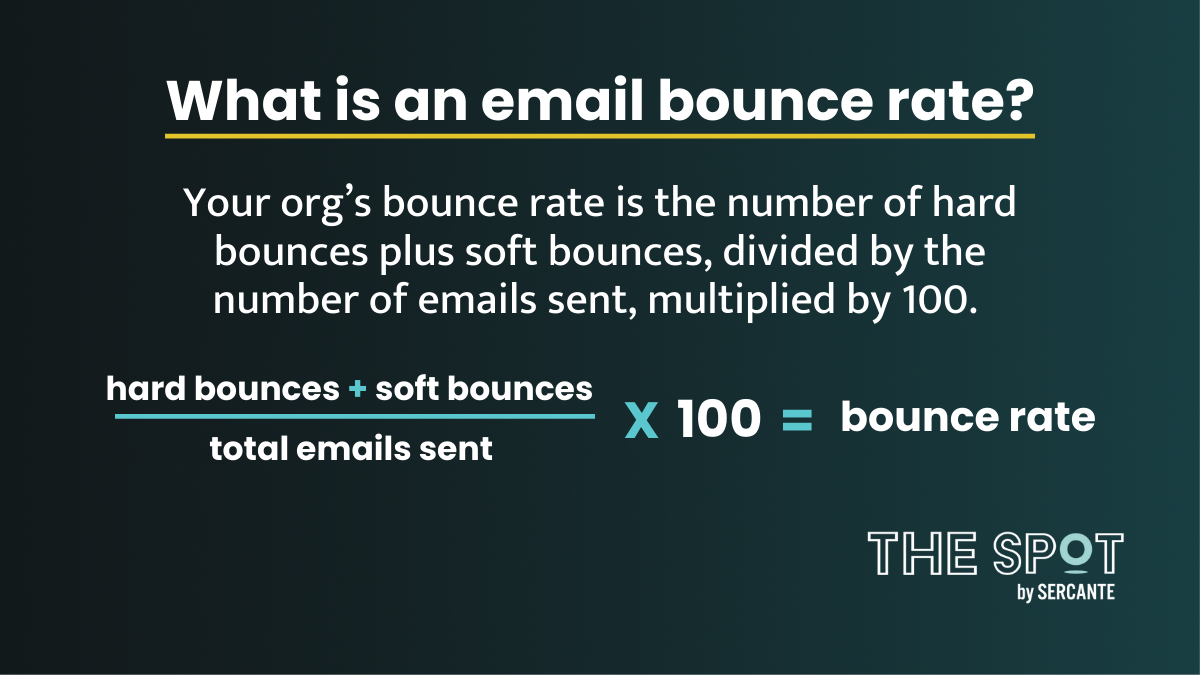
Your org’s bounce rate is the number of hard bounces plus soft bounces, divided by the number of emails sent, multiplied by 100.
In B2B marketing, anything below 10% is considered a good bounce rate.
It’s good practice to monitor your bounce rate. And this report helps you do just that!
Who can get the Pardot Email Bounce Report?
This report is available on all Pardot editions, and it includes bounced email addresses from both Pardot Classic and Lightning.
The report is pretty comprehensive and shows bounce data for ALL Pardot prospects. We’ll go into some of the use cases in another blog post.
From total number of email bounces (filtered by date) to bounce reasons, this report has it all. And yes, all of the bounce rate report data is exportable.
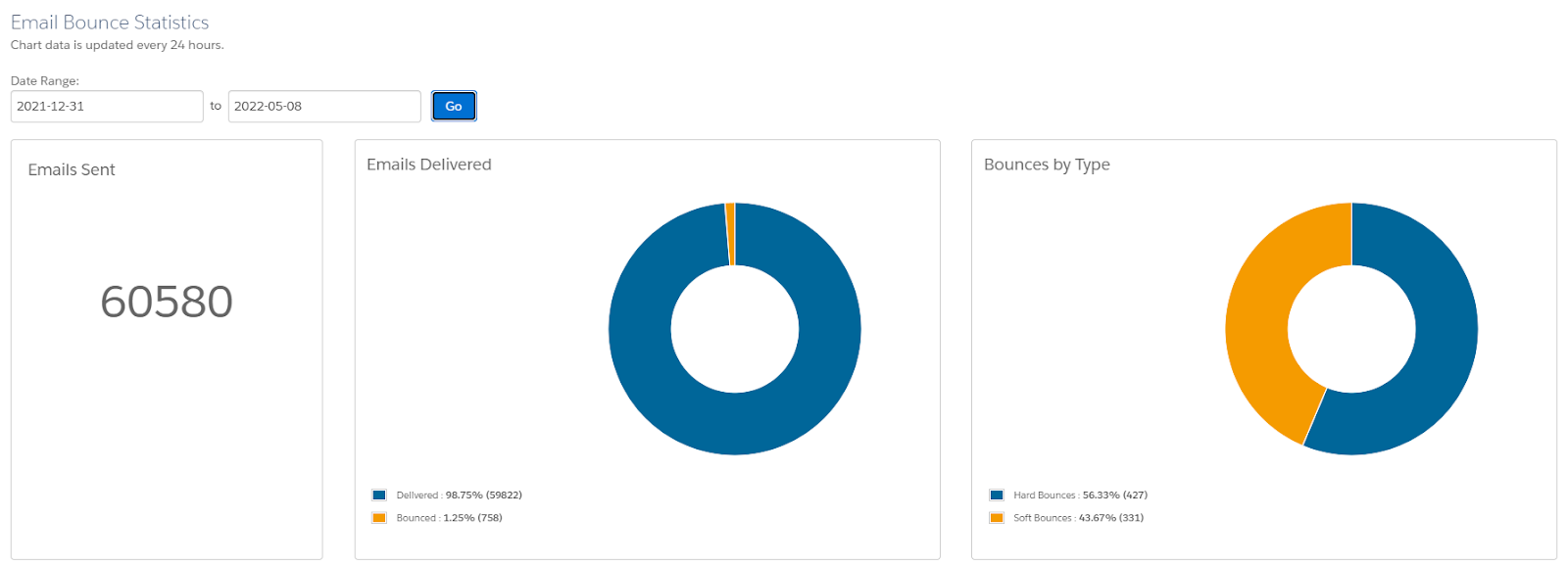
Found under marketing reports, you are greeted with a chart illustrating,
All emails sent over the last year – one year from todays date – so if its the 12 May 2022, you can go back to 12 May 2021. Personally, I’d hope this is amended in future updates as it would be useful to see further than the last year in some cases.
Total emails sent
Total bounced & delivered
Bounce by type – Soft vs. Hard
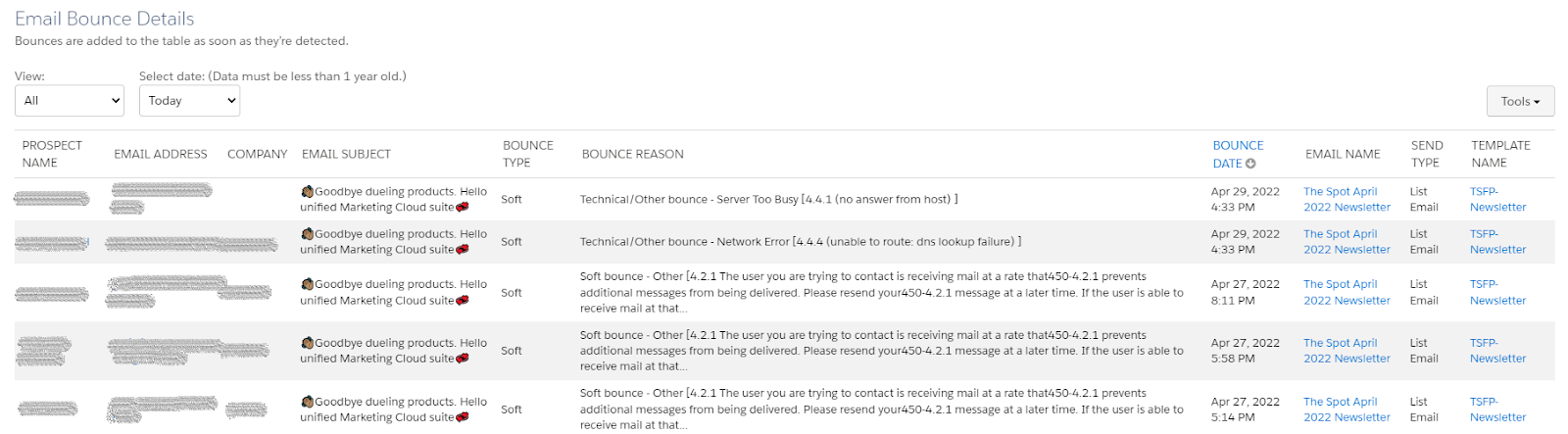
Scroll down, and you get to the good stuff… the bounce details, including bounce reason.
It’s no good seeing the number of bounces you’ve received if you can’t do anything about it. Filtered by bounce type and date, the Email Bounce details table tells you:
Prospects who have bounced
Email addresses and company names
Email subject
Bounce type
Bounce reason
Bounce date
Email name – linked
Email send type and template name
Why is the Pardot email bounce report so useful?
Understand why your emails are bouncing
From full inboxes, invaild email address and none responsive servers, there are a number of reasons why your emails may bounce. This report helps you understand those reasons and potentially act on them.
Types of bounces
Soft bounce – Occurs when an email is recognized by the recipient’s mail server but is returned to the sender because the recipient’s mailbox is full or the mail server is temporarily unavailable.
These prospects may be able to receive emails at a later time. However, after an email soft-bounces five times, Pardot will mark the prospect as undeliverable and suppresses them from receiving emails from you.
Hard bounce – Occurs when the prospect’s email address is invalid, the domain name does not exist, or the sender is suspected as spam and/or has been blocked. Prospects with a hard bounce are no longer mailable.
Bounce reasons – If you’re able to resolve the email bounce issue, you can reset the bounce count on the prospect record and start mailing them again.
2. Spot trends and take action
Use the report and export feature to filter and identify trends that may be contributing to you bounce rate, such as:
Particular templates that continuously bounce
Subject lines that cause bounces – Spammy subject lines?
Dates of email sends – Think back to the Google outage way back December 2020. Are there any significant dates when bounces were high?
Certain companies/ email domains – Contact the recipient and ask them if they’ve configured an email rule that forwards incoming email messages from you to another destination. Their rule could have tried to send a copy of your message to a bad email address. Or, have you simply misspelled the address/email domain?
3. See the bigger picture
Ever sent an email and thought “wow, that bounce rate was high!” You may have wondered if this was an isolated incident or if bounces were in fact an issue in your org?
Often marketers see a few emails with high bounce rate and assume they are destined for failure when it comes to getting their message into the inbox of prospects. Using this report, you can see the bigger picture. Then, you can understand how many bounces you have IN TOTAL out of all the emails sent in the last year.
4. Keep your Pardot data clean
Bounces often relate to the quality of your data and a low bounce rate overall indicates a healthy and clean org. Knowing how big of a problem bounces may (or may not) be can help with keeping your org clean and relevant.
Using the “Reset” feature found on individual prospect records you can reset bounces (hard and soft) and give yourself a second chance.
Still no luck? Consider removing these prospects, particularly if the bounce reason is permanent.
5. Avoid Salesforce account suspension
Salesforce is super serious about permission-based marketing. And its reputation as an email service provider, as well as your reputation as an email sender, is why they monitor accounts with bounce rates over 10% (as well as high spam complaint rates).
If Salesforce notices an issue with either of these numbers, they can suspend email sending from your account.
What can you do to lower your email bounce rate?
No email service provider can ever guarantee your deliverability rates — that’s down to your email practices and behavior.
Here are some things you can do to help with your email sending reputation and lower those bounce rates.
As above, understand why your emails are bouncing and take action.
Understanding email bounces is a big win for marketers
Armed with the data behind the bounces, this report is a win for marketers serious about their email sending reputation. However, if you’re left feeling confused, worried or overwhelmed by the numbers, reach out to the Sercante team to see how we can help.
Conditional Completion actions are coming to Marketing Cloud Account Engagement (Pardot)! And they’re a game changer for adding complexity to completion actions on your marketing assets.
This has been a long awaited request in the IdeaExchange. So, we’re ecstatic to see it finally come to fruition.
Note: This feature is not currently available in production. Conditional Completion actions will be rolled out during the Summer ’22 release (May 21st – June 11th) and this blog will be updated as we get access to this feature. Stay tuned!
What are Marketing Cloud Account Engagement (Pardot) completion actions?
Pardot Completion Actions allow you to add follow up automations to most Pardot assets such as forms, landing pages, files, custom redirects, etc.
These actions trigger after someone interacts with the asset such as a click or form fill. Pardot Admins and Marketing Users can configure which actions they want Pardot to trigger after the fact.
Completion actions include:
Add Tags
Add To List
Add to Salesforce Campaign
Adjust Score
Adjust Score For Scoring Category
Assign Prospect via Salesforce Active Assignment Rule
Assign To Queue
Change prospect custom field value
Change prospect default field value
Create Salesforce task
Increment prospect field value
Notify assigned user
Notify user
Notify user via Twilio (phone)
Register for webinar
Remove from list
Remove tags
Send autoresponder email
Set profile
Set prospect’s first touch campaign
Currently, you can add as many of these as you see necessary. But keep in mind, they trigger on ALL Prospects that interact with the asset. Conditional completion actions are changing that.
As Pardot stands today, other automation features, such as Engagement Studios and Automation Rules, can provide ways to conditionally process prospects. However, these automations have limits, and using multiple assets per form fill, link click, etc., can bog down your system.
With Conditional Completion actions, you will be able to perform all the desired actions right from the asset setup page.
What are Pardot conditional completion actions?
Welcome conditional completion actions!
Conditional completion actions add complex logic to your existing or new completion actions on your Pardot assets.
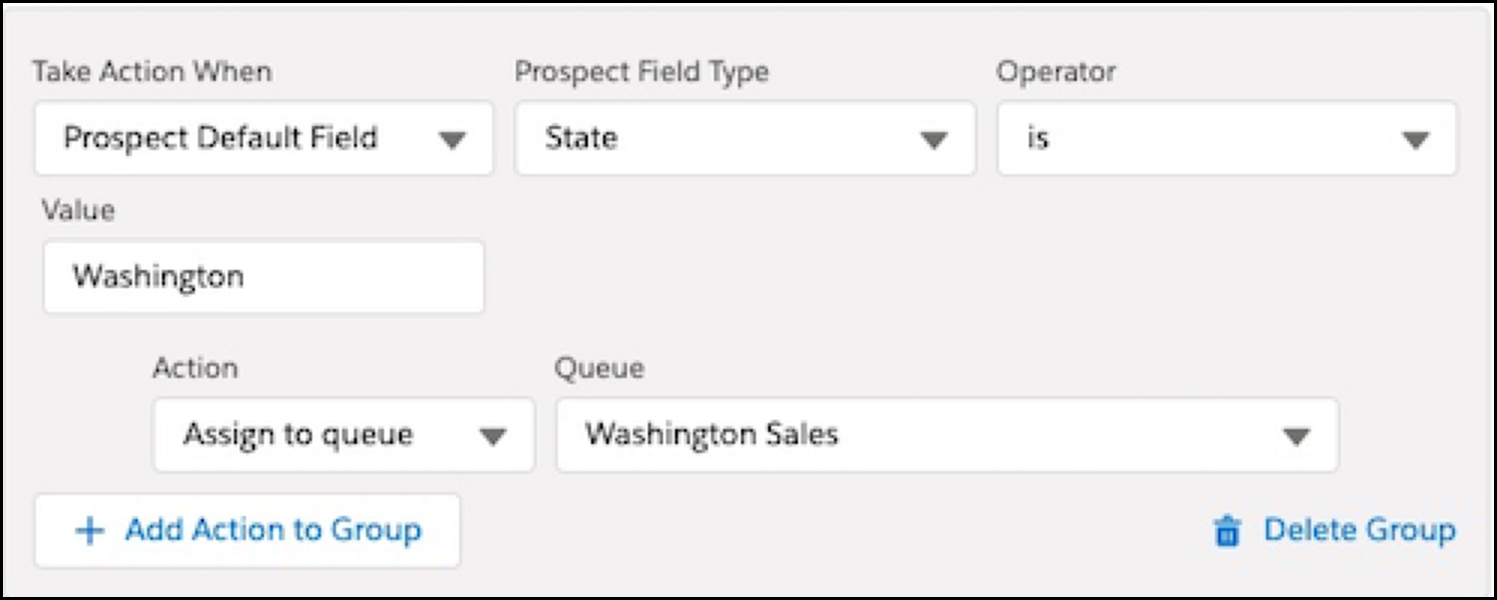
Essentially, you are able to create logic similar to dynamic lists or automations rules (or Salesforce Reports) that follow this pattern:
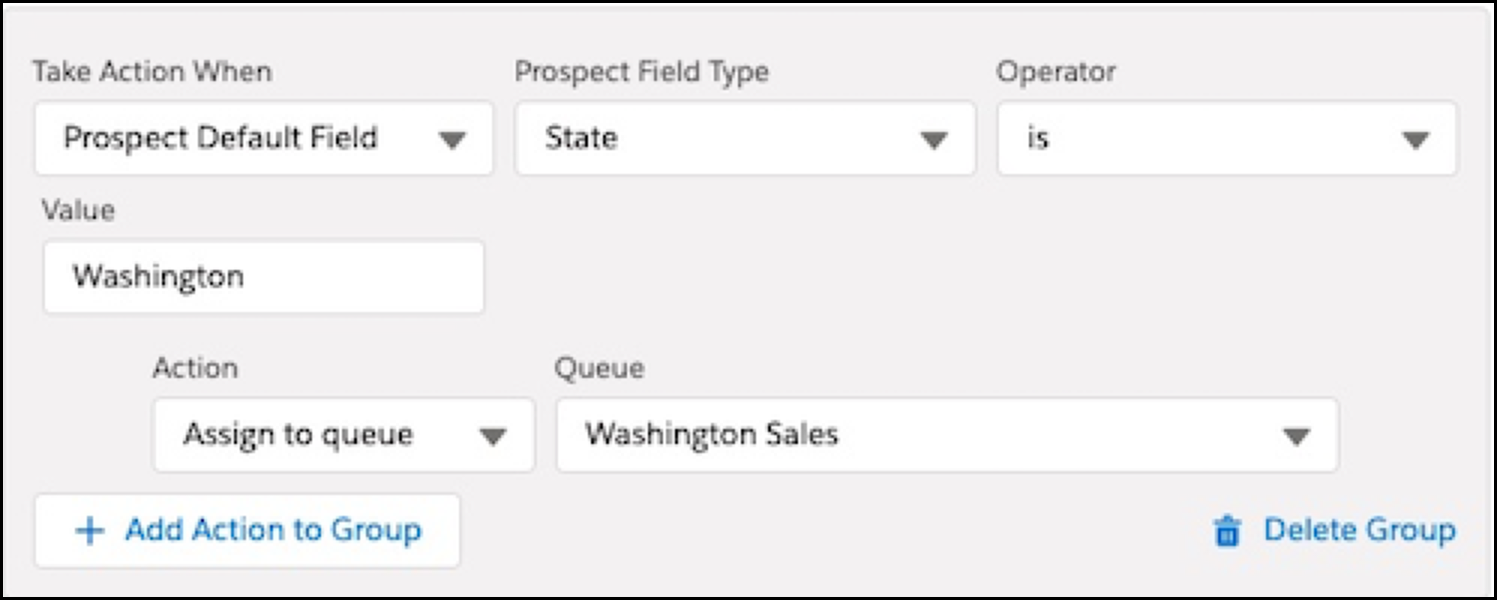
Before: Upon engagement (click/form fill), then trigger Y New: Upon engagement (click/form fill) look to see if X = Value; then trigger Y
You can still do regular completion actions that apply to ALL Prospects who engage with the asset in specific ways, but now we will be able to create conditional actions as well.
Below is an example of what you can expect to see in your account when the feature is released later this summer:
This feature will be available on Lightning list emails, forms, form handlers, files, custom redirects and page actions.
You can read more about it here and watch a quick demo, courtesy of Salesforce, here.
How are conditional completion actions different from normal completion actions?
In terms of functionality, there isn’t much of a difference between regular and conditional completion actions — they look at an action and then apply the necessary follow-up actions.
However, in terms of usage, conditional completion actions add complexity to the existing completion actions by allowing for criteria in addition to a click or form fill to decide if the action should be completed or not.
This allows marketers to create branches and manage different types of Prospects differently in Pardot.
Are there any limits or requirements to conditional completion actions?
Lucky for everyone, these actions will be available to everyone upon its release date.
We have identified the following limitations (that could change with further releases):
No conditional actions based on list membership
No conditional actions on classic email builder list emails (only available in the new Email Lightning Builder)
Limit of up to 6 conditional groups per asset (plus your standard completion actions)
Limit of up to 15 conditional group actions across all conditional groups per asset
We won’t have a concrete list of limits until this feature goes live, so stay tuned for updates!
What Pardot conditional completion use cases that I can look forward to?
First things first, this particular section will be updated post-release with additional information and screenshots. For now, we are basing these scenarios on existing completion action functionality. So, proceed with caution!
UTM-Based Lead Sources
Reporting on where your online website traffic is coming from is more important now than ever. For many organizations, being able to distinguish between sources of ads and beyond continues to be a hot topic.
At Sercante, we support our customer’s UTM tracking via custom hidden fields on their forms. Now with conditional completion actions, leveraging these UTM’s real-time to update Lead Source should be easier than ever!
Standard Lead Routing
Nothing magical here, aside from the fact that you can fit multiple territories/region/product assignment criteria into a single form. Previously, this would require multiple automations or a little support from Salesforce to route accordingly.
If you are interested in learning about how to manage Lead Routing in Pardot, check out my presentation from ParDreamin’!
Block Competitors
For those in industry segments with few players (we know everyone in the ocean), you may find it difficult to exclude competitors currently in Pardot (before they enter Pardot).
If you have a field that identifies your Prospects as a competitor (email or company for example) you can decide not to send them the email with your latest e-book or asset. This would save you time and effort from setting up individual automation or even using JavaScript.
Streamlined Campaign Management
During ParDreamin 2021, I discussed how you can streamline your asset delivery processes by creating custom fields and leveraging HML, Dynamic Content, and Snippets in the process. Although this is great to reduce the number of assets in the overall process of delivering content, you still need 1 automation rule per asset to update campaign membership.
By capturing the page title or asset name into a hidden field, you can then leverage this field to add the person to the correct Salesforce Campaign on each form — up to 6 branches (conditional groups).
This would reduce the number of forms you need to set up overall.
Multiple Link Click Options For List Emails
One of the most frustrating experiences currently is having an email with more than one CTA and having to pick between “any link” or “specific link” clicks. This feature would allow you to do this with up to 6 different links (we have not seen conditional actions on list emails yet).
This function would only be available in the Lightning Email Builder and not for the Classic Email Builder.
Extending The Power of Webinar Connectors
This directly speaks about WebEx and GoToWebinar products.
Many B2B organizations have webinar series where they would love for people to register for multiple webinars at the same time. As of today, you either had to use (3) automation rules and a custom field, or (3) separate forms as Pardot does not allow for multiple registrations (using Pardot forms).
An alternative to creating multiple automation rules is to use Javascript here, but the hope is that conditional completion actions provide a no-code alternative.
With this conditional completion actions feature, you can skip setting up the automation across the platform, thus requiring less work and a central location for it all!
Supercharge Your ABM Strategy
Leverage account types or build a new field called “Account Tier” to signal which accounts need the “white glove treatment.”
Using conditional completion actions, then create custom Slack notifications, User notifications, or User tasks immediately after these Prospects complete their forms.
In addition, you can also update a custom field such as “Prioritization” to increase their prioritization in Views in Salesforce. This would be an excellent companion to the Einstein Key Account Identification feature for those on Pardot’s Advance tier or higher.
Imagine the possibilities for conditional completion actions
As a consultant, I am very much looking forward to streamlining automations for my customers by leveraging conditional completion actions in their organizations in the near future.
If you need to strategize how to leverage this feature in your organization, or you just want to brainstorm ideas, contact us here!
Before we jump into it, we wanted to point out the key theme we are continuing to see: enhancements that allow for greater cross-collaboration use cases. The lines between studio, platform, and cloud are blurring more than ever. Now on with the show…
Einstein: Engagement Frequency ‘What-If’ Analyzer
Users will now be able to clearly see how saturated contacts are within a business unit based on engagement data. It’s no longer a guessing game or trying to compare yourself against industry benchmarks and best practices.
The goal of Einstein Engagement Frequency ‘What If’ Analyzer is to help you better plan for your upcoming campaigns and more specifically, can help you decide how many message activities to add to each of the paths and Einstein Frequency Split Activity within Journey Builder.
Key Benefits Include
Greater visibility into frequency performance: grouped by on-target, over-saturated and undersaturated, you can now segment and target based upon these groupings. Pull back on recipients who may be experiencing email fatigue, ramp up on those who are not getting enough communications, and stay the course with those who are on target. The end goal should be to have the majority of your contacts in the on-target grouping.
Visually test multiple message frequency scenarios: instead of testing scenarios in the wild and coming to learn potential negative outcomes that are too late to be course-corrected, you can view possible outcomes on how additional messages will affect your engagement over time through the power of AI. It’s like a crystal ball into the future!
Availability: customers who have access to Einstein Engagement Frequency (paid add on to pro, included with corp editions and above)
Personalization: Triggered Campaign Messages
Combining Marketing Cloud Personalization (Interaction Studio) with the outbound communication engine of Journey Builder, users are now able to easily deliver personalized, relevant messages across numerous channels based on deep, contextual customer behavior — all in real-time.
You can use nine configurable, real-time, behavioral triggers to start Marketing Cloud Journeys. That includes cart or browse abandonment, product price reduction, and product back-in-stock.
You also can send user information and recommendations from Interaction Studio to Journey Builder Entry Events, and then use that data for personalization and decision splits. You can run A/B tests and analyze the performance of your triggered campaigns with built-in reports and dashboards.
Availability: Included in both Growth and Premium editions of Marketing Cloud Personalization.
Engagement: Data Extensions Query Support for Intelligence Reports Advanced
Before we dive right in, as a reminder, Intelligence Reports Advanced (formerly known as Datorama Reports Advanced) is a premium upgrade for Marketing Cloud Engagement (SFMC). It’s an included analytics tool for analyzing and optimizing email, mobile and Journey Builder messaging.
With Intelligence Reports Advanced, you can create your own dashboards, dimensions, and measurements, query high volume and granular data with a Codeless Query Builder, and start your cross-channel analytics journey. You have access to ready-made apps for connecting email to the web, advertising studio first-party audiences to performance data and more.
Now to the latest enhancements. In a nutshell, users who have Intelligence Reports Advanced will be able to add Data Extensions and query them with Engagement Data (Opens, clicks, bounce, unsubs, etc).
Key benefits include:
Enrich Engagement Data with Data Extensions: by easily querying your data extensions alongside email and mobile push engagement you’re able to add additional context and optimize messages based on performance by audience attributes from your data extensions
Optimize future messaging based on performance by audience attributes: Perform codeless queries to uncover optimization opportunities per any audience attribute stored in a Data Extension.
Use Case: You have a data extension of subscriber IDs and an audience attribute indicating that they’re part of your brand’s loyalty program. Now, you can join this data and then run queries to compare performance for subscribers in that loyalty program, versus customers not in that loyalty program. Once your data connections are connected, querying them is easy.
Query Data Extensions to validate and explore their data: Understand the structure and rows of your Data Extensions with standalone querying.
Availability: Requires Intelligence Reports Advanced for Engagement.
Intelligence: Database Exports
Users can now easily export clean and harmonized marketing data into your enterprise database, specifically for Snowflake and Postgres, and in turn unlock more value in your enterprise data strategy while creating an audit-proof system of data for managing exports.
To break this down a bit more, your marketing data no longer needs to live in a silo. It can be made available to your Business Intelligence group to make insights accessible across the org in a manner that addresses concerns such as data integrity and auditing.
Highlights include:
Automation of the export of cleansed and harmonized marketing data into your orgs database
Marketing Data is available to other parts of your org for analysis and deeper insights
Marketing data is backed up in your preferred database, creating an audit-proof system for all your enterprise data.
Availability: Included in all Intelligence (Datorama) editions
Customer Data Platform (CDP): Activation Enhancements
Users can now send additional customer profile information from CDP to marketing platforms like Marketing Cloud Engagement (SFMC). This feature allows marketers to enhance personalization communication and leverage mobile push as an activation contact point, which until now was not possible. And as a result, you can more easily reach customers with the right message on their preferred channels.
Benefits include:
Greater personalization options for messaging and journeys by changing the volume and variety of data types that can be shared with Marketing Cloud Engagement, for example.
Ability to connect data from across the enterprise: blend marketing (loyalty data) and non-marketing (transactional) systems simultaneously during activation across clouds.
Meet customers on preferred channels: increase marketing reach and flexibility, specifically driving personalization mobile messages.
Availability: Included in all CDP editions
Some other gems we wanted to call out…
Marketing Cloud Einstein and Analytics
GA Integration with Journey Builder: You can now see how your SMS, mobile, and email activity throughout a journey impact conversion events on a website or mobile app (err… about time 😀)
Einstein & Mail Privacy Protection: Einstein models have been updated to address the expanding list of MPP initiatives, allowing more accurate predictions
Subject Line Performance: Uncover which language factor is impacting your subject line. For each factor, you get a score and guidance on how best to update to get the highest impact
Einstein Weather Content Selection: Use local weather conditions including forecasts (temperature and precipitation) and alarm events (thunderstorms) to personalize and promote your content.
Marketing Cloud Journeys and Mobile App
From activating audiences in CDP (as previously mentioned) and retargeting contacts when they open a push notification or engage with an in-app message to directly linking between your mobile app and Journey builder, which allows for marketers to listen for corresponding in-app message engagement as a wait step in a journey, this release is finally expanding on the potential of mobile push and in-app interaction points.
See full Salesforce Marketing Cloud Summer ‘22 Release details here.
Summer of Love
As you can tell, the Marketing Cloud Engagement product teams have been quite busy and super focused on cross-cloud capabilities. This release is chock full of terrific enhancements that will allow marketers to continue to push the limits and advance their digital marketing initiatives forward. Thanks for the love, Salesforce!
To learn more about this release, register to attend Salesforce’s Marketing Cloud Summer ‘22 New Feature Overview Webinar on June 23, 2022, or contact us for assistance on how to unlock some of the exciting new enhancements for your org. We are ready to take your program to the next level!
Knowing the who, what, when, and how of Salesforce and Account Engagement (Pardot) sync behavior is key to understanding how you can use the integration to your advantage.
If you’re a newbie to Marketing Cloud Account Engagement (Pardot), then you may be wondering how in the world this system communicates with the main workhorse of Sales Cloud (Salesforce).
Well, follow me my little pretties, as we look behind the curtain of the Wizard of Oz to find out how it really all works.
1. The Who: Identifying the Wizard
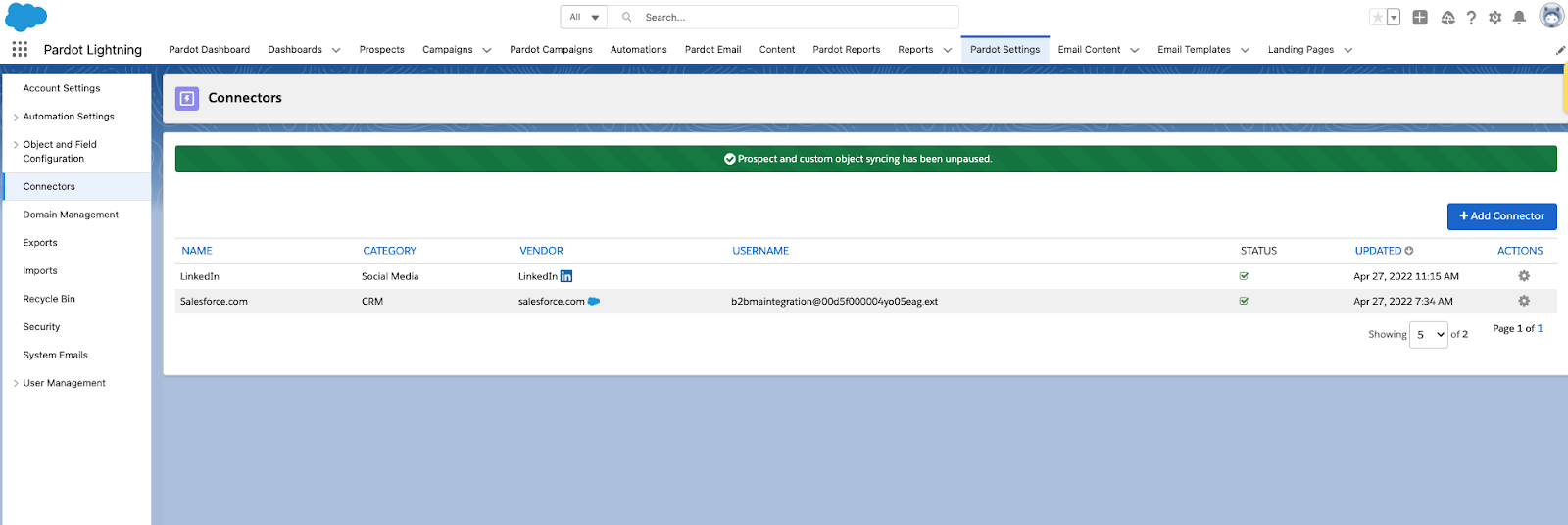
Unmasking the culprit behind the smoke and mirrors of the sync magic is not a difficult path to take. Just navigate to your Pardot Settings tab, and hang a left at the Connectors intersection.
Here you will find the wizard who’s behind all of the shenanigans.
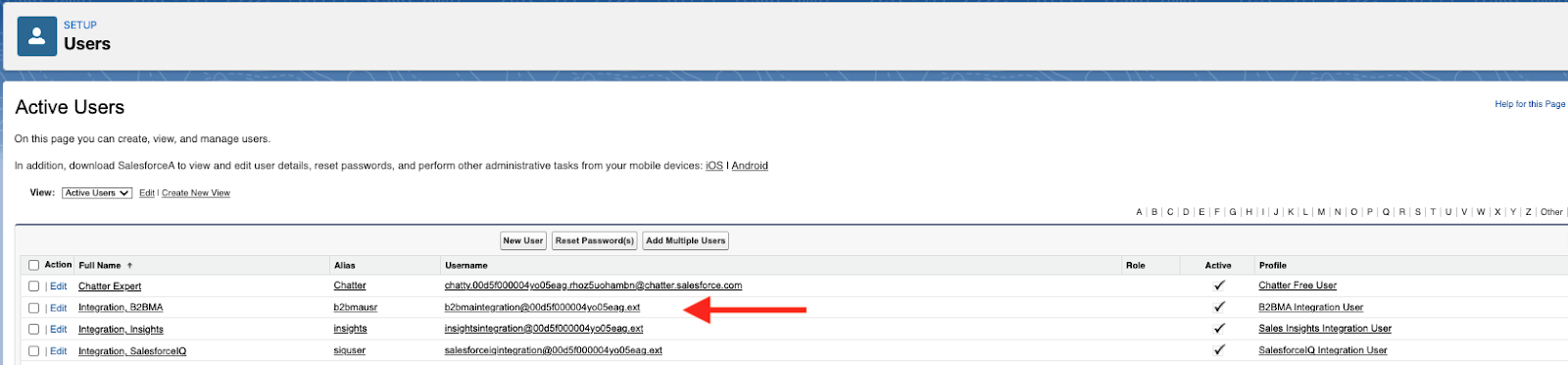
Enter the B2BMA Integration user.
B2BMA Integration User controls Sales Cloud and Pardot Sync behavior
You can find the B2BMA Integration user in your Salesforce setup with the username similar to the following: [email protected] (see below).
This user comes out of the box with the installation of any new v2 MCAE/Pardot instance purchased after February 11, 2019. It’s a free Salesforce licensed user that serves as the handshake between both MCAE/Pardot and Salesforce (Sales Cloud).
Chances are, you have this user available to you. If not, you likely have a custom connector user that’s tied to a company-specific/unique Salesforce username (and license) that’s in its place.
Whichever username you have, the underlying matter is that this is the who the system looks to for direction and instruction on what will sync when the sync occurs. Whatever this user can see, will be what the system will sync when the sync takes place.
2. The What: Determine what will sync to Salesforce
You may be wondering, what do you mean, whatever this user can see? Well, I’m glad you asked.
Connector user access determines what will sync to Salesforce
To understand what will sync when the sync occurs, you first have to understand the fabric of the connector user. This user is special. Whatever this user can see — a la whatever visibility to record data this user has access to will be what is included when the Salesforce-Pardot sync transpires.
Heads up — Salesforce connector user gotchas
As a quick reminder, there are four out-of-the-box standard objects that the connector user can communicate with in Salesforce; that’s the Lead, Contact, Account, and Opportunity objects. The Account and Opportunity objects/fields have a read-only relationship and the Lead and Contact objects/fields have a read/write relationship.
Your connector user (B2BMA Integration User or Custom Connector User) will determine what set of records will be included in the sync between both systems. The out-of-the-box B2BMA Integration User has View All/Modify All permissions for all lead and contact records that exist in Salesforce. Therefore, if this user is the selected user, then all records will have the capability to sync between both systems.
If your Pardot system has a different user (i.e. Custom Connector User) with sharing rules set up to only have access to certain lead/contact records, or if you are using Marketing Data Sharing (Advanced and Premium editions only), then those records will be the only ones that will be synced when the sync ensues.
3. The When: Understand how often Salesforce and Pardot sync
Once the connector user has been set up and is in “play mode” (see below green ticker), watch the wizardry transpire.
The smoke machine behind the curtain is powered by a native feature that automatically syncs record and field data every 2-4 minutes. Certain changes to prospect or lead/contact records will be pushed to Salesforce and certain information that is updated on Salesforce records, that have a matching MCAE/Pardot record, will be pulled into the corresponding prospect record.
4. All Salesforce record changes are not created equal
It is tempting to say that any changes to records will trigger a sync. However, this is not the case.
The Salesforce connector user will only recognize certain “activities” when it’s ready to perform its regularly scheduled automated sync. Such changes to prospect records can be classified by the three types of activities:
System
User
Prospect
The following is a breakdown of each type of action that can cause a prospect record to queue for syncing.
System activities:
Any record changes to field values that occur because of an automation rule or completion action
Using the “Add to Salesforce campaign” in an automation rule, segmentation rule, completion action, or Engagement Program action
Changing/updating a Salesforce campaign status via automation rule, segmentation rule, completion action, or Engagement Program action
User activities:
Performing a prospect import
Changing any prospect fields (including opting out prospects via import or manually)
Making changes to a Pardot campaign (for those who do not have Connected Campaigns)
Making changes to a prospects’ assigned user
Manually syncing from the prospect record (yes you can go the good ole fashioned route and manually sync an individual prospect record by pressing the “Sync with CRM” button on the Prospect record)
Prospect activities:
When a new or existing prospects submits a Pardot form
When a new or existing prospects submits on a Pardot form handler
When a new or existing prospects submits on a Pardot landing page form
When an existing prospect unsubscribes (globally opts out)
5. But what about Salesforce to Pardot?
While there are qualified activities that can cause a sync to trigger from Pardot to Salesforce, there are equally a few activities that can trigger a sync from Salesforce to Pardot.
The following is a breakdown of each type of action that can cause a prospect record to queue for syncing.
Updating the Last Modified timestamp triggers a sync to Pardot for existing prospects
Updating a lead or contact email address
Updating the assigned user (owner) for the lead or contact record
Making field changes to a lead or contact record (Check the Sync Behavior setting on the MCAE/Pardot field to determine whether this value will “win” out when the sync occurs)
Updating a related account record in Salesforce for a lead or contact who is associated to a Pardot prospect.
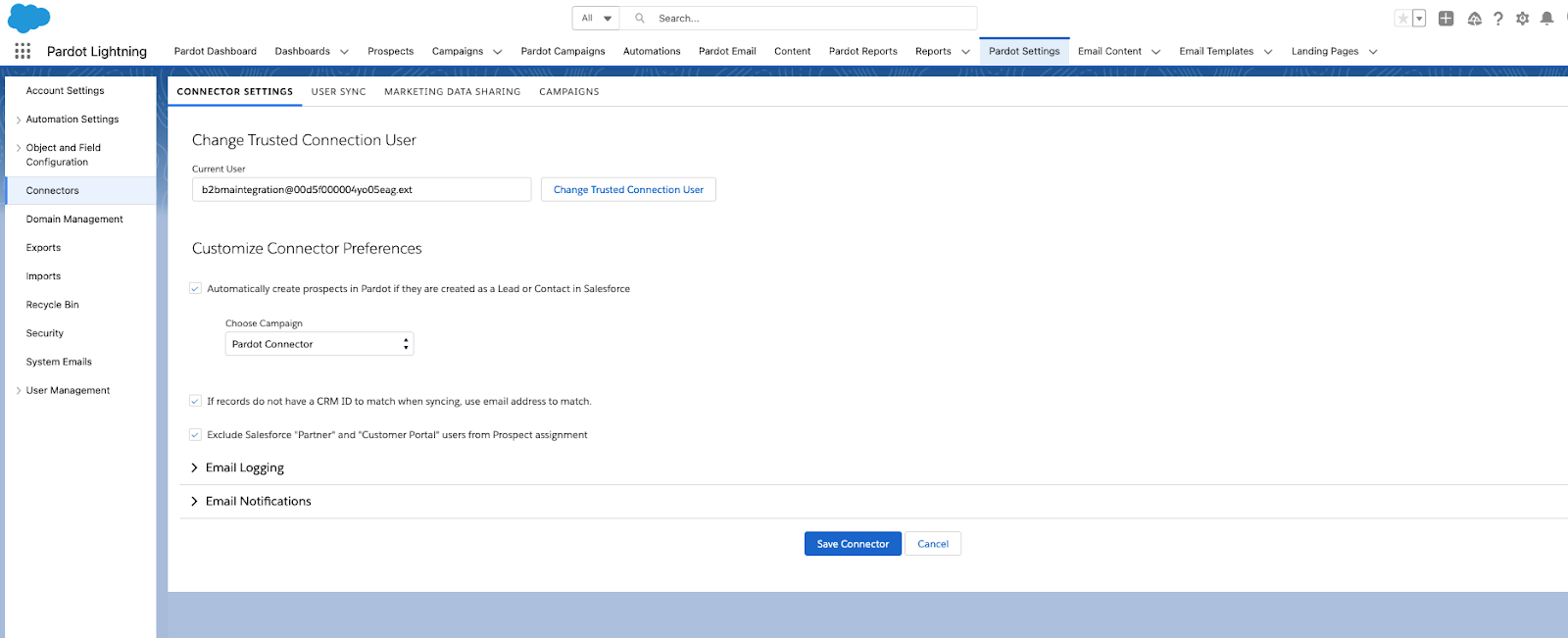
Each Pardot account comes with two key customizable connector preferences that determine how the sync will follow suit:
Automatically create prospects in Pardot if they are created as a Lead or Contact in Salesforce
and
If records do not have a CRM ID to match when syncing, use email address to match.
The first setting has to do with record creation from Salesforce to Pardot and the second setting relates to the overall sync logic.
With the first setting enabled (turned on/selected), the connector user will check every 2-4 minutes to see if a new lead or contact record with an email address has been created in Salesforce that does not currently exist in Pardot. If found, that record will be swooped up by the connector user, scanned and copied over to Pardot as a new prospect record with the corresponding record data accompanying it.
Recommendations for enabling this setting for your system are on a case-by-case basis depending on your mailable database limits and overall internal operational workflow/strategy.
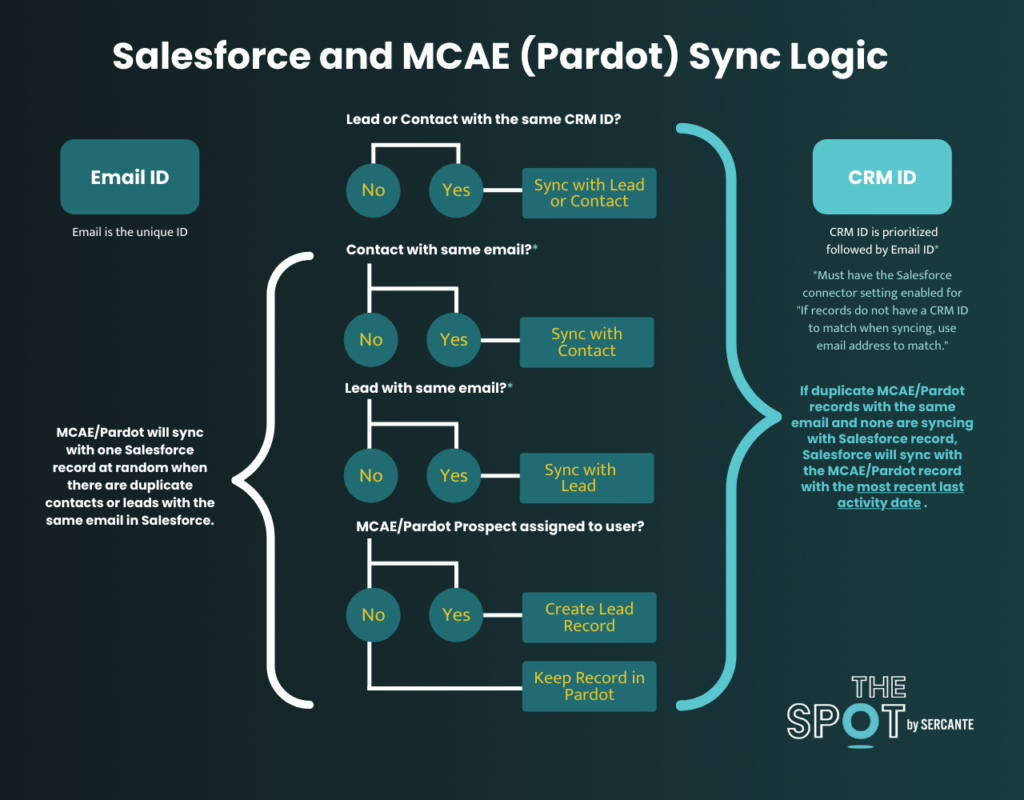
The second connector preference setting relates to how the system performs its hierarchical sync logic when a sync commences. It is highly recommended (best practice) to enable and keep this setting checked on your connector due to its native sync logic behavior as shown in the below diagram:
Essentially, what this outlines is that when the connector user performs the sync, it will first check for a matching CRM ID at the lead or contact level. If no matching record is found for the existing Pardot record, it will then check for a matching email address first at the Contact level then down at the Lead level. If neither a matching CRM ID or email address has been located for the Pardot prospect record, that record will remain in Pardot until the record is assigned (either to a user, a queue or via any active assignment rule).
Now you’re a Salesforce sync Wizard
So, now that you are armed with the who, what, when and how Pardot syncs with Salesforce, it’s time to lock arms with the Tin Man, Scarecrow and Lion to ease on down the road to Oz.
If you’re still feeling a little “cowardly” or “scarecrowy” (yeah totally not a word), then let the Sercante Munchkins escort you along the way!